Visual indicator for the Original Poster (OP) [Complete]

Hi everyone,

Quick question: is there an existing setting to highlight the Original Poster (OP) in threads? If so, I completely missed it!

If it doesn’t exist, I’d love to request it as a feature. Adding a small “OP” tag or a distinct color next to their username makes reading long threads and tracking the author’s replies much easier.

If this isn’t something that can be added natively right now, I’d be happy to write a quick Tampermonkey userscript to do it client-side and share it with the community

Thanks!

I went ahead and wrote the Tampermonkey script I mentioned!

It adds a clean, official-looking “OP” badge next to the username and a subtle blue line on the left side of their posts. This makes it super easy to spot the author’s replies while scrolling through long threads.
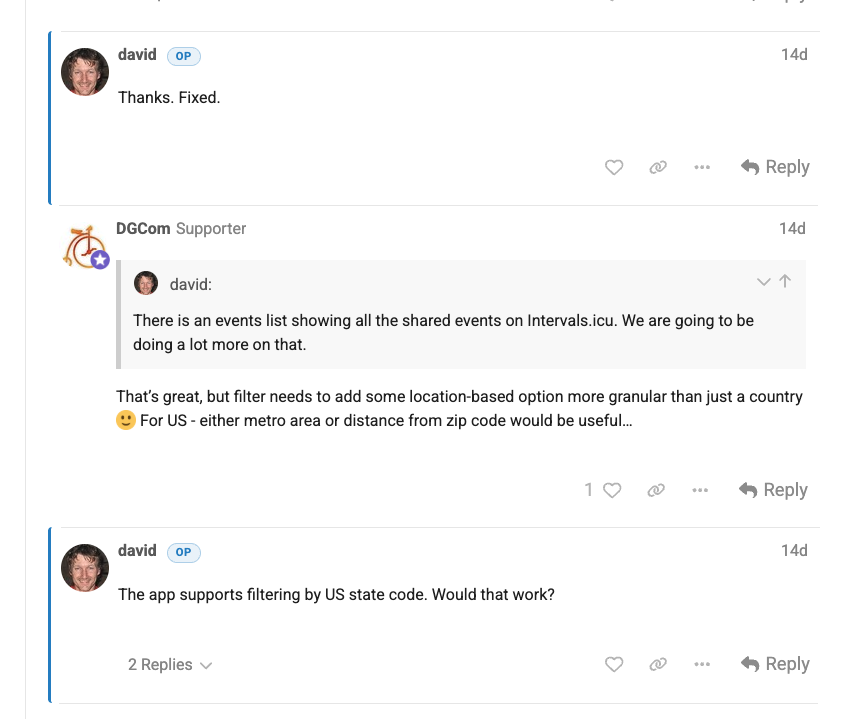
Here is how it looks in action:

How to use it:

  1. Install the Tampermonkey extension for your browser (Chrome, Firefox, Safari, etc.).
  2. Click on the Tampermonkey icon and select “Create a new script…”.
  3. Delete any default code there, paste the code below, and hit File > Save (or Ctrl+S / Cmd+S).
// ==UserScript==
// @name         Intervals Forum OP Highlighter
// @namespace    [http://tampermonkey.net/](http://tampermonkey.net/)
// @version      1.6
// @description  Highlights the OP's username and the entire body of their posts, specifically for mobile views.
// @author       txuselo
// @match        [https://forum.intervals.icu/](https://forum.intervals.icu/)*
// @grant        none
// ==/UserScript==

(function() {
    'use strict';

    const css = `
        /* 1. "OP" badge next to the username */
        .topic-owner .names .username::after {
            content: "OP";
            color: #0088CC; /* Intervals official blue */
            background-color: rgba(0, 136, 204, 0.1);
            border: 1px solid rgba(0, 136, 204, 0.3);
            font-size: 0.7em;
            padding: 2px 8px;
            margin-left: 10px;
            border-radius: 12px;
            font-weight: 800;
            vertical-align: middle;
            display: inline-block;
            line-height: 1.2;
            text-transform: uppercase;
            letter-spacing: 0.5px;
        }

        /* 2. Offset side border (Margin + Padding solution) */
        .topic-owner {
            background-color: transparent !important;
            border-left: 3px solid #0088CC !important;
            border-top-left-radius: 4px;
            border-bottom-left-radius: 4px;

            /* Trick: Pull the border to the left using margin... */
            margin-left: -10px !important;

            /* ...and push the content back to the right with padding to keep it aligned */
            padding-left: 10px !important;
        }
    `;

    // Native injection to bypass the forum's Content Security Policy (CSP)
    const styleNode = document.createElement('style');
    styleNode.type = 'text/css';
    styleNode.appendChild(document.createTextNode(css));
    document.head.appendChild(styleNode);

})();

Hi @eva could you kindly consider this feature?

I think it would improve the forum experience a lot with only 2 lines of css!

Cheers!

1 Like

Nice suggestion! This is now done with little tweaks (I made it respect the theme colors and forum fonts) and added it to all themes :slight_smile:

3 Likes