VeloForge — adaptive coaching that connects training, recovery, and fueling

Title: VeloForge — adaptive coaching that connects training, recovery, and fueling

Hi everyone,

I’ve been following the projects in this category and wanted to share what I’ve been building.

I’m Kerry—a former professional triathlete, longtime road cyclist, and still training seriously. Over the past year, I’ve been working on VeloForge, an adaptive AI cycling coach for athletes who want structured progression but also deal with group rides, fatigue, work, travel, and missed sessions that constantly break static plans.

Several AI coaching tools are appearing now, so I want to be clear about the difference I’m trying to create.

VeloForge is not an LLM that simply reads activity data and invents workouts. The AI sits on top of a deterministic coaching system with defined training rules, physiological guardrails, and structured calculations.

The core system includes:

  • Adaptive training phases based on athlete level, goals, and race timing

  • Individualized power targets derived from the athlete’s power profile

  • Weekly limits on productive hard volume

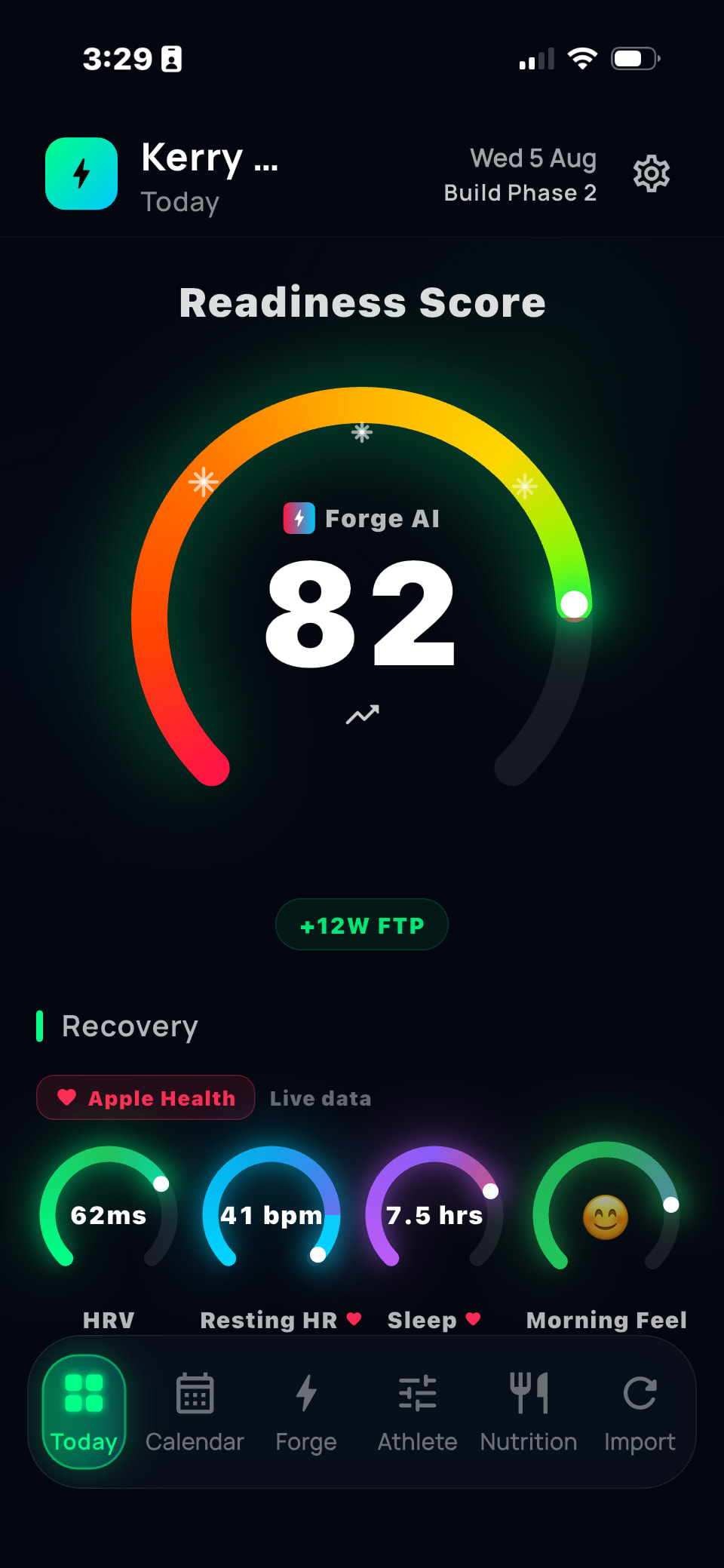
  • Daily adjustments using sleep, HRV, resting heart rate, readiness, and completed training

  • Automatic schedule rebuilding when workouts are missed, moved, or replaced

  • Recognition of group rides and their actual intensity cost

  • Race-specific build and taper logic

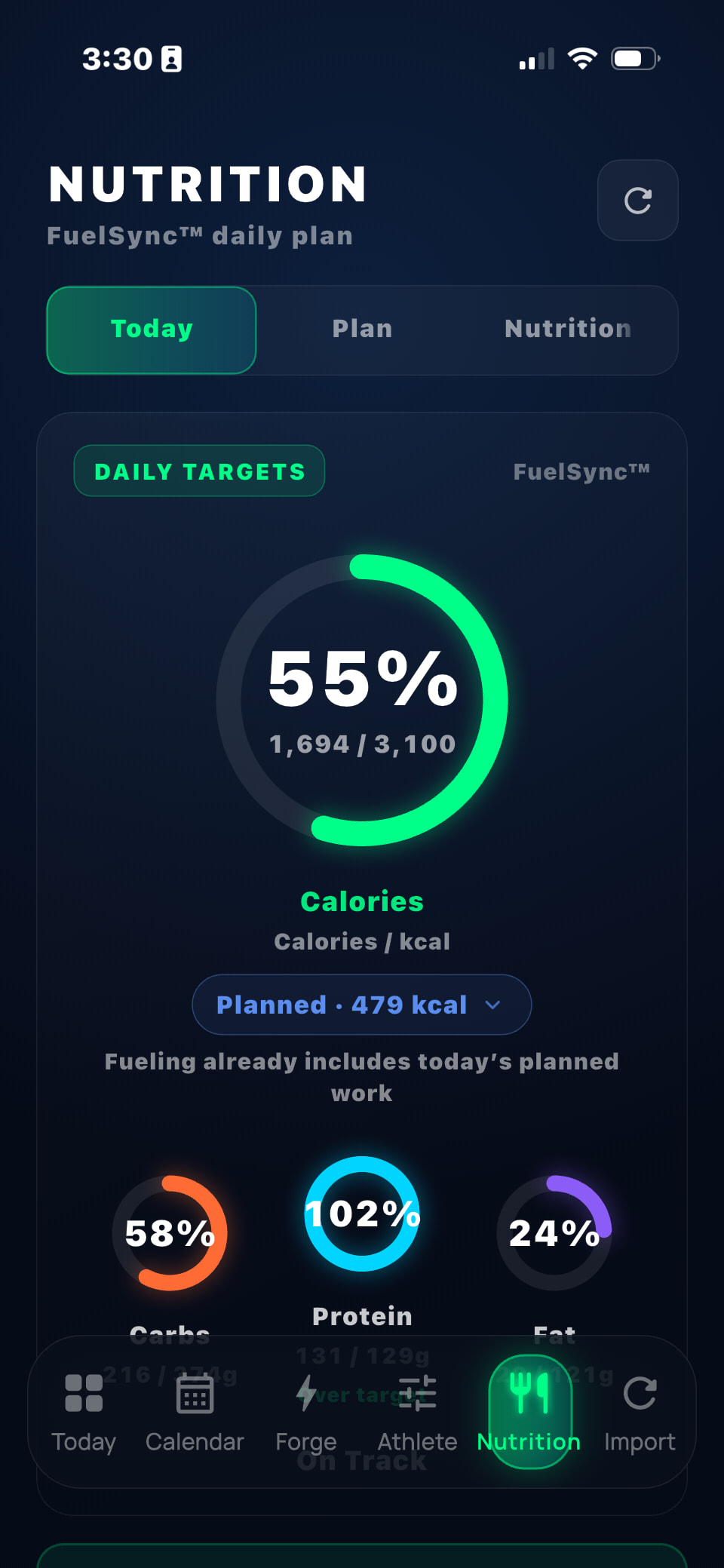
  • Daily calorie, carbohydrate, protein, fat, and ride-fueling targets

  • Cycling-specific strength work aligned with the training phase

One of the main problems I wanted to solve is what happens when the original plan is no longer appropriate.

For example, an athlete completes a hard five-hour group ride on Saturday, accumulates significant high-intensity work, sleeps poorly, and still has a threshold session planned for Tuesday.

A static plan continues as written. A generic AI coach may improvise.

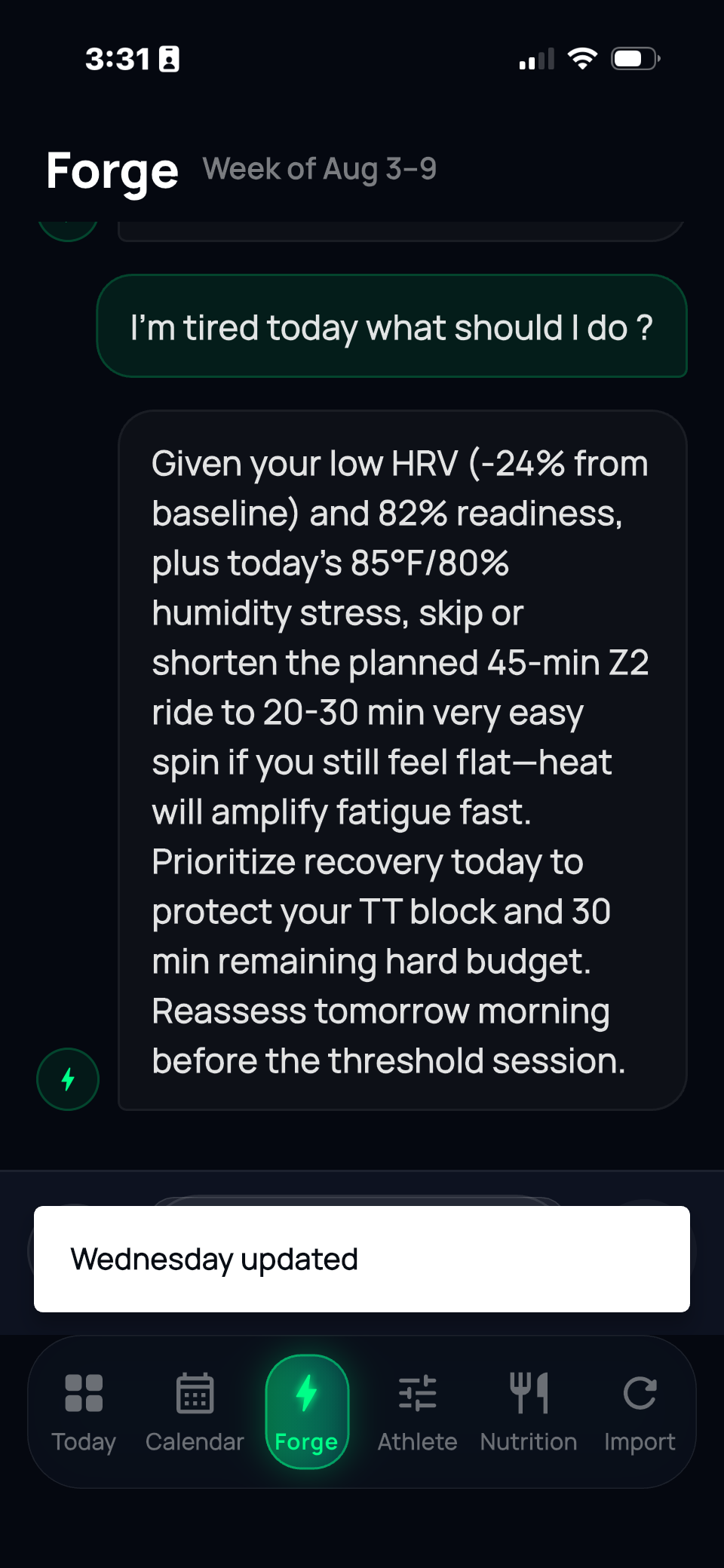
VeloForge should account for the hard work already completed, the athlete’s remaining weekly intensity budget, recovery status, training phase, and upcoming sessions—then adjust the week without destroying the purpose of the block.

Training and nutrition also remain connected. When a workout changes, VeloForge automatically recalculates daily energy needs, macros, ride fueling, recovery nutrition, and the remaining meals for the day.

Current status

VeloForge is a Flutter-based iOS app distributed through TestFlight.

  • Apple Health and Wahoo are supported

  • Strava integration is live

  • Garmin access is pending approval

I’m still actively debugging and refining the system, so this is not a finished product.

I’m looking for a small group of serious cyclists to test it and challenge the coaching logic.

The ideal early tester:

  • Trains approximately 8–15+ hours per week

  • Uses structured workouts but also participates in group rides

  • Tracks power and heart rate

  • Cares about recovery and fueling

  • Has experienced plans failing to adapt when real life changes

  • Is willing to provide direct and detailed feedback

I’m particularly interested in feedback on:

  • Whether the weekly structure makes physiological sense

  • How the system responds to missed or changed workouts

  • Whether recovery adjustments are appropriately conservative

  • Whether fueling recommendations match real training demands

  • Where AI explanations are useful versus unnecessary

  • Any situation where the system makes a clearly poor coaching decision

I’m building VeloForge because I believe AI coaching is only useful when strong reasoning is combined with clear training rules and reliable calculations.

Anyone interested in testing it can join here:

I’m also happy to discuss the architecture and coaching approach in this thread.

Honest criticism is welcome—this community understands the difference between a polished demonstration and a system athletes can actually trust.
2 Likes

here is what athlete sees in daily view. It will adjust day and week as neede on sleep, HRV resting and how athlete feels

you can talk with just like regular coach and it will make adjustments needed

Gives Macro nutrient reconditions adjusts macros based on athletes goals, time and type of work out and how what athlete logs each meal

Can we connect via intervals.icu api?

as of now you cant. But Im willing to do it. Do you have any info on how i can do that ??

API access to Intervals.icu - Guide - Intervals.icu Forum

great thanks!

To make sure I understand the use case, what would be most valuable to you?

Would you primarily want VeloForge to import your completed rides and Intervals.icu calendar, or would you also want VeloForge’s adjusted workouts pushed back into Intervals.icu?

I’m speaking with early athletes now, so this kind of feedback is extremely helpful.

Hey — just wanted to follow up. We got the personal API connection working in VeloForge today and also submitted the OAuth app request to Intervals.

Appreciate you pointing me to the docs earlier.

1 Like

It is usefull VeloForge will use all the data I allready have in Intervals.icu. I’ll test VeloForge asap :wink:

1 Like

You’ve got the OAuth request in, so two things on the scope string that cost me time, in case they save you some.

Intervals rejects a scope string that lists the same resource twice, with “duplicate scope calendar”. So it’s CALENDAR:WRITE on its own, not CALENDAR:READ plus CALENDAR:WRITE. Write implies read.

Include SETTINGS:READ. Without it, GET /athlete/0 returns 403, and that’s the call you need for the athlete id your webhooks are keyed on. The connection itself succeeds without it, so it breaks later and looks like something else.

On your question above: the import side is where the value was for me, and the write side is the harder call. I ask for calendar write but only send a session when the athlete presses a button. People here curate their calendars and won’t forgive an app that fills them on its own.

1 Like

thanks for heads up i appreciate it

@Dflasse thanks again — solid tips.

We already folded them into the OAuth scope setup:

• SETTINGS:READ always on (so /athlete/0 and athlete id for webhooks don’t 403 later)

• CALENDAR:WRITE only if we request calendar — never READ+WRITE (no duplicate scope)

• Calendar push only when the athlete hits a button — import-first, no auto-filling their plan

Appreciate you saving us the footguns.

Hey @Bart_Zurings — quick update.

You were one of the first to ask about connecting via Intervals. Multi-user OAuth is wired on our side now (import-first: activities + wellness). Cleaning the next TestFlight build, then I can put you on it.

I’ll send the link when it’s ready. Appreciate you jumping early.

1 Like

@Bart_Zurings TestFlight’s open if you still want a look. Join the VeloForge beta - TestFlight - Apple
Happy to hear what breaks & what can be better :slight_smile:

TestFlight’s open if anyone else here wants a look.

Happy to hear what breaks.

@Kerry22 Note: I’ve reported this via the Testflight Feedback Form already on my phone but thought maybe I can improve after a night of sleep and trying again while writing the report on my PC instead of phone.

I’m on iPhone 13 mini with latest iOS version (so rather small screen)

I didn’t manage to connect my intervals.icu account.

Please note: I’ve received an email to confirm my email address from Supabase at some point yesterday, but I couldn’t tell you when this happened. Maybe something is stuck now?
I’ve clicked the link yesterday but nothing happened on my phone. I clicked it again on my PC this morning and eventually the url changes and includes “email link is invalid or has expired” etc. stuff

The website just shows the animated ufo. Appears it couldn’t load to display the message that I found in the url.

What I’ve tried next this morning. In Step 17 “where should your training data come from?”
First try:

  1. Select Intervals.icu
  2. Click Connect with intervals

The button gets the “moving circle” animation for a little bit then back to showing the text with the message “No athlete profile linked. Sign in and try again”.
The message is also shown below the button which means in my case I didn’t even see it after the first click (maybe that’s the small screen).

Second try:

  1. Enter API key copy&paste from intervals.icu settings
  2. Click Continue that shows up below the textbox.

I’m forwarded to the next step but obviously the connection hasn’t been made

Third try:

  1. Enter API key as above
  2. Force to leave the text box so that I’m back in the full screen of Step 17
  3. Click Connect with intervals which then circles again and then changes to Connect with API key . I assume this should change the text immediately when entering an API key?
  4. Click Connect with API key
    But I again get the No athlete profile linked. message

Let me know if I can provide more info to help you investigate and what I can do to successfully connect

Philipp

As a separate message I’ll just note a possible improvement in the sign up process in general:

Since I’ve not succeeded I’ve had to re-enter everything again multiple times.
The order makes logically sense to me, so it’s unfortunate the connection steps are at the end.

It would be helpful though if the App would temporarily store the previously entered data so that if the wizard is interrrupted users don’t have to start from scratch. since it’s quite an involved process.

Alternatively could only ask for the basic stuff to start and once the initial sign up is done do a second wizard that asks about all the training goals etc.
Such a long wizard tends to be discouraging for users. If it’s multiple smaller sets of wizards it’s more managable.

I’m looking forward to being able to give it a try once my connection works :slight_smile:

Cheers,

Philipp

@Philipp_Dolder thanks for writing this up. This is exactly the kind of break we need to see.

On it now: Intervals connect (OAuth and API key) dying on “No athlete profile linked.” And the confirm-email link dying / UFO page with the error only in the URL.

13 mini hiding the error and the wizard wiping your answers after a fail are on the list too. You shouldn’t have to re-enter that.

I’ll reply here when those two are actually fixed, not when we think they are. If you still have the expired-link URL or the TestFlight screenshot, send it.

Anyone else hitting the same connect wall, say so here.

@Philipp_Dolder those two are actually in TestFlight now.

Intervals connect (OAuth and API key) should get past “No athlete profile linked.” Update the app, then try Connect again. Workouts pull in when you open the app — you shouldn’t have to go hit Sync.

Confirm-email: if the link is dead, the page should say so now instead of the UFO. Request a new one from the app.

Wizard answers should stick if you have to back up.

If Connect still dies, say so here.