The second one should be checked because that’s defined by your settings. The third one may be checked because the activity is based on a workout, given the fact that there’s a compliance number in the summary. If that one is checked and the workout has no steps, then you should uncheck it.
I track my workouts on an Amazfit T-Rex 3 and usually use a predefined workout. I create it in intervals and then manually create it in the Zepp app to send to my watch (automatically pushing workouts to the app/ watch would be an absolute game changer). I have Zepp and Strava sync connected (although I don’t even really use Strava, could get rid of it…).
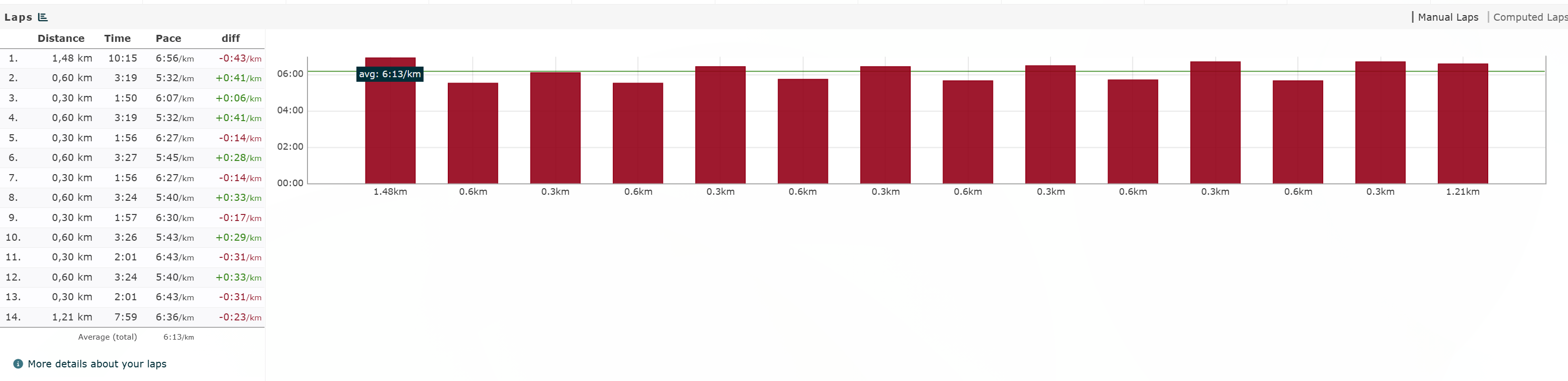
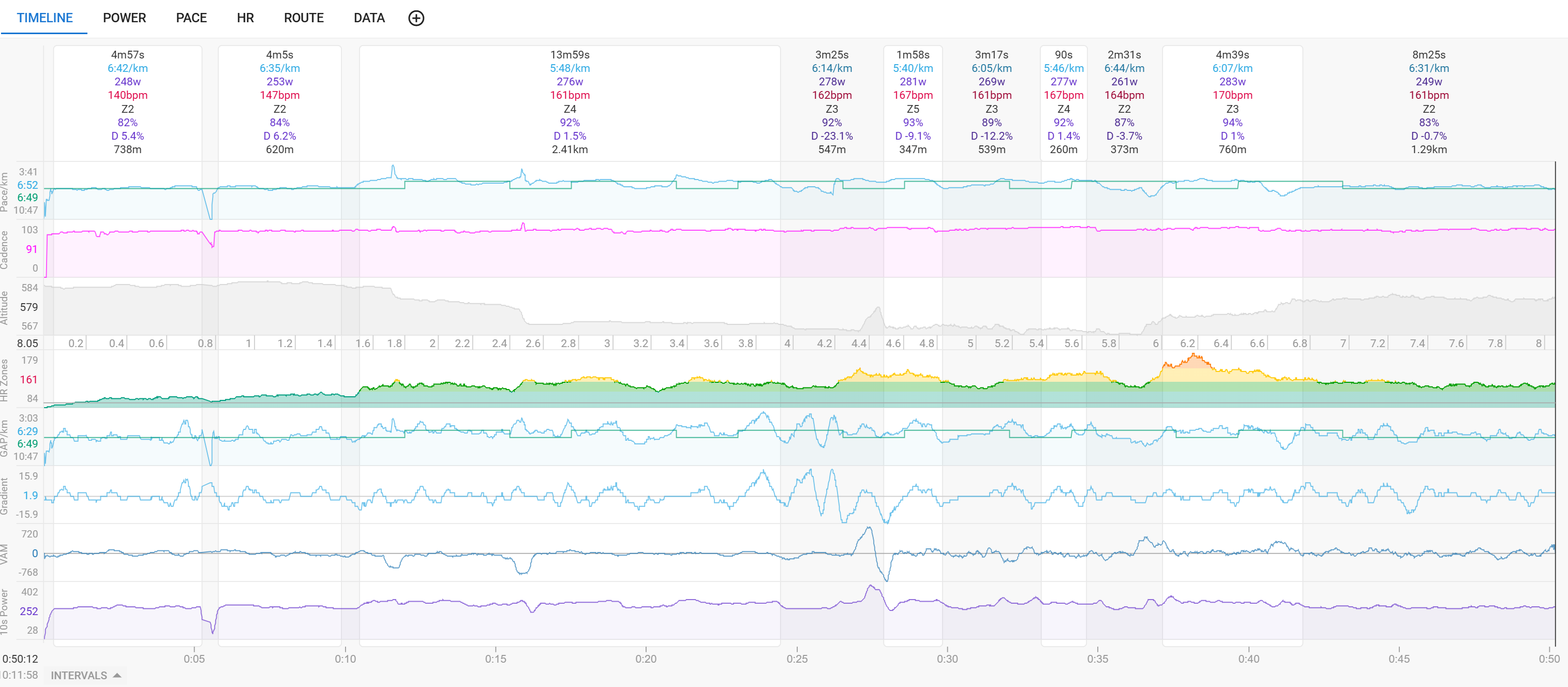
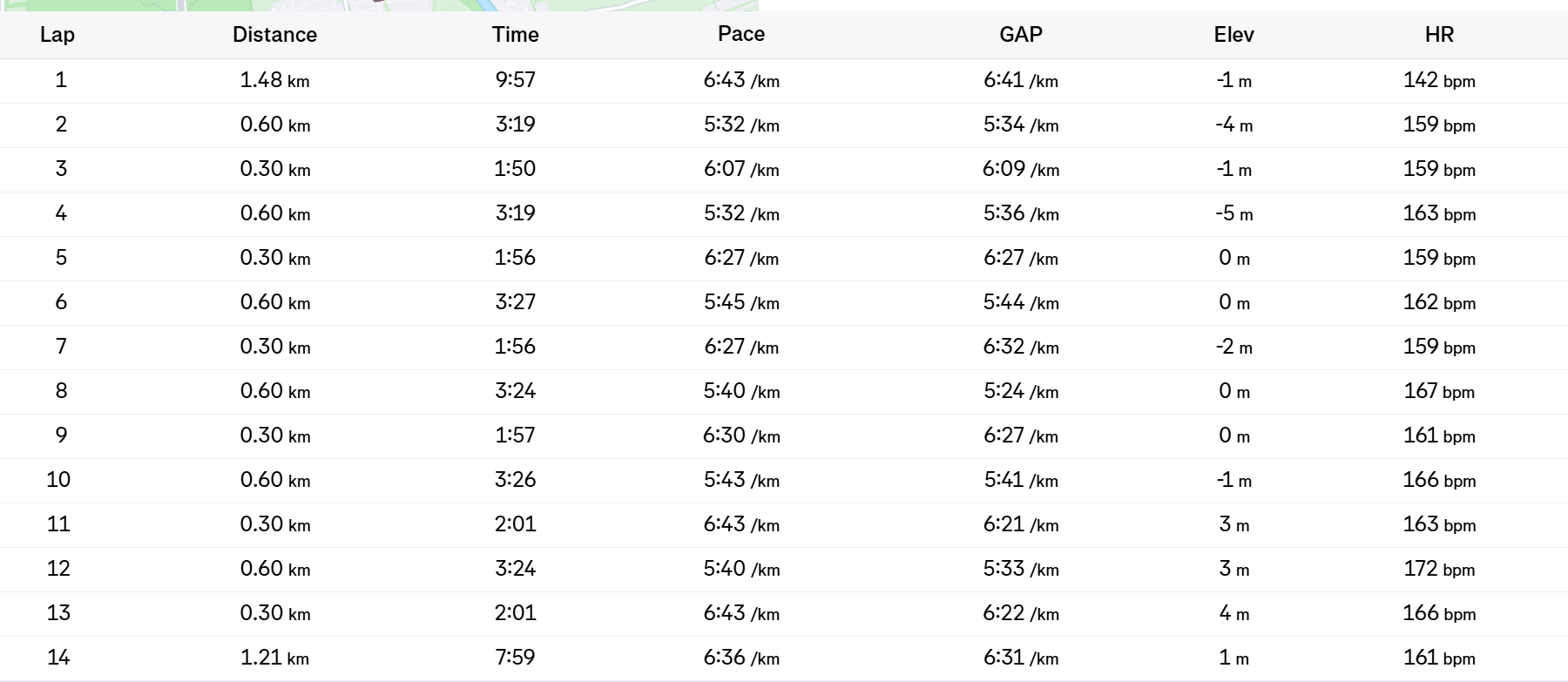
I’ve found that the intervals shown in intervals (heh) are not correct. I don’t really understand whether I have a wrong setting or something else is amiss. The intervals are shown correctly in the Zepp app as well as in Runalyze (which gets its data from Strava). I read somewhere that the privacy circle can mess with the Strava API (I’ve turned it off today), but then runalyze would also need to be affected I guess.
Am I doing something wrong? I already tried uploading the FIT file directly, but that didn’t help either. Perhaps Zepp encodes the FIT files incorrectly (wouldn’t put it past them) → but then how does Runalyze have the right data from Strava? I have both the “Use laps for intervals” and “Keep all laps” settings active, although I’m not 100% certain I understand exactly what both of them do.
@Manuel_Schurr Moved your question here. The answers to your questions should be at the top. Try it for your next activities.
Check especially these posts
Your activity looks like it doesn’t use laps. Can you show the settings box for that activity type?
And you could look up your fit file at fitfileviewer.com → are the laps correctly in there?
The intervals on Strava are correct. Does Strava somehow integrate differently with Zepp from how Intervals does it?
What’s also interesting: The tcx downloaded from the Zepp app has one lap, the tcx downloaded from runalyze has the correct laps. I suppose Strava does something that Intervals doesn’t do
Yeah, but sometimes user set the options for Ride activities, and wonder why it is not working for running activities. Therefore I just said, double check your activity type settings
But maybe Amazfit integration doesn’t deliver laps. While they do it for Strava perhaps.
Undelete your Strava activity, and check if the laps are shown there could be an option.
If the screenshot from fitfileviewer is the original fit file, it looks like there are no laps.
Yes, there are no laps in the file (neither for FIT nor TCX). I’ve already reported this to the Amazfit/ Zepp team.
I have both “laps” checkboxes ticked both for Bike and Run.
I’m really mostly just wondering why Strava has other ("better) data than intervals if they’re both integrated “the same way” (i.e. presumably through the same API)…
Think I found a better way of explaining this:
In case of ‘Use Laps’ only:
The first lap event starts an interval
The second lap event stops that interval
The third lap event starts a second interval
…
The time at the start of the recording up until the first lap press is not an interval in that case, just like the time in between the end of second and the start of the third.
In the case both checkboxes are enabled:
The beginning of a recording starts an interval
The first lap event stops that interval and starts a new one (second interval)
The second lap event stops that second interval and starts a third one
…
Everything from start to end is an interval and the lap events are dividing the whole ride in intervals (laps), no matter if those parts are effort or recovery.
Ahh, that makes a ton of sense, thanks. So the setting “use laps for intervals” satisfies the assumption "work and rest intervals always alternate ", right? Would “the first lap event” occur at the beginning of the recording of the first time I press the lap button? Or does this depend on the device (I assume Garmin is the default )? Normally an interval workout would be warmup-work-rest-work-rest-work-rest-cooldown.
That’s not always correct and that’s exactly why the Keep all laps function got implemented. If you do Over-Under intervals you have two consecutive work intervals
Also, in your example above, the cooldown part would be marked as a work interval if you simply use the rule af alternating.
Ah yeah, I wanted to verify that. Easier to keep all laps (if they’re there :D) and then remove the rest intervals. Thanks for clarifying. Perhaps that could be added as a tooltip on hover for those settings? Might make it easier for noobies to understand what they do.

 I have both the “Use laps for intervals” and “Keep all laps” settings active, although I’m not 100% certain I understand exactly what both of them do.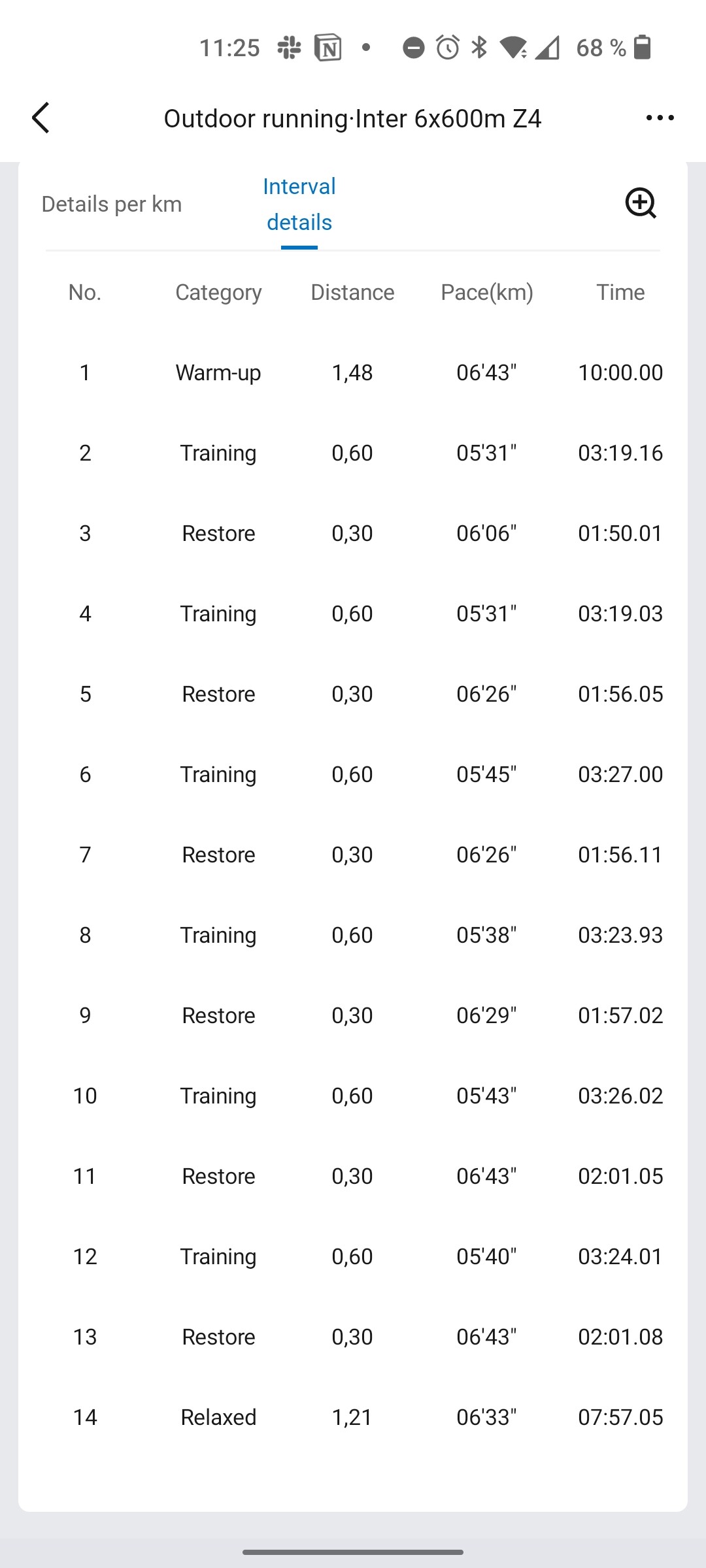




 )? Normally an interval workout would be warmup-work-rest-work-rest-work-rest-cooldown.