Training load for strength sessions (no power, HR unreliable) — how to make prescribed load count?

Hi,

I’m a coach working with BMX Race athletes, so strength and power training is a core part of my programming. I’m running into a problem with training load for gym sessions.

My situation:

I’ve built a library of strength workouts with a Load value set in the workout’s Load field. When the athlete completes the session, the activity shows “Load 0 (51)” — the estimated load appears in brackets but isn’t counted.

What I’ve checked so far:

  • My sport settings for Weight Training / Workout only offer Power, HR, Pace as load priority options — no RPE or manual/prescribed option.
  • Typing a Load value manually on the completed activity isn’t retained.
  • In Activity Types settings, Weight Training and Workout are set to Fitness 0% / Fatigue 100%.

My questions:

  1. Is the “0” caused by the Fitness 0% setting, or is the load simply not being calculated/retained for these activity types?
  2. Is there a way to make the prescribed load from a planned workout carry over to the completed activity?
  3. Is RPE-based load (session RPE × duration) supported anywhere, or planned?

For a strength-speed sport like BMX, HR is a poor proxy — a heavy max-strength session with long rests shows low HR but represents a very high neuromuscular load, while a metabolic hypertrophy session shows high HR. So HR-derived load systematically underestimates the sessions that matter most for my athletes.

Any guidance appreciated. Thanks for the great tool.

Marco
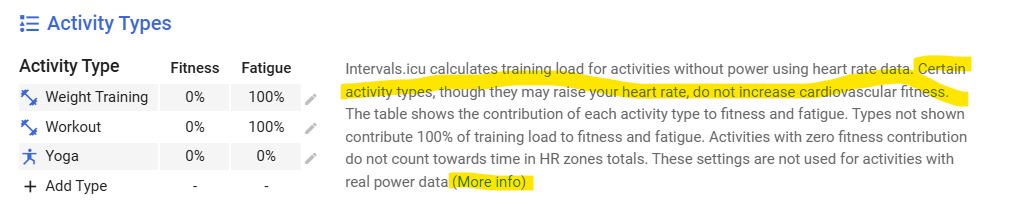
Yes, the activities set to Fitness = 0% will not count for Fitness improvement. The reason that it is set by default like that, is simply because weight training is a type of activity that doesn’t really contribute to ‘cardiovascular fitness’. It does cause fatigue and improves strength, but does very little to nothing for the typical endurance cardiovascular condition.
So if you want it to count for fitness calculations (which is probably a good idea in your case), set it to 50 - 100%. At 100%, the value in brackets will disappear and load will be counted full. At 50% you will see Load - 50%of the value in brackets followed by the full load in brackets. “Load 26 (51)” means that 26 will be counted as fitness improvement, while the entire load is 51.

Thanks a lot, that’s exactly what I needed! :folded_hands:

I understand now — the value in brackets is the full load, and the number in front is what’s actually counted towards fitness. So the “0” was just the Fitness setting doing its job.

I’ve set Weight Training and Workout to 100% in my case. I coach BMX Race athletes, and for us strength work isn’t cross-training — explosive force is what builds the start, which is where the race is won. Plus, keeping Fitness and Fatigue consistent means Form stays meaningful.

Really appreciate the clear explanation!