Reposting this here as I’m realizing this is most likely a feature request:
I’d like to monitor the EF of different work intervals, separately and over time on the fitness page. So, for example, monitoring how the EF of specifically my VO2 intervals progresses with my training. If there were a way to filter for work intervals and for power zone in the fitness charts, I think that would achieve it. But I’m open to other possibilities. My motivation here is that, while I track EF and EF filtered by IF and absolute power to monitor how EF changes for either steady Z1/2 rides v. interval workouts, the fact that EF is sensitive to higher power efforts can complicate these data. And so I’d be interested to compare the EF of specific work intervals. Inspection of training data suggests this can report on increasing fitness or the onset of fatigue.
I have a rather gross set-up
Note: I have no coding experience and just steal tidbits of interestingly-looking code from public custom fields
I have a custom interval field called RE. I guess the following code could be used for whatever interval field you want to track
intervals[i].“insert your own field here”
I’ve just got a setup where I delete my recovery intervals for my interval training, then this custom activity field sums up all the remaining (active) intervals
workP = 0
c = 0
intervals = activity.icu_intervals
for (let i = 0; i < intervals.length; i++) {
if (intervals[i].type !== ‘WORK’) continue
workP += intervals[i].RE
c++
}
workP / c
Thanks … I’m not quite following how you implement this. Where are you running this code? I’ve spent a fair bit of time putting together python scripts to pull all my cycling activities, filter them, calculate these metrics, and then add them to the activities. But in the process, I discovered that there’s not way to access any of my cycling activities because they all come from strava and so are not accessible through the API. So now I’m completely at a loss.
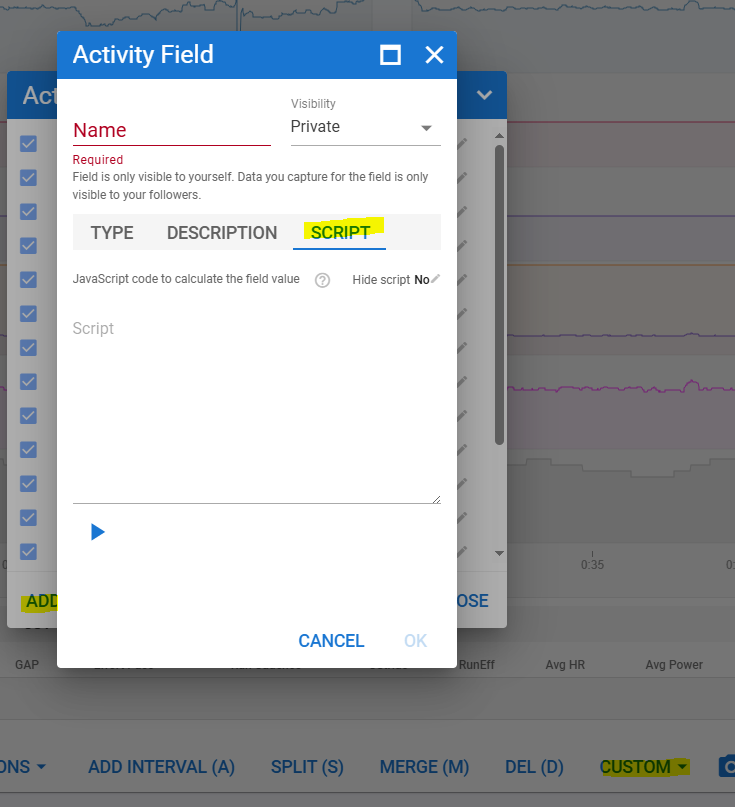
You can code quit a bit within Intervals itself. On the bottom af the activity timeline tab, there is a menu ‘Custom’, which has the possibility of adding custom fields coded and calculated by yourself. Enter your JavaScript there to create your own Custom fields per activity. Then you can use those custom fileds to plot on the Fitness page.
Yes, it will executed for every new activity automatically. If you want to run it with older activities, go to the activity list and select all your old activities and then Edit → Analyze
very cool … where can I find a tutorial on scripting with intervals.icu? It would be helpful to know which value/variables I can access and play with. Specifically, I’d just like to iterate over work intervals and calculate/access EF, average W, norm W, average HR, and kJ work so that I can calculate average values for across all work intervals. I should be able later to filter activities by name and create the plots I’m after on the fitness page. thanks!
I’ve stumbled upon an easier method
some metrics are calculated for you
groups = icu.activity.icu_groups
for (let group of groups) {
console.log(group.id)
group.average_watts
}
others need to be accumulated
{
let group = icu.activity.icu_groups[0]
let intervals = icu.activity.icu_intervals?.filter(i => i.group_id === group.id)
let intensities = intervals.map(i => i.intensity).filter(e => e)
let avgIntensity = intensities.length > 0 ?
(intensities.reduce((a, b) => a + b) / intensities.length) :
null
avgIntensity
}
I haven’t worked out if it’s possible to create a custom intervalgroup metric
but this code is much much cleaner than the one I posted before
you can replace intensity with any default or custom interval metric you have set up