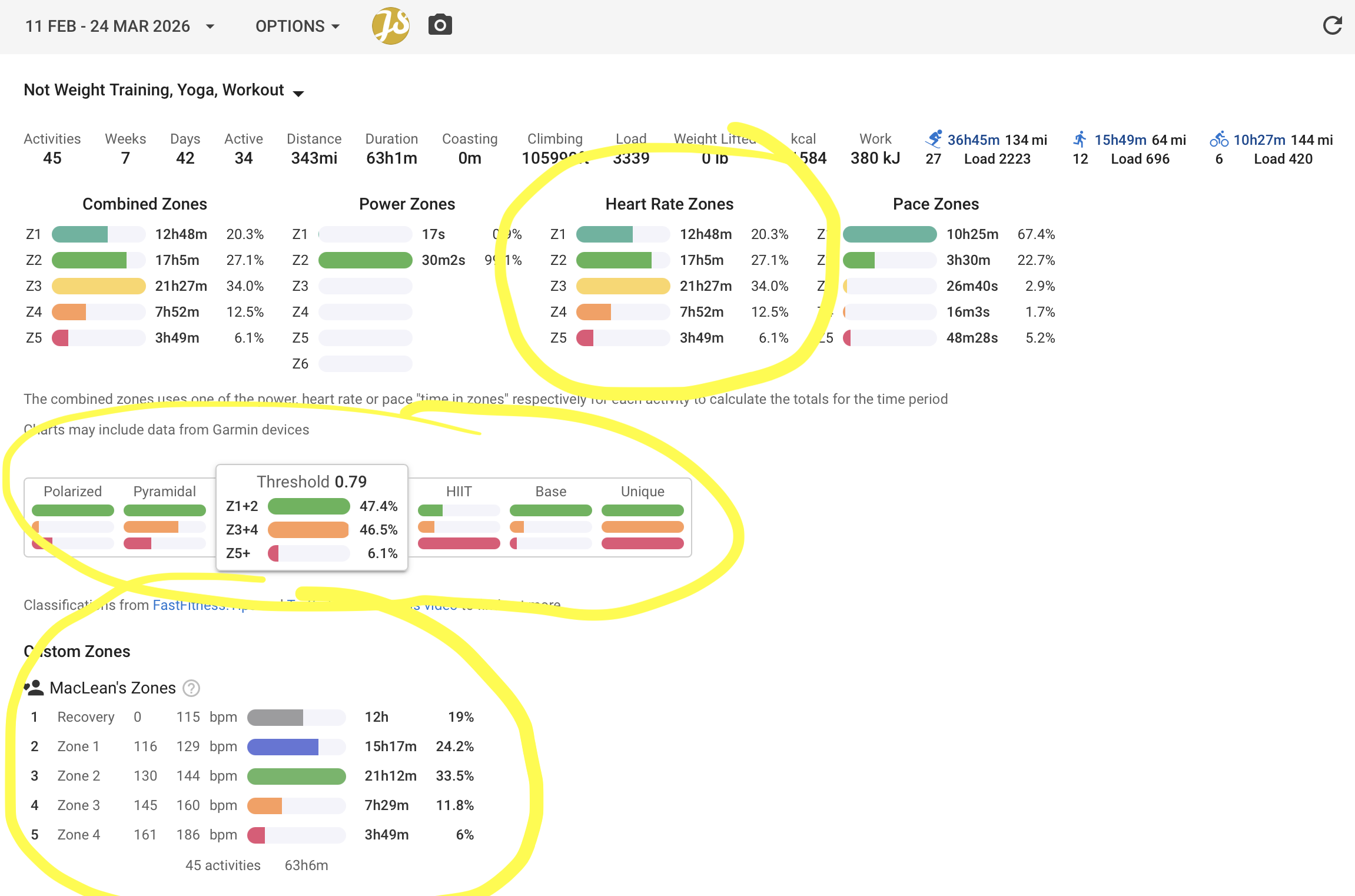
Hi team, love the work on Custom Zones, this has helped address a problem that I and others had with the platform with the inability to use the default “Zone 1” as a “Recovery” zone (like how Uphill Athlete defines zones using LT1 and LT2). However, even though I’m able to create a Custom Zone, the interface across the platform (on totals page, calendar view, activity page) still uses the default heart rate zones to display the “Class” being Polarized, Pyramidal, Threshold, HIIT, Base, or Unique. Is there a way to change this so that the “Class” uses my Custom Zone?
In the attached screenshot, you can see that with the Default Zones the interface thinks I am doing Threshold training, but with my Custom Zone its quite clear I am not (I’m closer to Base or Pyramidal). Before Custom Zones I have always just ignored this part of intervals.icu because I use default Zone 1 as “Recovery Zone” (therefore default Z2 = my Z1, default Z3 = my Z2… etc). After scrolling through the forums for years, I’m sure I’m not the only one with this issue. Changing the Class to calculate from my Custom Zone would unlock a lot more value for me with the program. Thank you!
How is that supposed to work? You haven’t even defined Zone 5 yet, and since anyone can create any zones in any order (you could define z5 first), so that’s not possible.
However, you can create another custom zone with L1 = your zone 0 to Z2, L2 = Z3, and L3 = Z4, or whatever you like. You won’t get the prompt indicating it’s pyramidal, but of course you can see it…
What do you mean? Custom Zone 5" (CZ5) is defined as “Zone 4 (161 bpm - 186 bpm)”
It’s a good idea with the additional custom zone, but the whole point of my post is that I do want the prompt in intervals.icu UX on the Totals page, Calendar view, and Activities view.
You have defined Recovery and Zone 1 to 4 in your description for your custom zone. From your explanation above I assumed you had a problem creating a “Zone 0”, but now you could create it with a custom zone. But there are only 4 others (1 to 4). Where is the Zone 5? These classes are defined as Z1+2 and Z3+4 and Z5. What’s your Z5?
Another user could only create Z1 Z3 and Z444 (you can create any zone and they can even overlap). So this is just not possible to match that classes, because nobody knows what custom zone is the “matching” built-in zone
What do you want to see? What’s your Z1+2 (Green)? What’s your Z3+4 (orange)? And what’s your Z5+ (red)? If you know that, you can just edit the heart rate zone to match that, for example
Green is 0 .. 144, so top of Z2 => 144
Orange is 145 .. 160, so top of Z4 => 160
Red is everyting above 161
I appreciate your input R2Tom, but I think you’re overthinking it - respectfully. Please see my original attached image, I think it lays out my friction point with the current UX and what I would like to see as a feature in intervals.icu. Thank you!
Ok, but I don’t see an answer of how the mapping should be.
Whats your green, orange and red zone?
If it’s obvious, then sorry, I don’t see it in your post.
I’ve read, you want the “Class” using your custom zone. I’ve asked what’s your green, orange and red zone (so how shall the mapping to the class zone work). You couldn’t answer, or didn’t want to … I dont know.
My current HR zones (“Default”):
Z1: I use this as “Recovery Zone”
Z2: I use this as Zone 1
Z3: I use this as Zone 2
Z4: I use this as Zone 3
Z5: I use this as Zone 4
As you can see using Z1 as Recovery (and etc) throws off the system and it say’s I’m in the “Threshold” Class when really I’m in the “Base” or “Pyramidal” Class. In my HR model (Uphill Athlete) there is no “Zone 5” because anything above LT2 is Zone 4. I think this is a pretty common HR model.
My desired outcome from intervals.icu is to use my Custom Zones to define the Class. In my custom zones CZ1 = Recovery, CZ2 = Zone 1…CZ5 = Zone 4. Using your colors terminology, my green zone is CZ2 + CZ3 (Zone 1 + Zone 2), orange is CZ4 (Zone 3), and red is CZ5 (Zone 4). Hopefully I’ve explained this better. Thanks for your help!
This helps, because this wasn’t clear from the initial post, thanks.
Are you using the built in heartrate zones at all, now as you’ve created your custom zone?
Because, though it’s not ideal, but you could quirk these zones, so that they match the “classes”. For example
Green (your CZ1 to CZ3):
Z1 = 0 .. 129
Z2 = 130 .. 144
Yes I use the built in (“default”) HR zones, I really like the HR chart on the timeline page and other features, I’ve just learned to adjust the zones in my mind.
While I could quirk the zones to fit the Class model, I would lose a lot of insight this way. As the UX is currently set up, if I have Z1 from 0-129 it would categorize time at 80 bpm the same as time at 128 bpm, this is not ideal. Since I do a lot of trail running with long technical downhills, I do spent a fair amount of time below Z1 (below 116) so this would really throw off the distribution as I try to keep 80% of my training below LT1 with 10-20% above LT1. As you can see in the screenshot over the selected period (42 days) 19% of training was below 116. Hence the request to be able to use my Custom Zone to determine Class.