I’ve been trying to get more out of my strength training data in Intervals.icu and hoping someone has solved this already.
Here’s my setup:
I create structured strength workouts in Garmin Connect (exercises, sets, reps, rest times)
I follow them on my Forerunner 965
After syncing, Garmin Connect shows a full breakdown: exercise name, duration per set, reps, weight, rest — exactly what I want
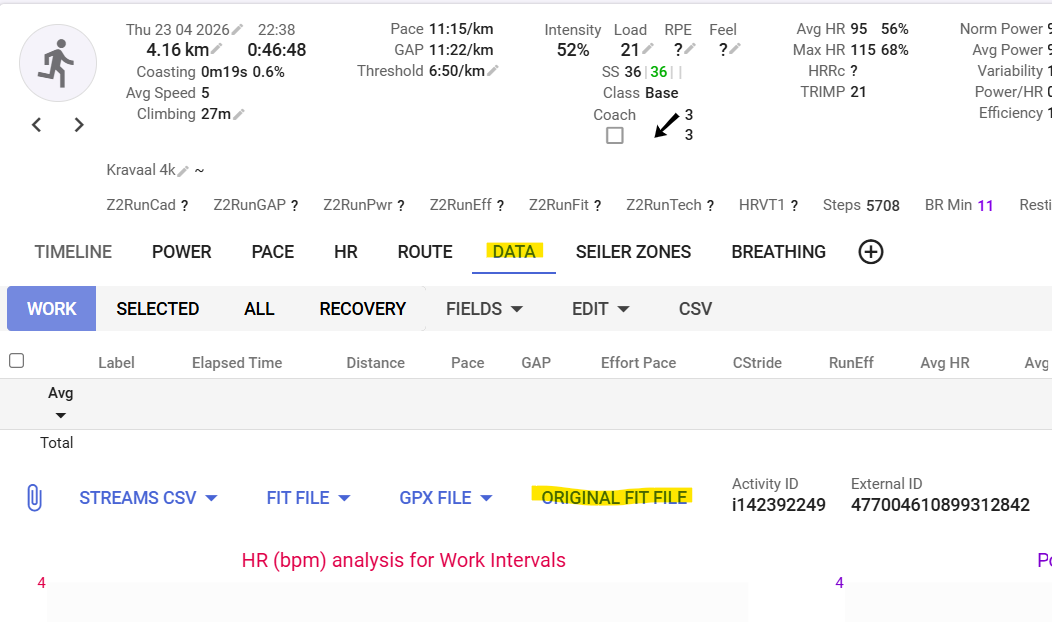
The workout does come through to Intervals.icu but only shows a chart of my HR over time.
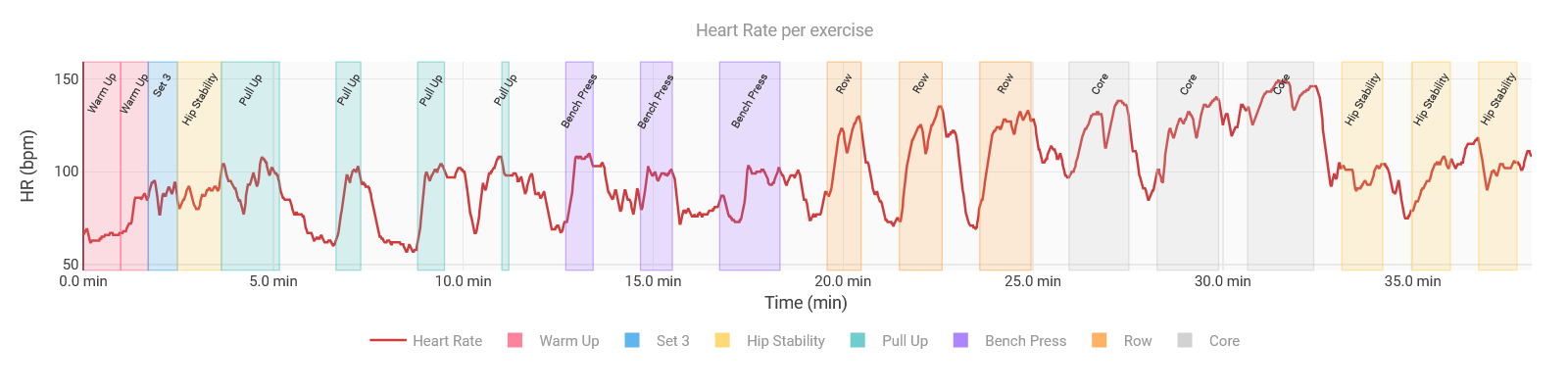
What I’d actually like is something more visual — ideally a chart where I can see heart rate plotted over time, with the individual exercises/sets shown as intervals or background bands (similar to how lap data works for running). Eventually with the weights etc.
My assumption is that Garmin records each set as a lap in the FIT file, which would make this possible — but I can’t figure out how to surface that in Intervals.
My questions:
Are strength sets actually recorded as laps in the FIT file, and does Intervals.icu read those?
Is there a way to get Intervals to display exercises as named intervals on the timeline (like it does for structured runs)?
If not natively, would a custom chart be the right approach — and has anyone built something like this?
You can try with MyTrainPal | Endurance AI Coach , you can ignore the AI part if it’s irrelevant for you, but it has the ability to track your strength sessions on watch or phone.
Currently it shows on the completed workout screen the targets (load/sets/rpe) vs what you actually did. And tracks your strength progress over time, together with your cardio exercises.
It works better if you are an Apple Watch user, but plan is to have Garmin Direct integration that will push and pull structured strength exercises.
Could you share a FIT file from one of those strength sessions? That would allow the developers and users to take a closer look at how the sets and exercises are being recorded.
Even better, if you also have access to the planned workout file, sharing that as well could help compare what was prescribed versus what was recorded. Or, who knows, add that to the workout builder.
As a coach, and even knowing that Intervals.icu has a strong emphasis on endurance sports, the possibility of centralizing both strength prescription and analysis here would be absolutely fantastic.
I took the time (with my buddy Claude) to analyze the file structure, so here’s what’s actually in there:
FIT message types present:
set records (message 225): 36 records — one per set, including rest sets
exercise_title records: 8 records — containing the Dutch exercise names I entered in Garmin Connect
workout_step records: 19 records — containing exercise category, target reps, weight, and notes
record records: 2289 — the standard HR/timestamp stream
Each set record contains:
start_time: absolute timestamp (matches the HR stream timeline perfectly)
duration: duration in seconds
set_type: active or rest
category: exercise category ID (e.g. pull_up, bench_press, row, core)
weight: in kg
wkt_step_index: links back to the workout_step and exercise_title records
The session record reports num_laps: 36 — so Garmin itself considers the sets as laps.
The exercise names (in my case in Dutch) are stored in exercise_title records and map to set records via (exercise_category, exercise_name) tuple.
So all the data is there and the timestamps align perfectly with the HR stream. The only missing piece is Intervals.icu surfacing these set records as named intervals on the timeline — the same way it handles lap records for running.
Would love to know if this is something that could be supported natively, or if there’s a custom field/stream workaround I’m missing!
Is this the FIT file downloaded from Garmin directly or is it the FIT file that came to Intervals over the API?
Those used to be identical, but Garmin started limiting the content that is forwarded lately.
For us to be able to say something meaningfull, you should give us the one that came to Intervals automatically.
Good catch on the file difference! I compared both files and here’s what Garmin strips out in the API version:
Record type
Garmin direct
Via Intervals API
exercise_title
8
0
workout
1
0
workout_step
19
0
So Garmin removes the exercise names and workout structure from the API export. That explains why the Dutch exercise names I entered in Garmin Connect won’t be available in Intervals.
However — and this is the important part — the set records are fully intact in both files (36 records). Each set record still contains:
start_time (absolute timestamp, aligns with HR stream)
duration
set_type (active/rest)
category (exercise category ID, e.g. pull_up, bench_press, row, core)
weight in kg
So the data needed to display sets as named intervals on the timeline is there. The exercise names would fall back to generic category names (pull_up, bench_press etc.) rather than custom names, but that’s workable.
The only missing piece remains Intervals.icu treating those set records as intervals on the timeline — like it does for lap records in running.
Hi @ohmax, happy to share the setup! It took some digging but here’s the full step-by-step.
How it works
Garmin records each active set as a FIT message (_num 225) with a start_time, duration, category, weight and reps. These are NOT converted to intervals by Intervals.icu, but they can be read via a custom script. The trick is using an Activity Field as a data bridge: it reads the FIT set records and stores them as a string, which an Activity Chart can then parse and visualise.
Step 1 — Create the LapData Activity Field
Go to Custom → Activity Fields → Add field
Name: Lap Data
Code: LapData (exact, case-sensitive)
Type: Text
Inline: OFF (otherwise it shows as a text blob on the activity page OR you can just not show the whole field by unchecking it afterwards)
Processes fit file messages: ON
Script:
{
  var data = ''
  for (var i = 0; i < icu.fit.length; i++) {
    var m = icu.fit[i]
    if (m._num !== 225) continue
    if (m.set_type == null || m.set_type.value !== 1) continue
    if (data.length > 0) data += ';'
    data += '' + m
  }
  data
}
This field acts as a data bridge — it reads the set records from the FIT file and stores them so the Activity Charts can use them.
Step 2 — Add the charts
Both charts are available in the community. Go to Custom → Activity Charts and search for:
Strength HR Timeline — plots heart rate over time with colour-coded blocks per exercise category and a dotted average HR line per set
Strength Session Overview — per-set table with exercise, start time, duration, reps, weight, volume, avg HR and max HR
The LapData Activity Field from Step 1 must be set up first — both charts depend on it.
Important limitations
Exercise names show as generic Garmin categories (Squat, Lunge, Deadlift…) because Garmin strips the custom exercise names from the API export. Only the category ID comes through.
Reps and weight reflect what the device recorded during the workout. Manual edits made afterwards in Garmin Connect are NOT included, as Garmin does not write these back to the FIT file.
Tested on a Forerunner 965 with structured workouts created in Garmin Connect. Should work on any Garmin device that records strength sets in the FIT file.
Quick follow-up on my own setup — I’ve been refining it and managed to fix a few things worth sharing.
Improvement 1: exact exercise names instead of generic categories
The LapData field contains not just category but also category_subtype. The combination of those two values maps to a specific exercise in the Garmin FIT protocol — e.g. category=21 + subtype=13 = “Lat Pulldown”, not just “Pull Up”. The full catalog covers 1184 exercises across 33 categories and is baked into the FIT SDK.
I built an EXERCISE_NAMES lookup table (catNum_subtypeNum → display name) into the chart script. Instead of “Row” you now see “Chest Supported Dumbbell Row”, instead of “Pull Up” you see “Lat Pulldown”, etc. Works retroactively on all past sessions and automatically on future ones.
Improvement 2: cleaner labels on the chart
With full exercise names, showing a label above every individual set got messy fast. Fixed by grouping consecutive sets of the same exercise and placing one label centered above the whole group, while keeping individual coloured blocks and per-set HR averages intact. Labels are now horizontal and sit just above the chart area so they don’t overlap with the HR data.