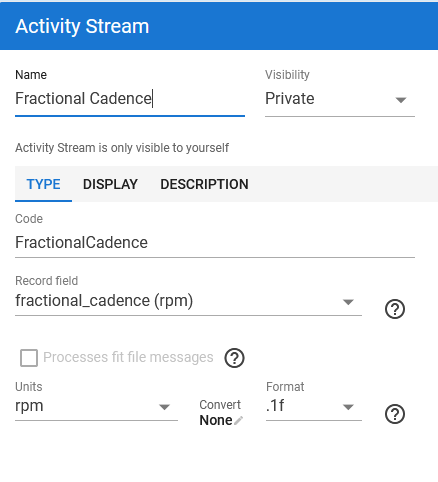
Running cadence is stored per foot as an integer, so a doubled “Run Cadence” custom stream can only produce even SPM values (180, 182…), never 181. The FIT record message carries the half step in a separate field, fractional_cadence (field 53, values 0 or 0.5), and the standard formula is SPM = (cadence + fractional_cadence) × 2.
I tried to read it from a custom stream with “Process fit file messages” enabled:
m.cadence.value returns the integer per-foot cadence (e.g. 81)
m.fractional_cadence is null on every record message
Object.keys(m) returns numeric indexes (0…17), no field names, and indexing by FIT field number (m[53]) throws “Index 36 out of bounds for length 1”
So from a script there is currently no way to reach the fractional part, even if the file contains it. Example activity (COROS Pace 3): Intervals.icu
Two possible fixes, either would be great:
expose fractional_cadence on record messages in scripts, like the other fields;
better: when parsing runs, fold it into the cadence stream (cadence + fractional_cadence), so the built-in cadence stream becomes e.g. 90.5 and a simple ×2 gives correct odd SPM everywhere (streams, interval fields, activity fields).
Thank you for the script, it’s the right approach and I owe you an apology for my earlier reply: your script does work. I ran it on a Garmin activity from another account and it gives correct odd SPM values (the fractional_cadence field is there, 0/1 alternation when isolated).
What was confusing me: on my own COROS runs, the same script only gives even values, and the script preview showed decimals (163.6) that I mistook for half-step data; they were just the smoothed preview curve.
To get to the bottom of it, I decoded the original COROS PACE 3 FIT file outside Intervals: the record messages have cadence as an integer per foot, plus vertical oscillation, ground contact time, vertical ratio, step length and power, but no fractional_cadence field (53) at all. So COROS simply doesn’t write the half step; nothing is wrong with your script or with Intervals.
I’m keeping your version as the shared stream for my athletes (odd SPM on Garmin, even on COROS) and sending COROS a request to add field 53. I’ll post a short summary and mark the topic solved. Thanks again.
Intervals stores running cadence per foot as an integer. To get exact SPM (181, not only 180/182) you need the FIT field fractional_cadence.
Garmin writes it: the script below gives correct odd SPM.
COROS doesn’t: I decoded an original COROS PACE 3 FIT file, the field is absent. Even values only, nothing can fix that on the Intervals side. Request sent to COROS.
Activities synced via Strava have no original FIT: the stream isn’t created at all. Connect the watch directly.
The script preview shows decimals (163.6): that’s just the smoothed preview, not half-step data.
Custom stream, “Process fit file messages” ticked, then Actions → Reprocess file:
{
  for (const m of icu.fit.record) {
    const cad  = m['cadence']?.value
    const frac = m['fractional_cadence']?.value
    if (cad !== undefined || frac !== undefined) {
      data.setAt(m.timestamp.value, ((cad ?? 0) + (frac ?? 0)) * 2)
    }
  }
}
There is perhaps an even simpler way to do this if you create a FractionalCadence helper custom stream first—that way, there is no need to check reprocess the FIT file checkbox and everything is run from memory for faster execution:
Unfortunately it doesn’t work for me. I created the FractionalCadence stream first (record field fractional_cadence, rpm, format .1f), then a second custom stream with your script. The result is still in steps of 2: the new stream is just a duplicate of the normal cadence, so the fractional part seems to be empty or 0.
I’ve given up on this for now, but thanks again for your help.
Unfortunately, it doesn’t work with Coros, Polar and Suunto wearables since they lack a fractional cadence stream, whereas Garmin, Apple, and Amazfit watches support it and works great