I have a question about how Interval.icu calculates the average power per lap (interval) compared to TrainingPeaks.
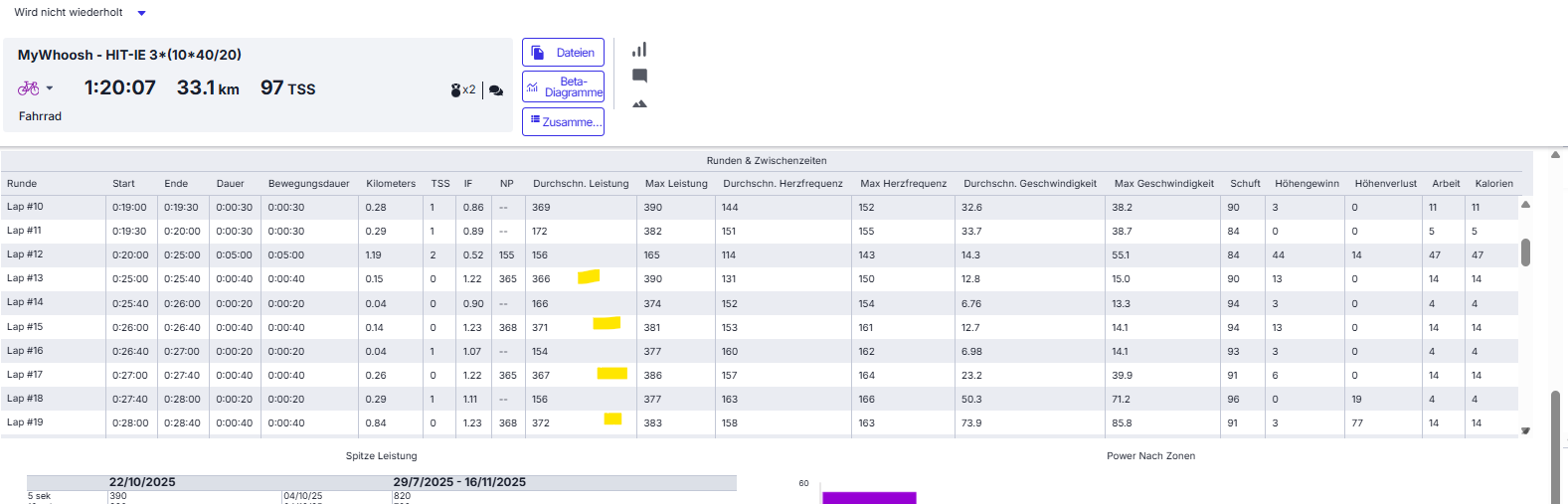
My workout files come from MyWhoosh. When I do 40/20 intervals (40 seconds work, 20 seconds rest), I’ve noticed that the average power per interval shown in Interval.icu differs from the values in TrainingPeaks.
Example:
In the 40-second work intervals, TrainingPeaks shows about 20 W higher average power than Intervall.icu.
In the 20-second recovery intervals, it shows about 20 W lower.
Interestingly, when I import the same raw file from MyWhoosh into Garmin Connect, the intervals and average power values appear same to those in TrainingPeaks.
Since all platforms use the same file, I’m wondering how Interval.icu calculates the average power per lap, and what might cause these differences compared to TrainingPeaks and Garmin.
Average power for an interval in Intervals.icu is a simple average of all the data points falling into the time range for the interval. Intervals.icu doesn’t use the summary info on the laps in the fit file, it recomputes from the data points. This is to support editing intervals, fixing bad data and so on.
I had a look at your ride on 22nd October and I don’t see how the 40s intervals could be 20w higher. Intervals.icu is actually close to the summary data in the fit file.
Could you please message me some screenshots of TP.
Hey David,
Thanks for the quick reply!
I’ve attached two screenshots — the analysis shows different power data. The Trainingpeaks values match MyWhoosh and Garmin Connect exactly, only Interval.icu shows a difference.
hi David, it was the activity from 22 October My Whoosh -Hit-IE 3*(10*40/20)and I have the same issue on the activity from yesterday 28th myWhoosh HIT-EB(5+5) of October. There is also a different about 20 W. br michal
If you zoom in on the first block of 10 you can see the white intervals from the lap data do not line up with the power trace bumps. So Intervals.icu ends up with less power. I already fixed this one so you won’t see that but here is a screenshot:
Hello David That I know but and the Intervall goes to 38 Second and Dead of 40 what I’m wondering That if you look to the other Programm like TrainingPeaks or Garmin the watts are Higher but the forty Second Split**
That is because they are using the lap data as is. Intervals uses the underlying power data and there is only 38s of non-zero data for those intervals (I checked the 1st one). So each interval is actually a bit short if you only count the part with power. And the laps do not line up with the data.
Perfekt — hier ist dein Text mit dem zusätzlichen Satz ergänzt:
⸻
Thanks for checking that!
Is there any way to make Interval.icu show the lap data exactly as it’s recorded in the file, just like the other platforms do? I’d prefer to see the laps displayed one-to-one, without recalculating them based on the power data. Otherwise, it’s quite difficult to compare the sessions.
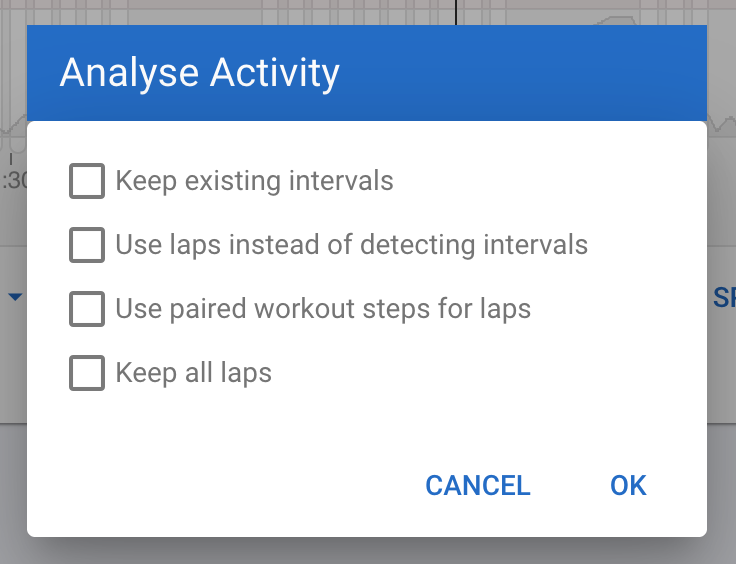
AFAIK, you can do “use laps” but that will only create the laps based on those indexes of those laps but I’m. Pretty sure that intervals still calls the lap data manually instead of directly using the numbers from the lap for reasons explained above.
Hi @david, I did unclick all the options as you showed, and it did recompute it indeed but I’d rather not do this every time. Should I leave “use laps for intervals” in the settings as on or off or are they unrelated?
My use case is: use workout from intervals.icu builder and do it either indoor, via zwift (and back to strava to intervals.icu) or outdoors via hammerhead headunit and directly from karoo 2 to intervals.icu.
Hi @david, I’m going through my tougher rides from this year so I can make sure my values in training zones are correct, and have reanalyzed most of the tougher rides. But for example, how do I make sure this is correct, as the “intervals.icu autodetect/analysis” also seems to be incorrect.
Although the total power for training zones analysis should be correct, as I’m getting “credit” for the 300+ watts, it’s not recovery.
So given my use case flow above, what’s the recommended setting to have the most accurate interval data?
If your activity file contains the lap events, have ‘Use Laps’ as default on the Settings page.
Connect Zwift directly to Intervals iso going through Strava, because privacy circles in Strava mess with Laps.
Ok thanks. I’ll change the connection then with Zwift.
But shouldn’t the “direct connection” with Hammerhead have the correct laps/watts if I had the “use laps” setting on?
If there aren’t any laps, it won’t help you. If there are laps, all intervals will created out of them.
You can also always create these intervals yourself with ‘A’ or Action → Find Intervals