Would be happy to test and use…
Hi nich! Really interested in the project. Please invite me… 
Hi folks - thanks for the interest and apologies for the delay. I’m now doing some final touches to make it publicly usable - very basic onboarding and tidying up settings and then I’ll get a TestFlight build posted here.
Just a heads up that the Apple Watch does infrequent beat-to-beat sampling while sleeping unless you have AF history switched on. With AF history you get samples once every ~4 minutes. If you switch AF on now you’ll have more reliable history when you load your data into the app. Do it in the watch app on you phone - Heart > AF History.
1 Like
Awesome thanks. Can’t wait.
Should we continue doing morning breath and Hrvtraining or is overnight AF, RMSD and your app better?
I wouldn’t stop doing what you’re doing until you’re comfortable with the app and you’re getting good data.
I have been using it for almost a year now. For the first few months I used it alongside hrv4training to check the data wasn’t wildly different. But now I just use my app as it’s around 60-70 one minute samples overnight vs just when you wake up.
1 Like
Yes, I’m excited to not having to do the morning minute and it’s all automated.
When you do HrV4training and drop box your RMSD to intervals what custom field does your app sync to in intervals.
Thanks
Morning measurements are the Gold Standard.
Overnight can be very close but it depends on your habits and the accuracy of the used devices.
If you have the habit of training late in the evening, an overnight measurement will capture a lot of time that is still recovering from the effort. A morning measurement will take a true ‘rest’ measurement. So differences will be less obvious and less pronounced in that case.
If your device measures short timespans during the night, HR will be different for the different sleep stages and you risk bigger influence from artefacts. For night measurements, it is better to capture and average the entire night.
1 Like
How can I download this app?
I’d be interested in a link!! Thanks
Hi folks - I have submitted the app to TestFlight but it’s taking a long time to go through review. It’s been 4 days now so I’m hoping I’ll have a TestFlight link for you all in the next day or two.
3 Likes
I would love the download link as well
Thank you so much!
I’d be interested in a link!
I would be interested in a link
I would also be interested.
OK finally through Apple review!
Anyone interested in trying out Sleep HRV can do so using TestFlight here: Join the Sleep HRV beta - TestFlight - Apple
The onboarding is very basic, so just to reiterate - you will get far better results putting your watch in AF History mode. To do this open the watch app on your phone, select “Heart”, then down the bottom activate AF History.
I have also realised that onboarding didn’t make it clear how to import your history. You need to double tap the white space down the bottom to open settings. Scroll to the bottom, select a data you want to sync data back to, and tap “Refresh all data”. I’ve added some screenshots below.
You can post general feedback here, and I’ll try to be as responsive as I can. For bug reporting, take a screenshot and tap the share button, and you’ll see an option to “Share beta feedback” (have to admit I did not know this was a TestFlight feature until today!)
Thanks for the interest everyone. I hope it’s valuable. I’ll keep working on stability (in particular the homescreen widget and watch complication update speed).
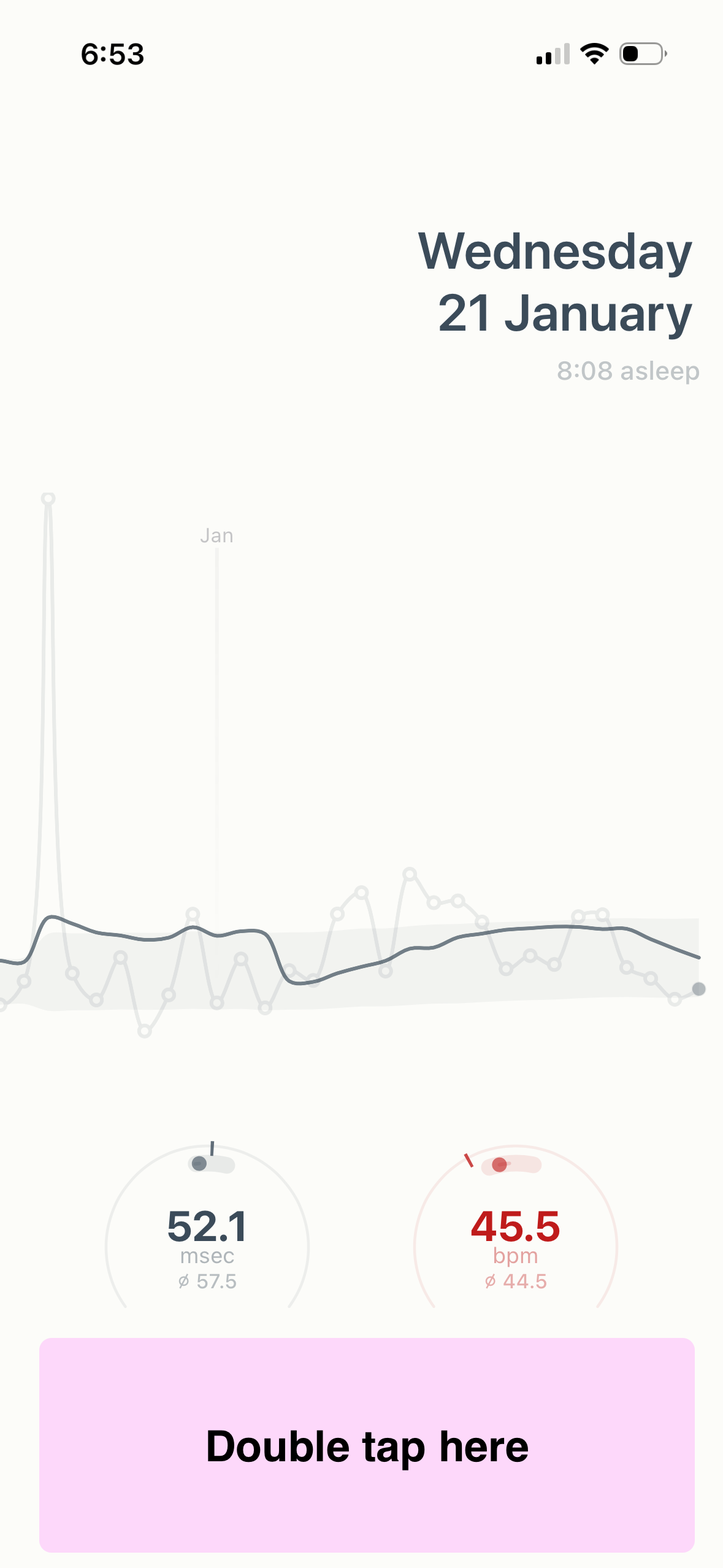
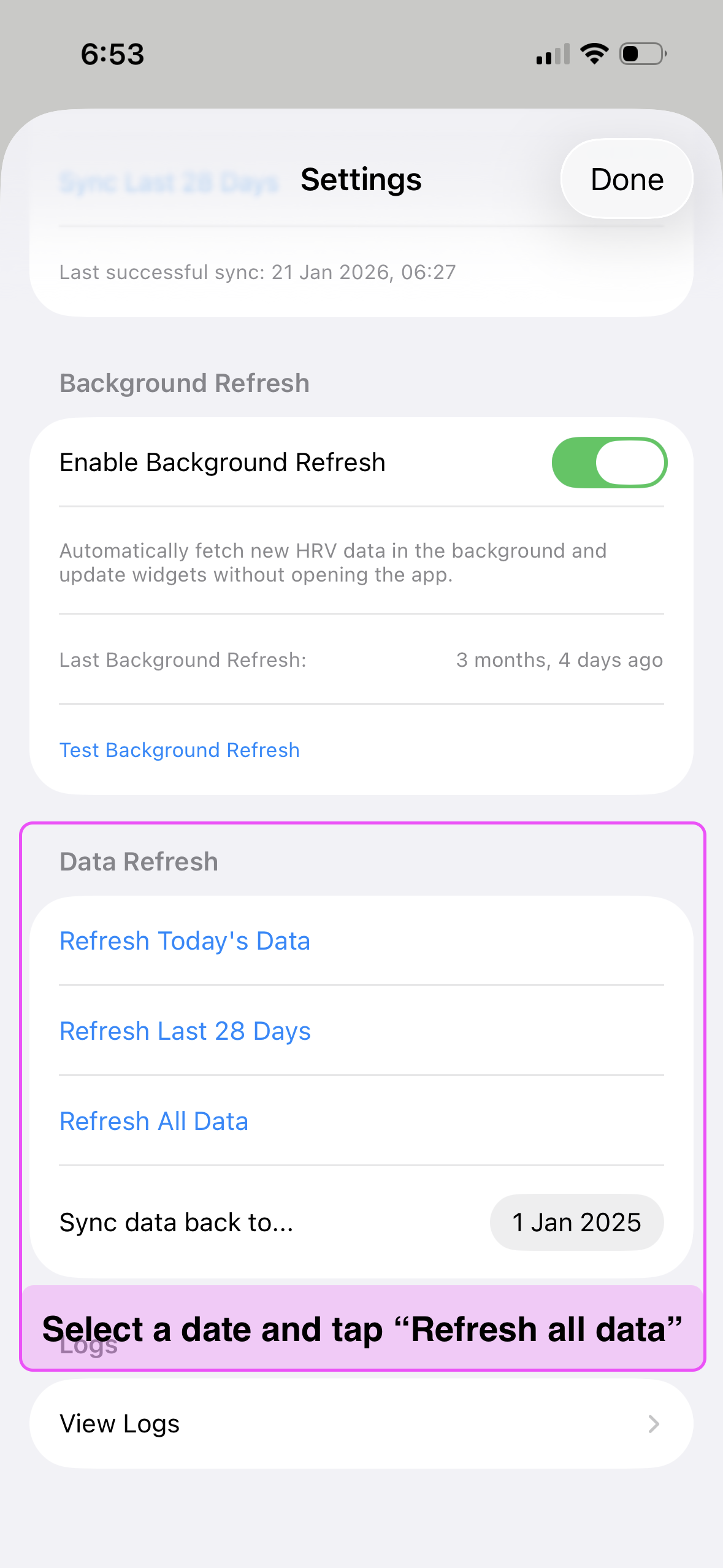
3 Likes
Thanks so much. All working with me.
Which wellness data fields are synced in intervals? Is it just HrV(RMSD)?
Any advice on how to manage the overnight RMSSd and mindfulness breath from HrV4training via drop box. Will they both compete for the same field?
It syncs with HRV (rMSSD) and Avg Sleeping HR fields.
In terms of competing - I assume intervals will use the most recently sync’d field?
1 Like
Thanks so much!!!
Great thanks. So it’s fully automatic just calculates RMSD from sleeping hrv from AF history mode.
It looks v similar to my hrv4training data. Saves remembering to do breath. Thanks so much!
Wonder if can use im4ready for readiness?
Yes you can. All you need is RMSSD and resting HR in the default Intervals fields. Or you define which fields to use inthe Imready4 config file.