Thanks I just logged in Claude for the first time. I like the concept of “Project” and the structured output, it’s just not text like ChatGPT but there are mini objects in the structured response. However compared to the ChatGPT agent I started to use for few weeks (Montis project see corresponding thread in this forum) Claude doesn’t have access to my Intervals data. Is it where the “Fetch” step in your “AI Prompt Generator” tool comes in? If I provide my Intervals API key then some useful data could be included in the prompt to help Claude AI? Actually, I would love if you could create some sample videos how yourself you use the tool with real examples. For example planning your weeks ahead on a given objective, or updating a week based on certain constraints (fatigue, injury) to adjust load, etc. Thanks.
The main purpose of the AI Prompt Generator is to pull your data from Intervals.icu and package it in a way that is easy to copy into the AI chatbot of your choice.
Yes, that is where the Fetch step comes in. If you provide your Intervals.icu API key, the tool can pull useful training data and include it in the prompt so the AI has real context to work with, rather than giving generic advice.
The other options are there to help build a more complete prompt, so you can guide the AI toward the kind of output you want, whether that is week planning, adjusting training based on fatigue or injury, or working toward a specific goal.
Wanted to share another tool I’ve been working on RunTK: GAP Planner
Like a lot of these tools it started as a spreadsheet about a year and a half ago, specifically to help me predict finish times for hilly races. The spreadsheet got unwieldy fast but the idea was solid, so eventually I rebuilt it properly.
Here’s how it works: you draw a route directly on the map — snapping to roads or trails — or upload a GPX file. It pulls elevation data for the route and breaks it into splits. For each split it calculates a grade-adjusted pace prediction based not on a generic formula but on your own Intervals.icu training data. It looks at your actual runs, models how your pace changes at different gradients across your HR zones, and uses that to build your personal pace curve. If you don’t have Intervals.icu data it falls back to a biomechanical model as a starting point which you can then adjust manually.
On top of that there’s a fatigue curve — you can build it from your activity history or shape it manually — which accounts for the fact that your pace at km 30 is not your pace at km 5. You can also drop waypoints on the route for aid stations or checkpoints, each with its own stop time, and the split table accounts for all of it.
To test it I went back and ran several of my old race routes through it using training data from those blocks. The predictions came out a bit optimistic — which honestly tracks, race day is never quite what training looks like — but close enough that I think it’s genuinely useful for planning rather than just a rough guess.
I’d be curious whether others get similar results. If you have a race you’ve already run, load the route, pull in training data from that block, and see how close the prediction lands against your actual finish. Would love to know whether the optimism is consistent across different athletes and terrain.
Sharing a couple of race comparisons from last year using the GAP planner. Both the pace curve and fatigue curves were built from training runs during the blocks leading into each race.
Half Marathon (21.47 km, +168m) Estimated: 1:39:34 | Actual: 1:38:36 — off by less than a minute.

53k Mountain Ultra (53.18 km, +2607m) Estimated: 7:47:29 | Actual: 7:52:22 — about 5 minutes off over nearly 8 hours.

You can see in both screenshots how closely the blue (actual) line tracks the yellow (estimated) line across the full distance. Pretty cool to see it hold up on both a relatively flat half and a big mountain ultra.
@runtk.com I Just found these tools , really good work …
I am currently very interested in the deep dive of analysis , from all the HR / Stryd data etc incorporating recovery / health metrics
analyzing, via AI with your tool is amazing, Thanks !
I maybe doing something wrong here , but I noticed the wellness data requested only populates resting_hr in the output prompt -
### wellness_daily.csv
```csv
date,resting_hr
If I run a curl query myself (blotted out my api / user_id  , i.e
, i.e
curl -u API_KEY:xxxxxxxxxxxxxxxxxxxxxxxxxxxxxxx https://intervals.icu/api/v1/athlete/i0123456789/wellness.csv > wellness.csv
I get all HRV , sleep etc , etc which I have mangled into the output to get the answers I was looking for.
I think the full set of data is very good for analysing the rest / recovery areas - Is it possible to check why did the query in the tool only gets resting_hr ?
It should be able to pull in all of your health metrics. You may just need to enable them from the Data screen by clicking “Choose recovery and health items” to expand the full list of options.
I just tested it with my own data and everything pulled into the prompt correctly.
Let me know if you run into any issues.
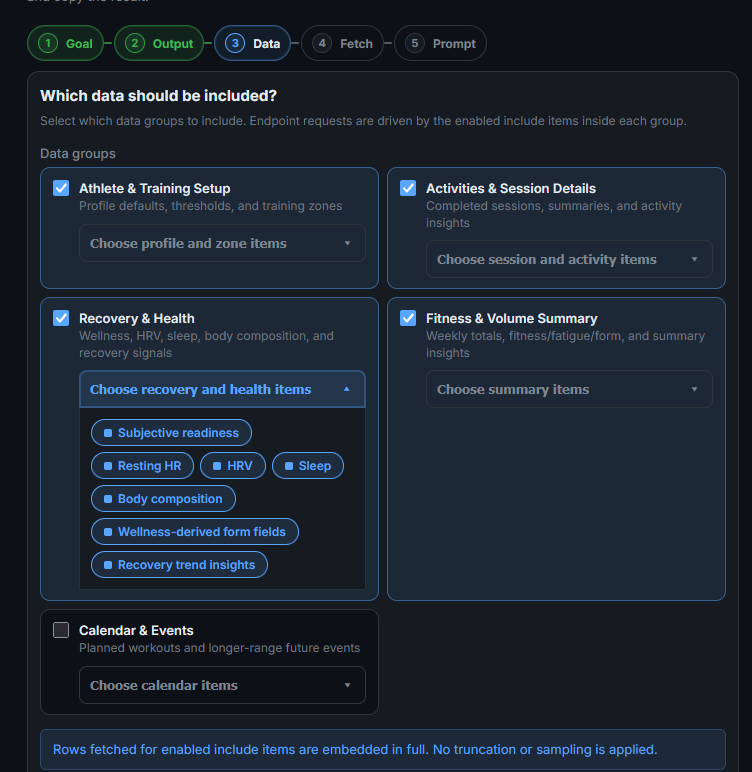
Agh, I knew it was going to be something simple - all tested & good now , Many Many Thanks 
Thanks I really like your tool but I’m not (yet) experienced trailer to be able to perform runs during prep that would replicate race conditions  However I’m currently preping for a marathon and do you think the tool could predict race time based on the last two long runs I’ll do (this week and next)?