Hi everyone,
As a road cyclist using Intervals.icu for my structured training, I was frustrated by a limitation in Garmin’s Connect IQ SDK: natively, Garmin only exposes the current step and the immediate next step to third-party data fields, making it impossible to see the rest of the workout on a custom screen.
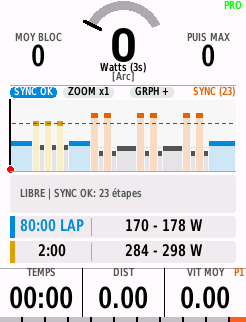
To work around this, I developed ** ProWorkout+**, a Garmin Edge data field that syncs directly with Intervals.icu (via API key or iCal link) to display the complete workout chart and upcoming steps on a single screen.
I just released version 1.1.0 and wanted to share what it does in case it is useful to other Garmin Edge riders here:
- Direct Intervals.icu Sync (API & iCal): Automatically fetches the planned workout of the day (up to 64 steps) in the background, or manually via the on-screen [SYNC] touch button.
- Full Workout Chart & Next Steps: Displays the full session profile with power zone colors, live power trace and the next 3 upcoming steps.
- Automatic Native Fallback: Checks at the start of the ride if the launched Garmin workout matches the synced Intervals.icu session (SYNC OK turns green). If you ride a different or unplanned Garmin workout, it automatically falls back to native Garmin mode (displaying current and next step).
- Start Auto-Zoom: Shows the full workout overview (ZOOM ALL) before starting the timer, then switches automatically to ZOOM x1 when you press Start.
- Touch & Swipe Controls:
- Tap the top gauge to switch between [Arc], [Bar], and [XXL] power modes (with live +W / -W target delta).
- Tap the toolbar or chart to change zoom (x1, x1.5, x2, ALL) or expand the chart height (GRPH + / GRPH MAX).
- tap left/right the bottom bar to cycle through 3 customizable data profiles (19 metrics available), plus a compact banner mode when placed on the Map screen.
- Optional step summary popup at the end of each interval and tap-to-view workout notes.
- Compatibility & Languages: Supports 13 languages automatically and is optimized to fit within the 32 KB RAM limit of older Edge 530 / 830 units as well as newer Edge 540 / 840 / 1030 / 1040 / 1050 / Explore 2 devices.
Note regarding manual sync: if you press [SYNC] twice within 5 minutes and see a “SYNC 300s” countdown, that is due to Garmin’s hardware limit between two background web requests. The current workout stays in memory and updates automatically once the timer reaches 0s.
The data field includes a 20-minute free trial every day so you can test the sync and layout on your rides, with a one-time lifetime unlock if you want to use it without the daily time limit.
Connect IQ Store link: ProWorkout+ link
If you encounter any bugs or have suggestions for additional metrics, feel free to reply here or email me at [email protected].
Thanks to David for the great API !