The idea is simple: connect your activity data and the web-app matches your GPS tracks against a global database of mountain peaks. The result is a personal summit log and interactive map.
You can connect your intervals account and it will backfill all past activities and then keep things in sync automatically via webhook. I’ve tried to keep the UX clean even while adding new features over time.
What it does:
Interactive map of all your summited peaks, mountain passes and huts
Follow iconic pre-defined Peak-projects or configure your own collections
Stats, elevation profiles and timelines
Filters by sport, year, elevation, country or custom tags
Follow friends and compare summit histories
Summit pages with photos and notes
For now I keep it free, but I’m happy if one or another supports the project and helps cover the costs.
If anyone here enjoys mountains as much as training data, I’d love to hear what you think. Feedback very welcome.
Hi Manuel! Great idea! I agree, that could be really interesting.
So far I haven’t added it because it overlaps quite a bit with what Strava segments already do. On Peakproject it would need to work specifically in the context of a reached peak, pass or hut, which makes it a bit different.
I’ll think about how this could be implemented in a way that fits with Peakproject. Thanks a lot for your feedback!
Hi, I’m just started play with Peakproject, I think it’s very interesting and I’m connecting my Strava. I’m downloading my tracks, I’m anxious for complet it and explore the possibilities.
Thanks very much for the work and congratulations for the project.
Quick update on this. I’ve gone ahead and built it!
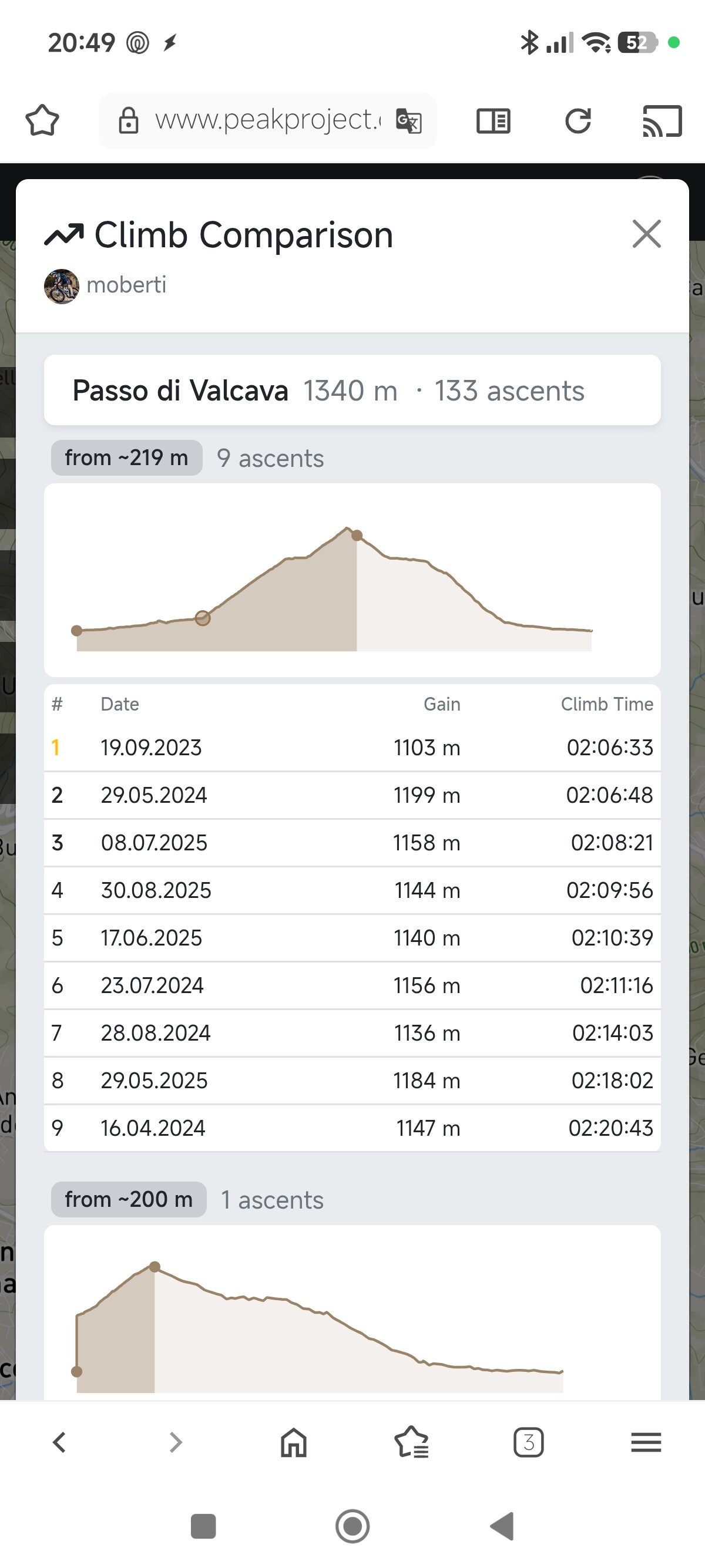
The feature works like this: for every peak, pass or hut you’ve reached on Peakproject, you can now see a climb comparison across all your ascents. It automatically detects the climb segment from your GPS data (lowest point before the summit → summit) and extracts:
Elevation gain + climb distance
Climb time + VAM (vertical meters/hour)
Elevation profile of just the climb portion
So if you’ve biked or hiked to the same summit multiple times, you can directly compare how each attempt went.
If you want to backfill climb data for your existing activities, there’s a one-click option in the Intervals connection settings under Advanced.
@Manuel_Oberti Does that cover what you had in mind? I think it was a great idea, thanks!
Looks interesting — I’ll take a closer look over the weekend!
PS) One small UX note: I found the icon for linking data sources a bit unintuitive — I honestly spent ~5 minutes figuring out how to link Intervals. You might consider adding a dedicated entry in the menu or Settings, e.g. “Link Data Sources” (or similar), that leads to the Linking Modal.
@Manuel_Oberti you should be able to see it if you click on the ascent number in the activity card which is a link. If you still don’t see it I have to fix it.
Nothing @Jan_M … I don’t under stand how tò see new function. I clink on peak , I see the list of activity but not the compare Page. Of I click on link of single Activity i see only the single Activity.
This new finctio works on mobile phone ?
Thanks
@Manuel_Oberti ok, thanks a lot for the feedback. I put a separate button called “Compare” at the bottom of the activity detail page. Does it work now?
(The feature only works for your own activities/peaks.)
@Jan_M … I think this is a bad solution. Taking times like this isn’t correct…I can even stop for a coffee before climbing the mountain. In my opinion, for each climb, there should be a starting altitude and a finishing altitude (e.g., in a table for eack peak ), and the time would be taken from the exact start to the exact finish of the climb. For each climb, you’d then only have the climbing time to compare and find your best.
Thanks
Hi Manuel, thanks for the feedback! I understand the point. If you include easy sections before the actual climb, the time isn’t very meaningful for comparison.
The reason it works this way: peaks can be approached from many different directions and routes. Defining a fixed start altitude for each peak would require manual curation for thousands of peaks this is not scalable. The current logic (lowest point before the summit with acceptance of small descents within) is a simple and works automatically for every peak. It’s not perfect, but consistent.
I’ll think about it: maybe a smarter gradient-based start detection could be an interesting improvement for the future. Or individual adaption of the starting point by the user.
Update: Custom climb start point added to better compare climb performance to a summit across different attempts.
@Manuel_Oberti just a quick follow-up on your suggestion about fixed start/end altitudes for climbs. I’ve implemented a solution that takes a similar idea but keeps it flexible. Users can now click directly on the elevation profile to set a custom start point for a climb. The chosen start point is saved per user and peak and automatically applies across different tracks to the same summit.
If the custom start is no longer needed, it can be reset with a single click and the automatic detection takes over again.
Quick update: Peakproject is now live on the Apple App Store! You can download it here:
Looking for Android testers!
The Android version is almost ready. I’m looking for testers who would like to try it out and give feedback before the public release. To join the testing group, you need a Google/gmail account. If you are interested, just drop me a message.