I have just joined intervals.icu and I want to learn the best way of importing data. I ride with Garmin outdoors and Garmin+Zwift indoors. I also use Strava - still paying but not seeing much benefit hoping to cancel last day of this year unless I start seeing any reason to stay #stravagate
In order to have Garmin data from indoor rides I import to Garmin Connect both Garmin watch and Zwift then update distance, name and elevation on Garmin upload (and add screenshots of route). Then I delete Zwift file. Correct me here but I noticed intervals.icu does not update changed activities. How do I go about it? I would like to keep the updated Garmin data. I think I could manually upload all activities but there has got to be a better way…
When uploading to Strava from both Garmin and Zwift, I delete the Garmin upload as not bothered about that data in Strava, fyi.
I not sure if i complicated it too much but if you could point your finger into any thread or FAQ or advise anything to streamline it, I would be eternally grateful.
To be honest, as a new intervals user I have no idea but there is way more data recorded using Garmin Watch comparing to Zwift as far as I can see. Also Garmin collects outdoors rides that feed into fitness profile. Don’t know what would be best use for me tbh…
I don’t have a Garmin watch, that’s why I am asking. I wonder if there is really more data recorded (and imported to intervals).
Afaik Garmin doesn’t allow to download data from their API more than once, so if you do updates in Garmin connect, they can’t be downloaded from intervals.
So I would say, your current options are:
Download only from Garmin, change distance name and elevation in Garmin and Intervals
Download from Garmin only Outdoor Rides and Download indoor Rides from Zwift
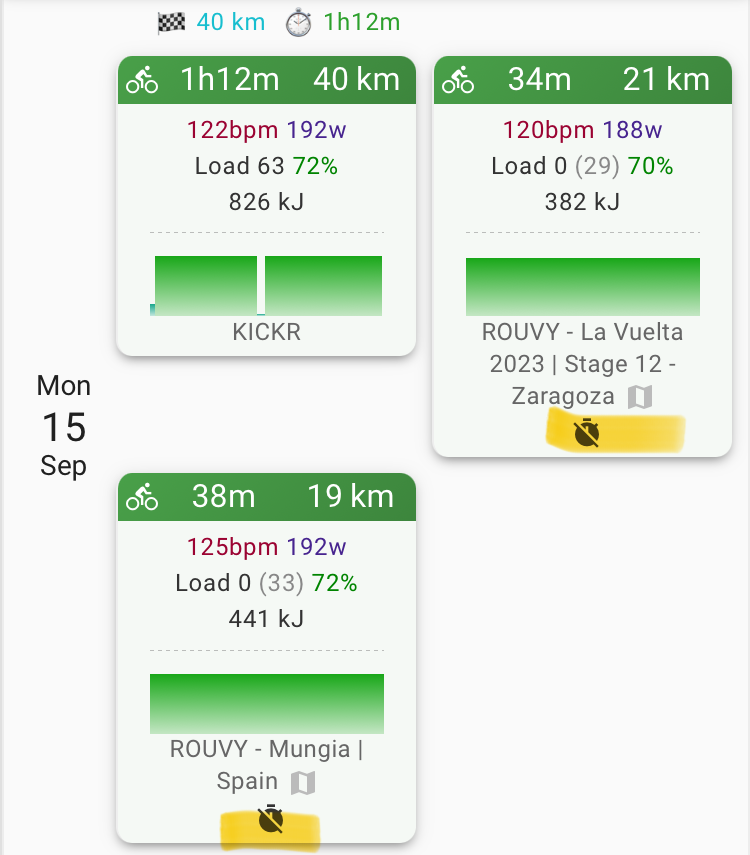
Download Garmin (Indoor and Outdoor) and Zwift Rides. Then e.g. Ignore the distance/time/load from Garmin in the settings of this activity.
I do the third option sometimes, for example if I do multiple rides in Rouvy. So I have the “long” workout recorded with Wahoo, and still have the routes from Rouvy:
It depends. When one is a direct connection (Garmin for example) and the second one is Strava, then Intervals dedups by keeping FIT information from Garmin and, if configured on your Strava connection, the name from Strava.
If both are from direct connections, like one from Garmin and one from Zwift, both are kept and they both count towards fitness, TIZ, etc. Then you either need to delete one or, as @R2Tom does, keep them both, but ignore Load, Distance and Time from one. Intervals can’t merge them at this moment. There are merge-tools, like gotoes.org.