So the readiness is just the percentage of the current value of a1 at a given warmup pace, relative to the average of the last 21 days. But wouldn’t it be better to make a standardised distribution of the last a1, values and compare current value to that distribution, like the z- or t-distribution?
Sorry if I wasn’t clear my question was not much how Ra value is calculated, but with each value, what can be done in term of analytics? The answer can totally be “nothing” because if the purpose is really just an indicator before starting a workout indeed there could be no need to make trend analysis.
For the actual value itself if I understand correctly then if this is “0” it means it is close to the “average”, if this is negative value it’s not a good sign and if this is positive value it’s more encouraging to tackle the workout with some confidence? Is that roughly the approach?
Not the average but the distance of measured a1 to the predicted a1 based on last 21 days linear regression:
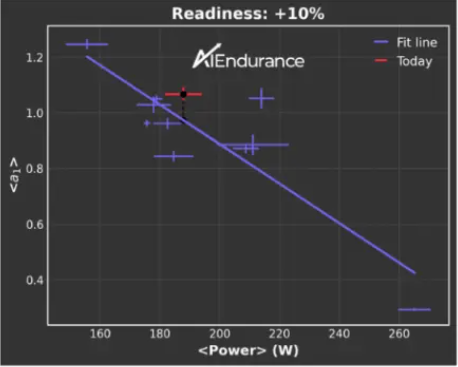
So there’s two dimensions here, a1 and power or pace.
Not saying what you’re proposing can’t be done in a two dimensional space but how exactly would you do it? I guess you could look at a distribution of the a1 distances to the linear regression prediction over the last 21 days.
Another thing to keep in mind is that even if you’re running every day you’ll have at most 21 data points for a distribution and in many cases less.
yes exactly. You can also make an informed decision on how to continue with your workout. For example if readiness is very low maybe not do (all) the intervals of a planned hard workout.
I think could be interesting to look at Ra over time. If you’re constantly recording negative Ra that should be interpretable as your performance going down or at least you having a bad (health) stretch. Conversely a slightly postive trend over time would mean you’re performing faster at less effort so making progress in terms of fitness.
Yes, but a1 is a function of power or pace (the linear regression line). But yeah if you only have 21 values, then it’s maybe no point. But what’s happening is that if somebody warms up with an a1 of say 0.75, and another with a1 of 1.00, then the relative difference of the former will be greater. So you cannot compare readinesses from person to person.
Comparison is never person to person but all data points taking into account are from the one person individually
2 Likes
Hello, I use HRV4training and Dropbox to import the data to Intervals .icu.
Can someone help me where I can find the data from HRV4training in intervals to use for a diagram.
Intervals.icu scroll to the bottom click Custom Charts, in the popup click add Graph and after Search For HRV. There is some already built in graphs for use straight away
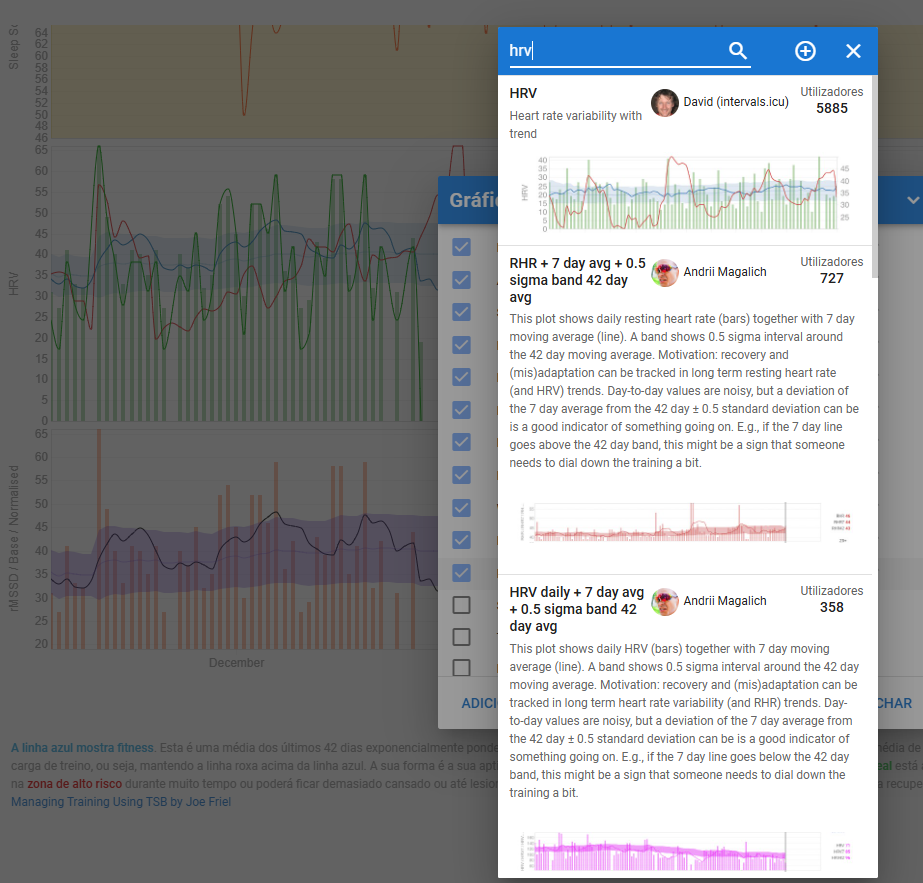
Thanks for the reply !
I have the diagram, but I don’t find HRV4 or Readiness (Ra) worth it.
Good morning, I’d like to report, and I don’t know if this is the correct way to do it, a behavior in the app. It was working fine during an activity, but after a while it stopped processing.
I have a Fenix 7s PRO, and I’ve used the app without any issues. Even yesterday, during a treadmill activity, it worked without any problems. However, today, during a “walking” activity, it started working and then stopped working, displaying fixed values on the screen.
The HRM I was using yesterday and today was the Garmin Pro Plus, updated to its latest version (8.9), connected via ANT+ to the watch and via Bluetooth to the CIQ Alpha HRV (v0.100.19).
I can provide the .fit file if that helps.
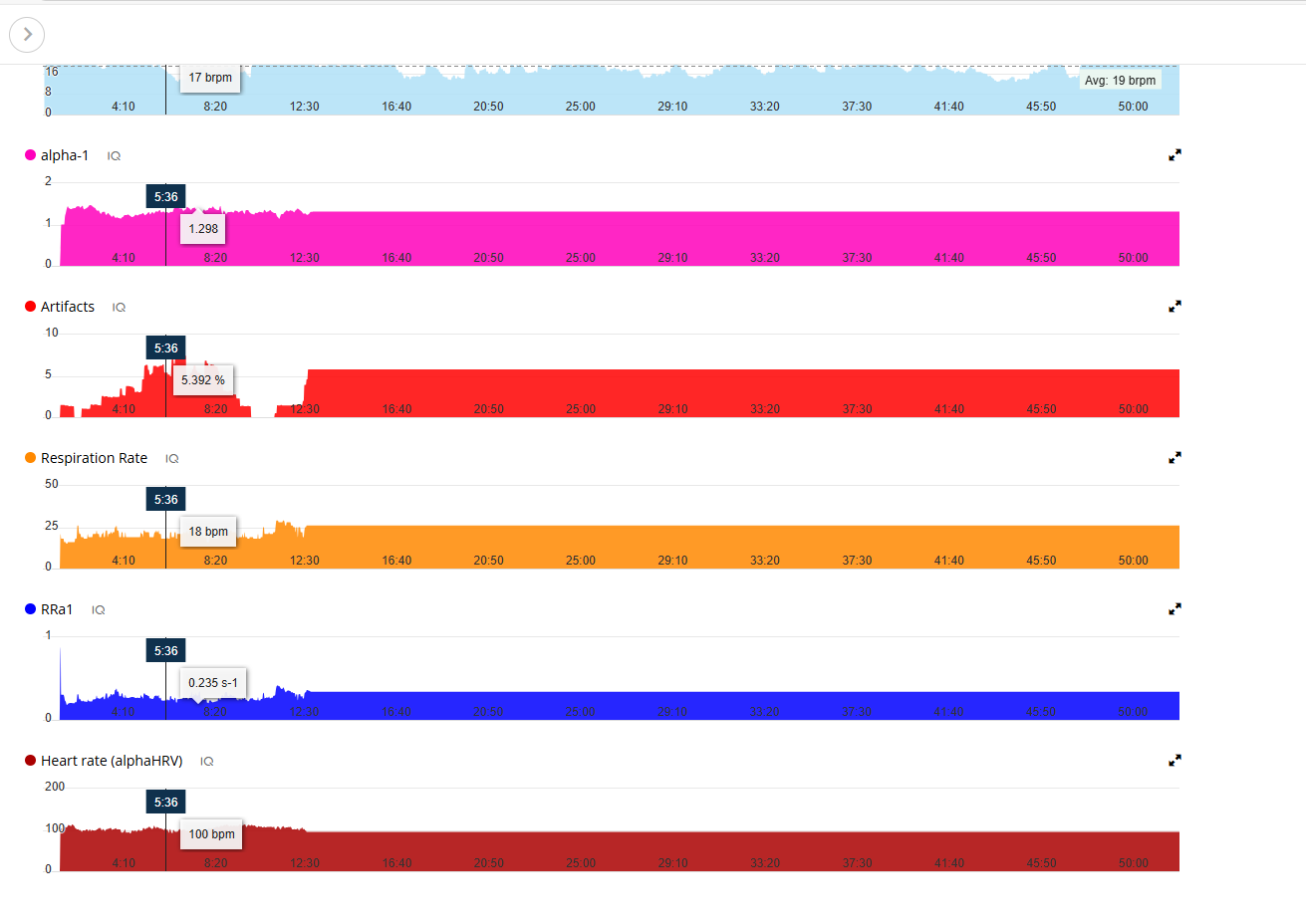
This is from yesterday workout (Treadmill) , and work without any issues. (Same connection )
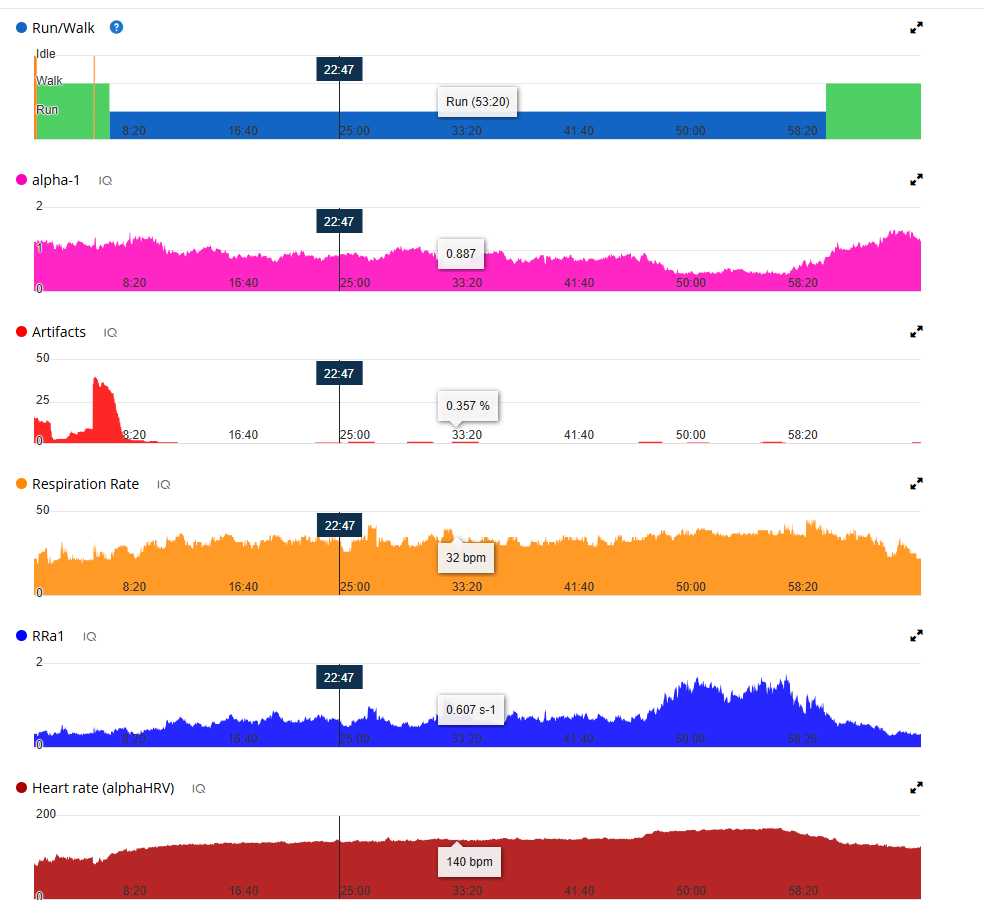
I occasionally see this happening. Maybe once a month or probably less. If you change your devices profile to another activity type and go back, it will reconnect and resume recording.
This behavior really seems strange to me. In my case, I didn’t have the AlphaHRV CIQ as the main screen, and I wasn’t paying attention to that screen because I trusted it would work as it always has.
And it wasn’t until the end of the activity, when I saved and synced with the app on my phone, that I noticed it hadn’t recorded any information after 12:32.
How do I do what you’re saying so I know what to do when it happens again?
You probably already have different profiles on your Garmin for Roadbike/Indoor/MTB… If not, create a simple one (one metric is enough, speed or HR or…), and give that profile a name (I named mine Reset Alpha).
When you see that the values are stuck, for an Edge, tap the screen, go to the Home page and swipe to the next profile, then back, and tap again on the profile you were using to bring up the data screen(s) again. This will reset AlphaHRV and reinitiate the connection.
Don’t know the exact procedure for a watch, but should be very similar. Just switch recording profile for a brief moment to reset AlphaHRV.
Ahhh, thank you so much for the information. I’ll keep it in mind when it happens again.
But do you think this behavior was due to some kind of disconnection or interference between the HRM and the watch? And that it’s due to the type of connection that keeps it from reconnecting? I’ve already had several activities using AlphaHRV, but this has never happened to me before, although the connections I had configured were the other way around (Bluetooth for the watch and ANT+ for the CIQ). However, this week, since I was going to do some workouts on the treadmill and the Garmin HRMPRO+ only detects indoor pace via ANT+, I changed the communication method.
I’ve also noticed that this HRM is very sensitive to artifacts, unlike the H10, which I also tested. However, when it’s set to 0.0%, it’s very stable.
I tend to see this ‘disconnection’ when I’m further away from my bike/device. Example is at a replenishment stop or after a longer break where I stopped my device. It doesn’t always reconnect or looses connection shortly after that break. Not always though, just everyone once in a while.
I have the smaller IQ field on my main screen, so I see it quickly.
I always use ANT+ for the AlphaHRV field and BLE to the Edge device. That’s because RR data on the device (Edge) is not correct with ANT+, while it is with BLE. That’s also the reason why AlphaHRV has it’s own ANT protocol to connect to the strap, which does have correct RR intervals.
Using Polar H10 all the time, which is also paired in ANT+ to my Coros watch (as a secondary device just as a backup)
alphaHRV is able to manage disconnections quite well and usually it recovers without the user noticing. Sometimes, this is not possible and frozen values are shown for a1 and respiration.
As @MedTechCD has said, you can reset alphaHRV moving to another profile and coming back again. I think this is only valid for Edge devices, as you cant change the profile in a watch if you dont stop the activity. Correct me if I am wrong.
Anyway, be sure that after first connection you set the specific ID of your HRM for ANT or you select connect to last in case of BLE. Otherwise, being close to another person wearing a strap when the app starts or tries to reconnect, you could connect to that person’s sensor. In this case you will observe the same behavior you have reported
I understand, although it seems very strange to me.
Anyway, in the software version I currently have on the Fenix 7s Pro (20.22), I can see that there is an option that says “Resume Later,” which pauses the activity and returns to the main screen. If I press the “Start” button again, it returns to the activity. From what I understand, it could be useful.
I’m also going to continue testing with the Garmin ProPlus HRM to see how it continues to behave.
I also reported some strange behavior in Runalyze regarding the HR data it is displaying when I sync this specific activity, where it is taking the fixed value that the CIQ Data Field was set to and is not using the HR value recorded in the .fit file natively by Garmin.
I should note that prior to this activity, I had checked the CIQ Data Field options to allow AlphaHRV to also store the heart rate data it recorded. Therefore, I had both pieces of information in my workout: the HR recorded in the data field and the HR recorded natively by Garmin.
However, given this situation, I deactivated that option.
I also filed a report on the Runalyze Reddit channel, in case anyone is interested.
https://www.reddit.com/r/Runalyze/comments/1k6z2ek/hr_data_error_ciq_alpha_hrv_garmin_hrmpro/
Thanks for all your Help
Hello, just a question about sensor is there any compatibility with arm bands such as Polar Verity Sense? I wanted to try such model instead of chest sensor. Although it supports ANT+ I couldn’t get AlphaHRV to connect to it. Thanks all.
For AlphaHRV to function, it needs the RAW RR intervals (stream of elapsed time in between the peaks of the QRS ECG complex).
Not all HR monitors provide this. Some just send a count of detected R peaks without relative timing info. Optical sensors often already condition the HR signal by filtering and smoothing, so the timing is already lost. But even optical sensors now become more sophisticated and can quit accurately send the timing info.
So, it really depends on the sensor specs if it can or can’t be used by AlphaHRV.
Bottom of this GitHub page explains the above:
2 Likes
alphaHRV is able to work with any sensor that provides RR-ints, but of course, results will depend on the quality of the data provided by them.
I performed some tests with the optical sensor Rythm24 (that apparently is able to provide good HRV data in BLE mode). Unfortunatelly, results were awful and I made the decision to restrict this device.
I am not able to repeat this test for Polar Verity Sense, so I can’t tell anything about it, although I’m sure it does not achieve same precision as chest straps.
By the way, it is easy to check compatibility and evaluate quality of the results. In case that the sensor provides RR-ints using ANT, just select this mode and alphaHRV should be able to connect and receive the data.
In case that BLE is required, there are two possible scenarios:
- The BLE characteristic associated to HRM profile that the sensor is advertising is visible for alphaHRV: all should work flawlessly as for ANT case
- The BLE characteristic associated to HRM profile that the sensor is advertising is NOT visible for alphaHRV: then, I need to know the advertised name (probably something similar to Polar Verity Sense xxx) to identify the sensor.
@ohmax check if you are facing an issue related to connection (Searching…) or reception of data (Collecting data 0% …) using ANT.
In the first case, be sure that you are not using simultaneously ANT mode from the Garmin device.