Having had a few conversations about workouts (and being very impressed with the responses) I just thought of something that might be useful. When I have clicked the conversation icon in the plan calendar re a specific workout there is no visual confirmation that I have started a conversation about that workout as the icon remains the same. That means I may possibly start a new conversation without the previous chat appearing. It might be good if the icon changes colour when there has been a conversation and the previous chat displays at the same point where it ended previously.
I know the conversation does appear in the list on the left had side of the app however it gets a date (which is the conversation date) and a title based on the workout title. That may mean that if you have multiple workouts with the same title you would not be able to instantly identify which workout date that conversation relates to?
Totally fair observation about the conversation icon. I also couple times opened the new conversation for an activity by accident. I’ve never got around to properly addressing it, as user might want to have multiple concurrent conversations linked to a single activity. Then it must be clearly represented in the UI to allow you to open existing one (what if there are many?) or create a new one. As I’m mostly done with the strength training enhancements, I think I’ll soon be able to work on the design for it.
I’m very glad to hear you are happy with the workout analysis results. Should you encounter any limitations, please let me know, I’m happy to address them.
 it’s true! That happens in other apps and I hadn’t noticed it.
Wow! Great work on the strength section. Tomorrow i will test it
1 Like
Thank you for building what i have been building for myself with Claude, but then way better!
Quick question on credits, as i justvstarted using it i am building my plan, chatting away and going through credits quickly. I see there is a section on the app that seems to indicate there is a way to earn extra credits. Can you let me know how?
And second, is there a way to remove the 180 limit? I would love for the app to be able to look back at my previous marathon builds and analyse what worked and what didnt work.
1 Like
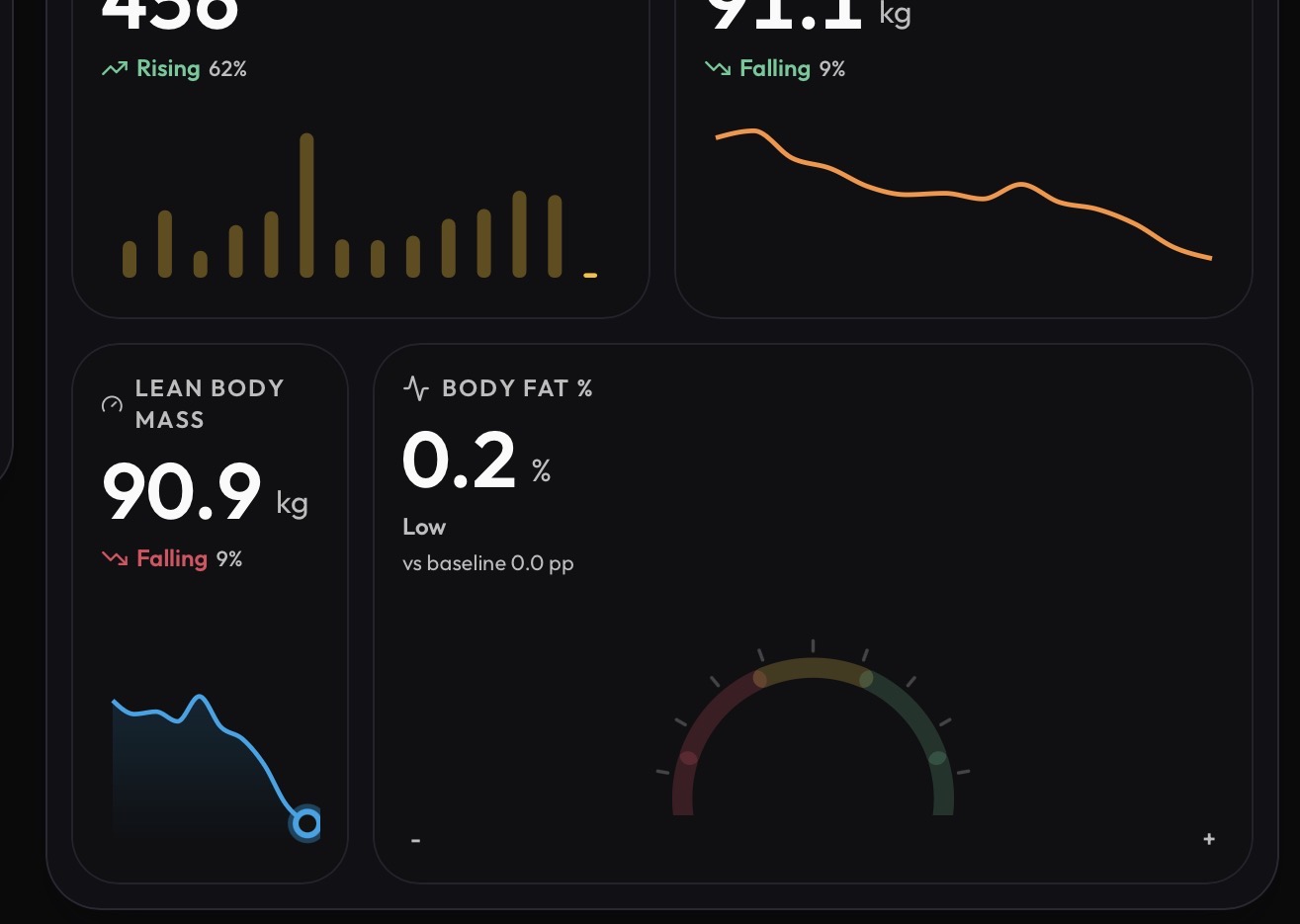
Thank you. I am seeing that the body fat metric changes during the course of the day. When initially synced in the morning around 8am it’s giving my value that comes from my Withings scale into Apple Health. When I look later in the afternoon/evening the value goes to 0.2%. Something is changing the value. It’s not coming from Apple Health which is still displaying the value supplied by Withings.
Thanks for reporting it. Found a problem, Apple HealthKit returns body fat as a fraction (0.2 = 20%), it’s going to be fixed in 2.83.
1 Like
That’s an incredible compliment coming from another builder. Thank you so much, so happy you enjoy MyTrainPal.
Extra credits are something I’m rolling out gradually. I have a few ideas for how users will be able to earn them and I’ll introduce those soon. For now, the only way is through your referral code: if you share it with a friend and they use it when subscribing, you’ll receive extra credits.
If you’ll dig in the connection settings for intervals, you’ll find the option to do “Full Sync (720 days)”. Available on Web version only. I’ll add it in next mobile releases as well.
3 Likes
A small update to the analytics backend.
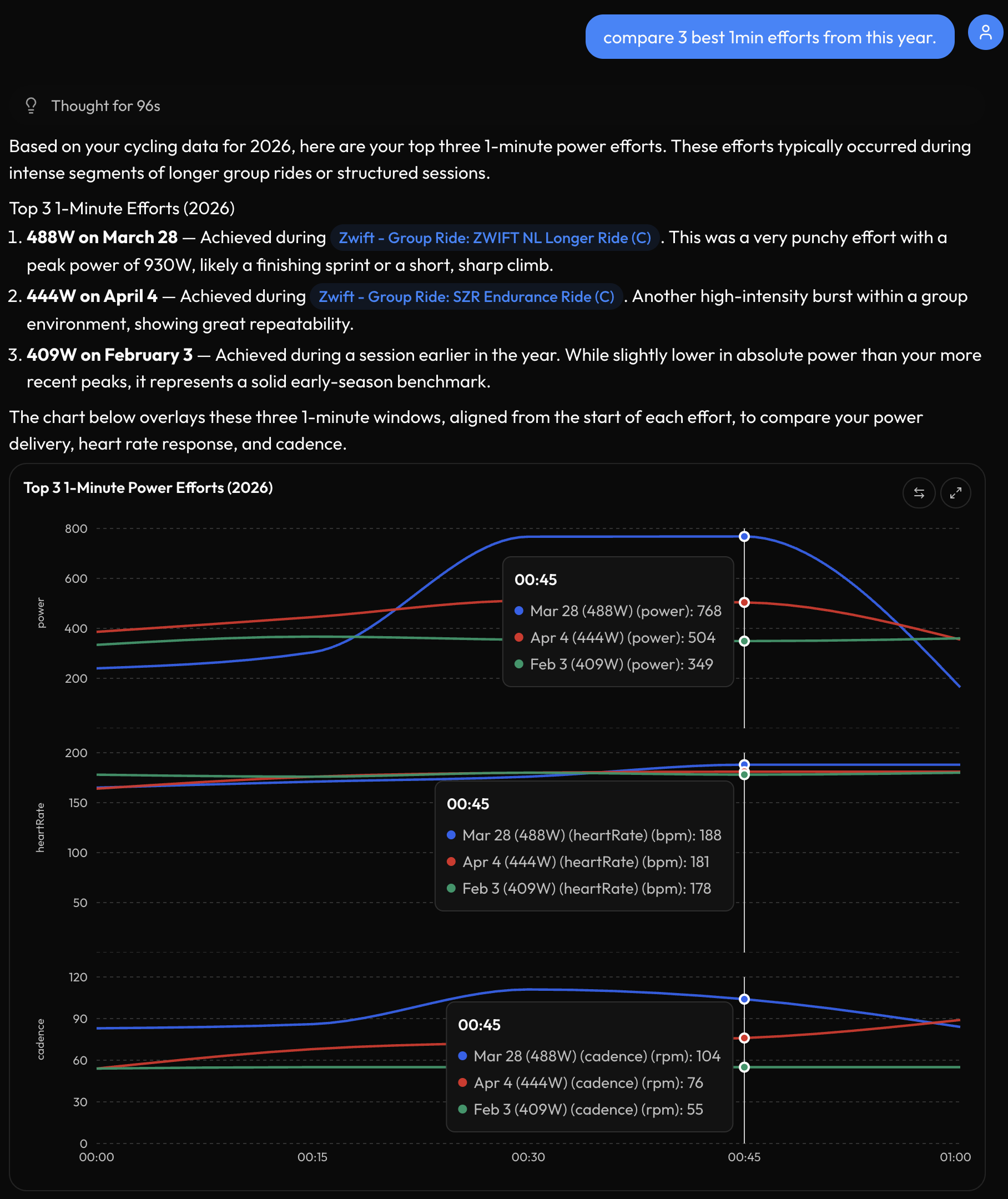
AI assistant now does peak performance analysis. One prompt, any duration, any sport. Type ‘compare 3 best 1min efforts from this year’ and get the rides identified, the windows aligned, and power, HR, cadence overlaid on one chart. Same works for 5s sprints, 20min threshold efforts, FTP tests, anything you’d normally dig through your history to find.
@James_Paul iOS version 2.33 is available with the fix for incorrect “Body Fat” value.
1 Like
Thank you. I’ve just updated and also tried the 720 day sync for intervals.icu. Thank you for updating those.
1 Like
Hi @ Krzysztof, yesterday I did a strength training session and everything worked correctly. It also recognized the rest periods correctly in Spanish.
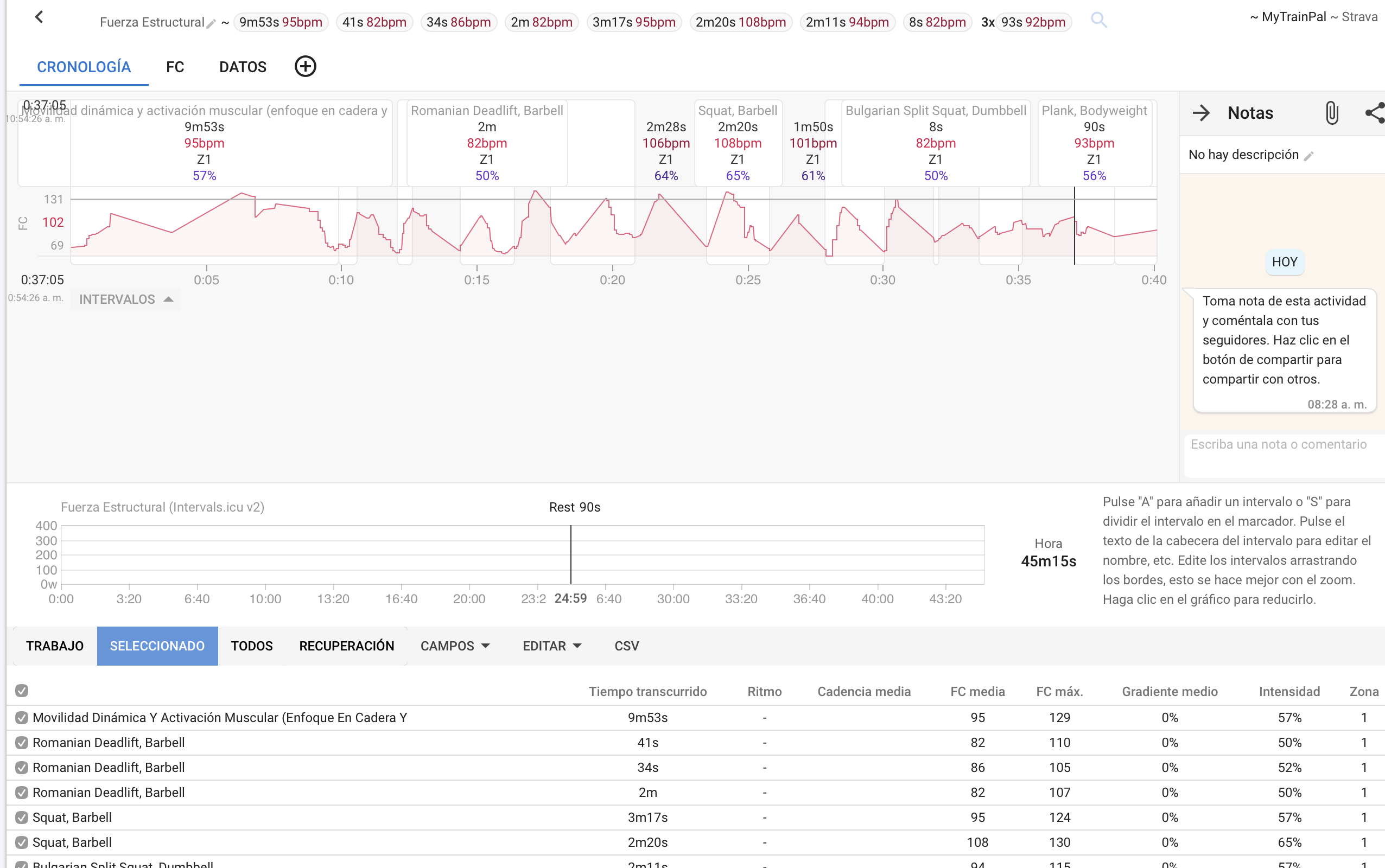
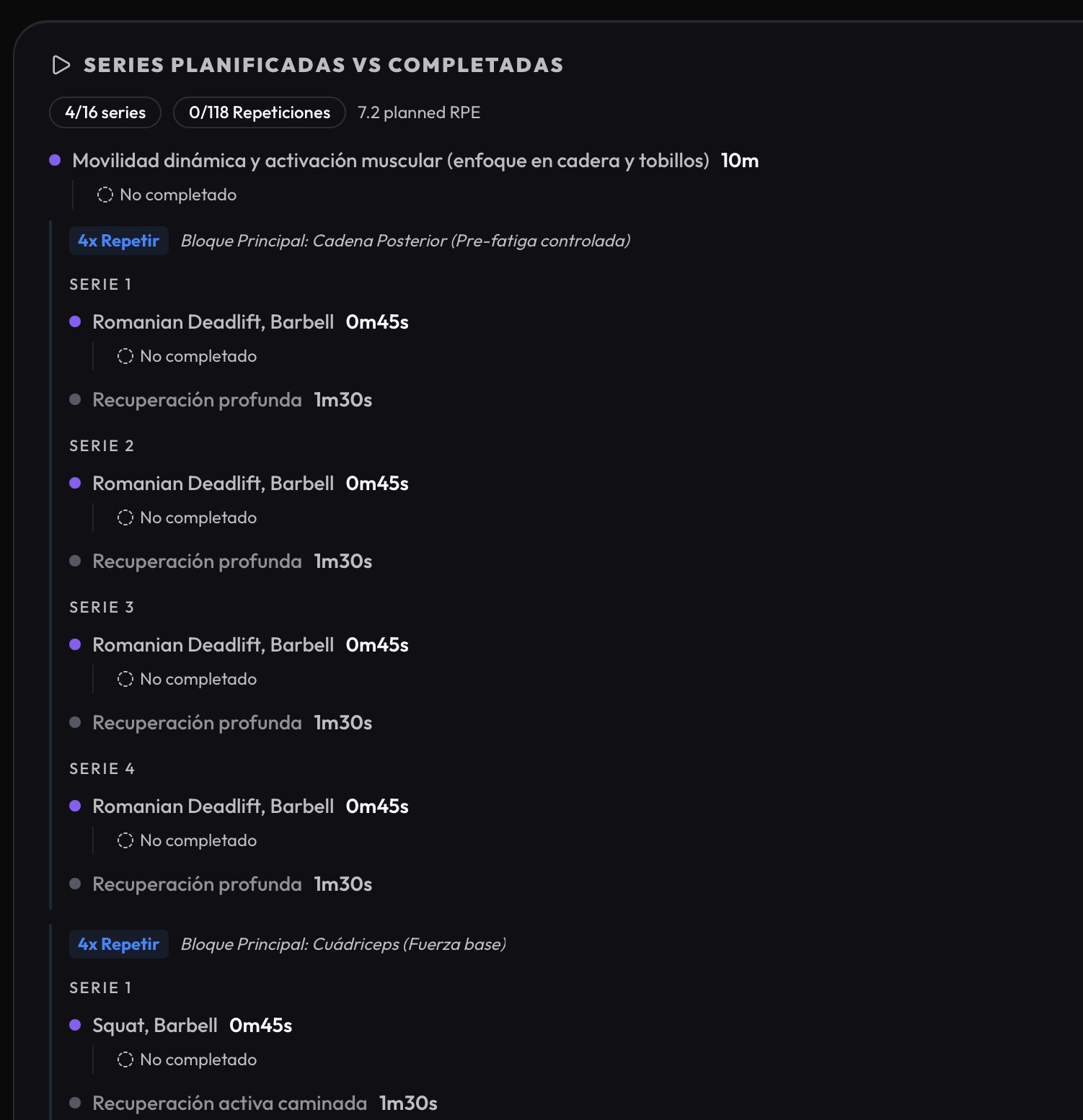
When I finished, it synced perfectly. But today I checked it and it looks like this. The new muscle visualization, etc., isn’t showing up because the completed intervals aren’t appearing.
I’m attaching a screenshot of intervals.icu so you can see that the app uploaded it, and another from MyTrainPal.
Thanks for the screenshots and the clear report. This is a sync bug on my side: the strength session was saved correctly in MyTrainPal and uploaded correctly to Intervals, but when you later synced back from Intervals, their version overwrote some of your richer local strength data, including completed intervals/sets.
I’ve already fixed this so MyTrainPal will preserve our own completed strength data when the activity was recorded in the app/watch. Sorry about that, and thanks for catching it.
1 Like
@Menno_van_Zanden there’s an option now to purchase extra credits (currently only Web version, but you can buy them on Web even if you subscribed through AppStore). They will be used only after you use all your monthly credits and they never expire.
Use code INTERVALS on checkout to get 30% discount!
2 Likes
Hey Krzysztof, I’ve been using the app for a week now and I’m really impressed. I’m having a small issue with the recovery metrics, though. I use an Apple Watch, and I think currently only the daily averages for resting HR and HRV are being saved from Apple Health. This doesn’t provide much insight, of course. Would it be possible in the future to use only the overnight averages instead, like apps such as Athlytic, Bevel, etc., do? Currently, I’m manually adjusting the values based on the data from those apps. I also have the IntervalsCompanion app installed, which also transfers these metrics to intervals.icu, but I can’t figure out how those are calculated.
1 Like
Something that would be helpful (maybe its already in and missed it)
In the training tab is it possible to set a default for power curves and zones? For me it defaults to cycling and as i only run i would like to change that.
Hey Jan, thanks a lot for trying the app and for the kind words. Really glad to hear you’re impressed so far!
On the recovery metrics, HRV is already using the morning reading rather than the full-day average. For resting HR, I agree that the daily average is not ideal, so in the most recent release I changed RHR to use the overnight value instead. That should make the recovery data much more useful for Apple Watch users.
I’m happy to take a closer look and see if there is anything that can be improved, especially around how the values are calculated or displayed. If you have an example where Apple Health, Athlytic, Bevel or IntervalsCompanion shows something different from MyTrainPal, that would be very helpful.
Thanks again for raising this. Feedback like this really helps improve the recovery side of the app.
Thanks for raising this. I can make it keep the last selected value and preserve it between refreshes. I’ll add it to the next release.
And please don’t hesitate to raise anything else you notice, whether it’s a bug, something confusing, or just an idea for improvement. Feedback like this is really helpful and much appreciated.
Thanks for the quick feedback and the adjustment to the resting heart rate! Regarding HRV, the mentioned apps typically take the average of all measurements during sleep. (On the Apple Watch, you can activate the AFib history, which ensures HRV is measured every 15 minutes at night—much more frequent than usual). This provides very reliable morning values comparable to Garmin or Whoop. Usually, also a conversion from SDNN (Apple) to RMSSD is performed, which is supposedly better for long-term trend tracking. I’ll gladly monitor this over the next few days and compare the values.
Thanks Jan, that’s really helpful context. I’ll look into this and see what can be improved.