You need to use the “Download old data” button in the Strava box in /settings.
Hi David.
I did exactly that for dates I was missing between January 5th and March 3rd 2023 but the date box will not let me go back further than December 22.
Have the same issue, starting from 1st of January and until start of May all activities are missing. Refresh on the “Fitness” page didn’t help
Thank you for an advice, that was the trick!
Hi! I have the same problem with some data missing from September 10th to October 29th. I tried all the solutions above and didn’t work. Thank you
Is it from Strava?
My data is missing as well between 13th November 2025 and 8th January 2026. Was my account set dormant as well? Might not have logged in on the website during winter that much but I would love if it’s possible to recover. Refreshing the calendar range manually didn’t work
Off course you can recover, but not by refreshing the calendar range.
Settings page - Connections tab. Look for a button ‘Download Old Data’ on your connection. You did not mention where your data comes from but it should be something similar like this:
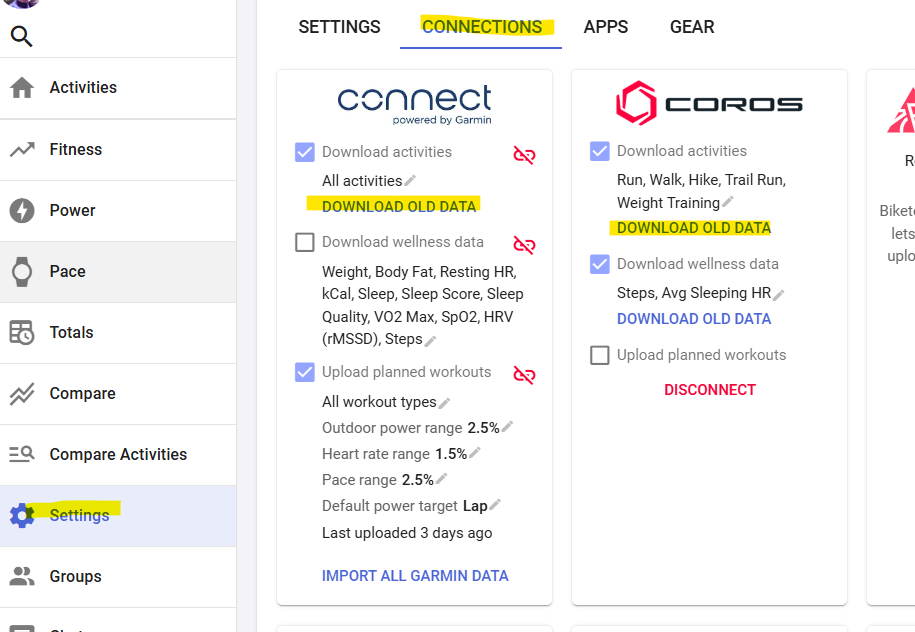
From your avatar, I see you are a supporter. Normally accounts from supporters are not set dormant. If the above is not solving your issue, give us some more details. Screenshots are the best way to clarify the situation.
1 Like