MacroBurn - Macro tracking and Training-aware fuelling for Intervals.icu

Hey all,

I’m Richard. I’ve been a cyclist for years and I’m currently building toward Peaks Challenge in March next year.

Like a lot of you, my training side is pretty solid. Intervals.icu does the heavy lifting, I can see my fitness, fatigue and form, my workouts are planned. The part that was always a bit all over the shop for me was fuelling. How much should I actually eat on a 5-hour endurance day versus a rest day? What goes on the bike for a big ride?

There are a lot of brilliant AI coaches in this forum. MacroBurn is built to sit alongside them. They handle the training; MacroBurn handles the fuelling.

How it works

  1. Connect your Intervals.icu account (Athlete ID + API key).
  2. MacroBurn pulls in your workouts and key events (races, gran fondos, goal dates).
  3. Macro and calorie targets scale with training load. A big day and a rest day get different numbers, automatically.

Kind of like if MyFitnessPal was built for endurance athletes (+ an MCP server).

What it does day to day

  • Training-aware targets : Macros and calories that follow planned and completed load from Intervals.
  • Meal logging + planning : Log what you ate, or plan the week ahead. Breakfast / lunch / dinner / snacks.
  • Auto-fill meals : Let it fill a day or a week from your own meal library, then tweak.
  • Shopping list : The week’s plan rolls up into a list grouped by aisle.
  • On-bike fuelling : Plan carbs-per-hour for specific workouts and save your go-to bottles/gels/bars as bookmarks.
  • Weight tracking : Log and trend body weight, feeds back into your targets.
  • Whole week at a glance : Training and food in one view.

It’s live on the App Store and Google Play right now. (web app coming soon)

MCP server

MacroBurn also runs an MCP server, so you can connect your own AI (Claude, ChatGPT, whatever) and possibly some of the AI coaches here straight to your fuelling data. That means you can say “plan my meals for next week’s training block, high-carb on the two long days” and have it write the plan straight into MacroBurn. Or “what should I eat on the bike for Saturday’s 5-hour endurance ride?” and have it set the on-bike fuel for that workout.

There are ~10 MCP tools exposed — meals, food catalog, your meal library, events/races, macro targets, on-bike fuel, weight, workouts (with per-workout fuel), and an on-demand Intervals.icu pull. Your AI can do anything the iOS and Android apps can.

Also super happy to compare notes with anyone working on MCP tool surfaces as well. :slight_smile:

Cost

It’s free. No tiers, no trial timer. Would really appreciate any feedback. Bug reports and feature requests very welcome.

Site: https://macroburn.cc

Thanks,
Richard

[email protected]

2 Likes

Awesome job! Just downloaded it, just one question how can i connect it claude using MCP?

1 Like

Hey Marcelo,

Thanks for trying it out. The MCP server is at https://app.macroburn.cc/mcp
Let me know how you get on. :folded_hands:t2:

Cheers
Richard

Thanks all for the feedback. Keep it coming :slight_smile:

Update 2.35 is released. Two major changes are :

  • AI meal identification fixes
  • Consolidation of workout fuel on the home screen

Release Notes — MacroBurn :folded_hands:

Release 2.39 : Thanks for the feedback around meal editing and adding custom foods.

Massive macro tracking and editing updates just landed.

Meals, recipes & editing

  • Build and edit meals ingredient by ingredient — add, remove, or change any amount, and the totals update as you go.
  • Give a meal a photo, recipe steps (drag to reorder), and a serves count when you create it.
  • Pick a meal’s type : Breakfast, Lunch, Dinner or Snack, so your meals no longer all save as “snack.”
  • Adjusting a logged meal is simpler: just type the amount (e.g. 1.5 servings, or 200 g) instead of tapping +/–.
  • Any meal you create is now added to your Faves automatically.

Faves, Foods & logging

  • New Faves tab : Save your favourite meals and foods and jump back to them in one tap (with a star in the tab bar).
  • Save your own custom foods with full nutrition.
  • Log multiple meals or foods to a single slot : Breakfast, Lunch and Dinner can now hold more than one item.
  • Add food faster : One screen with Quick Log · Meals · Foods · Recent.

Plan & Auto‑fill

  • Auto‑fill now leans on your Faves first : It fills snacks with your favourite foods and meals before anything else.
  • It won’t push a day over your calorie target, and it re‑plans the week so each day lands close to your goal.

Nutrients & design

  • Track more: fibre, sugar, sodium and caffeine now carry through your foods, meals and entries.
  • A cleaner, more consistent look : Tidier cards, buttons and labels throughout, and a simpler Weight tab with clearer weekly‑change wording.
  • Photos on meals, plus lots of small fixes to adjusting, editing and logging.

Over 100 commits .. It’s a bit of a big one. Macro tracking is now much more granular and tuneable.

Hi, just tried it out quickly.
What I directly see as must have in order to use it further:

  1. Possibility to add carb usage based on power / heart rate out of a lab test to have more precise carb and calories planning. Agent should suggest based on this and also afterwards compare the work done and show the gap.

  2. Agent should not suggest full meals, but should give a concrete plan when on the day to eat how much. I dont want recipes, I want to know how much I should eat for breakfast, lunch, after the ride, the timing around it e.g. when the workout is scheduled for 5pm

  3. I do not find a lot of products which are used and are common in germany. barcode scanning would be highly required

  4. Offer Garmin Sync next to apple health in order to get data directly from Garmin Connect for everything besides workouts

Would love to hear your feedback where this application is heading to.

Kind regards

1 Like

Hey b3nschiii,

Thanks for trying out MaroBurn.

There’s two parts to fuelling workouts. Planned fuelling and post fuelling.
For planned (before the workout), we use the CHO/h x hours to get the fuelling target.
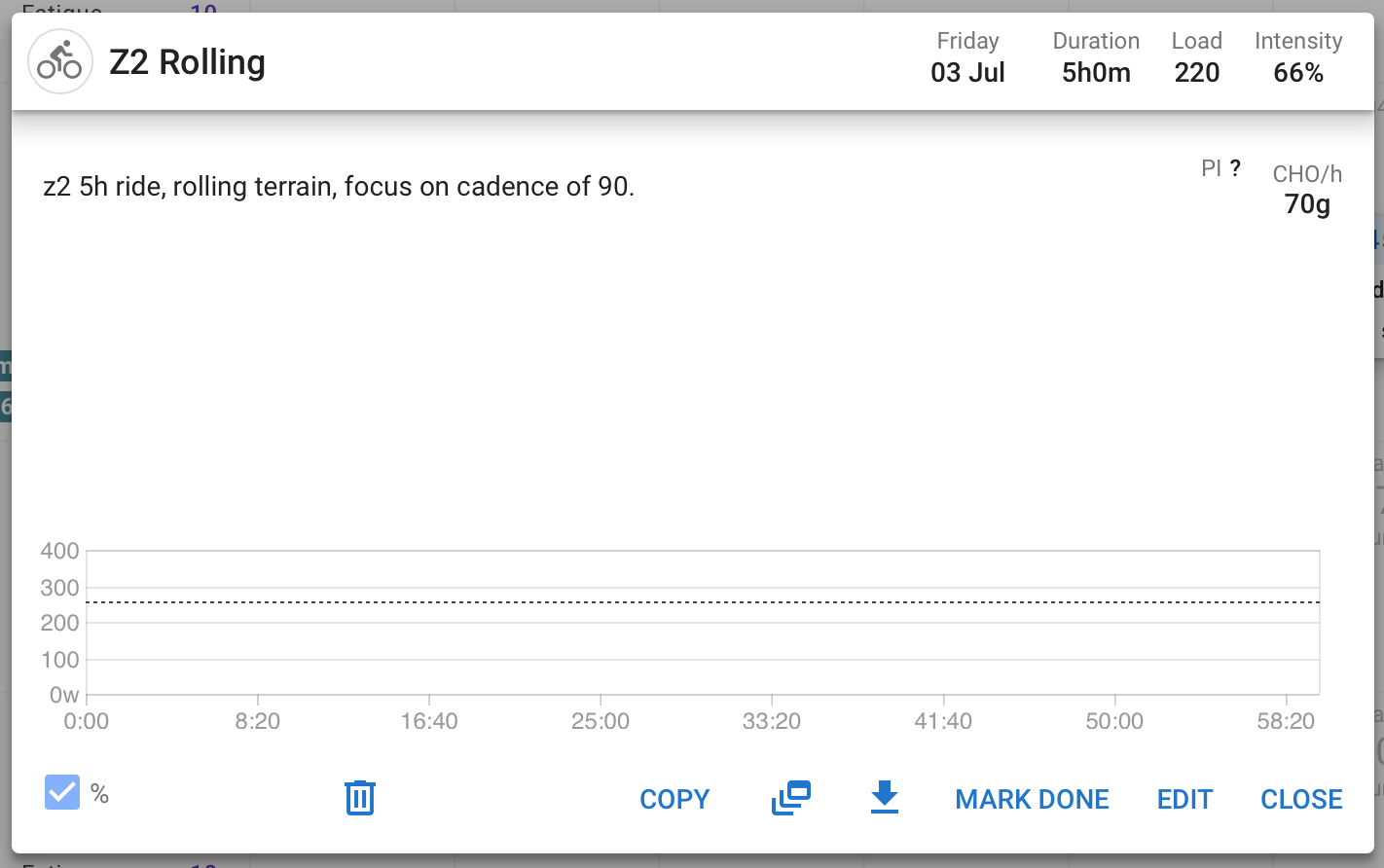
So for this planned workout below - its 5h at 70g which equals 350g of carbs for planned fuel consumption - you fuel carbs (drinks, bars, gels) against this for the workout.
MacroBurn pulls all this from your planned workouts in intervals.

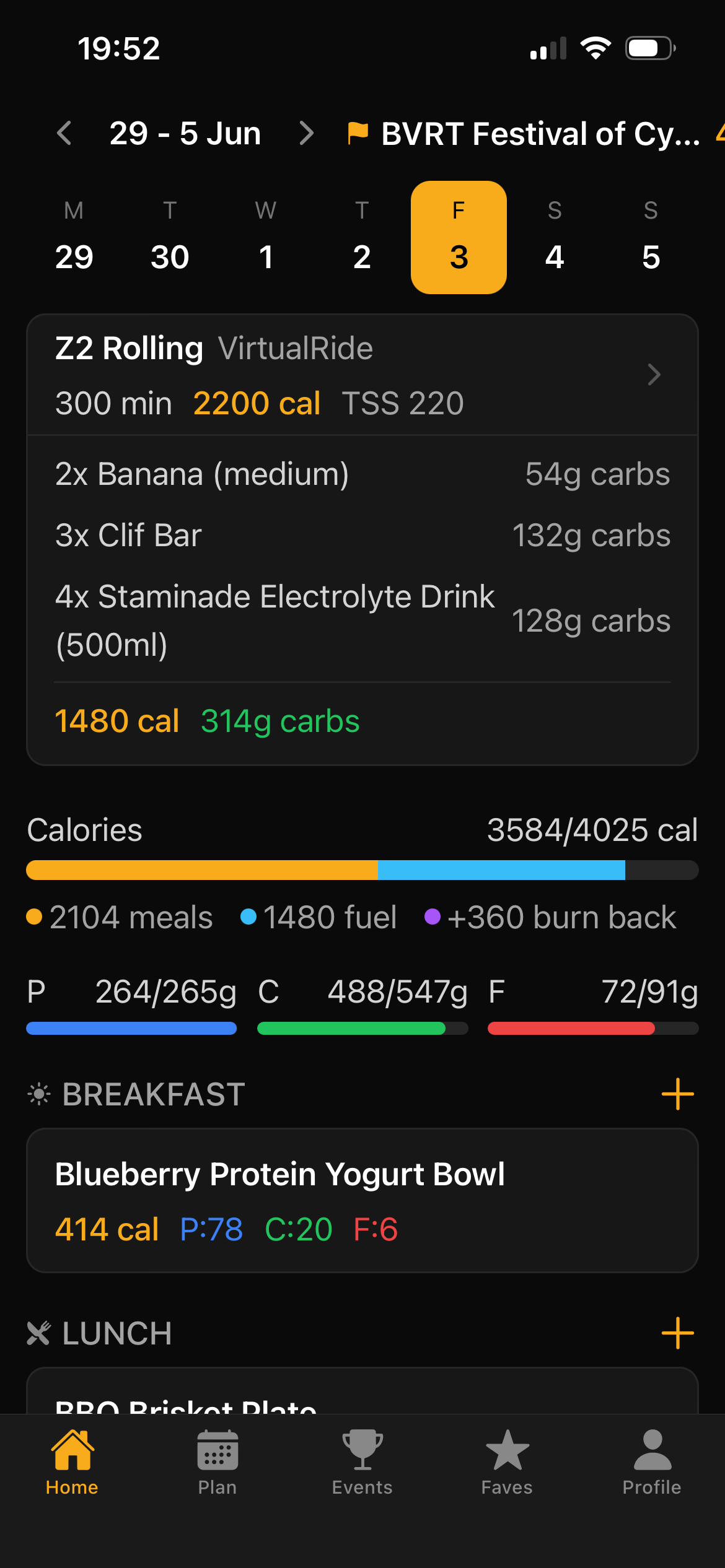
MacroBurn does not know your actual caloric burn until after the workout is complete but it uses load x 10 as an approximation (2200 cals in this case).

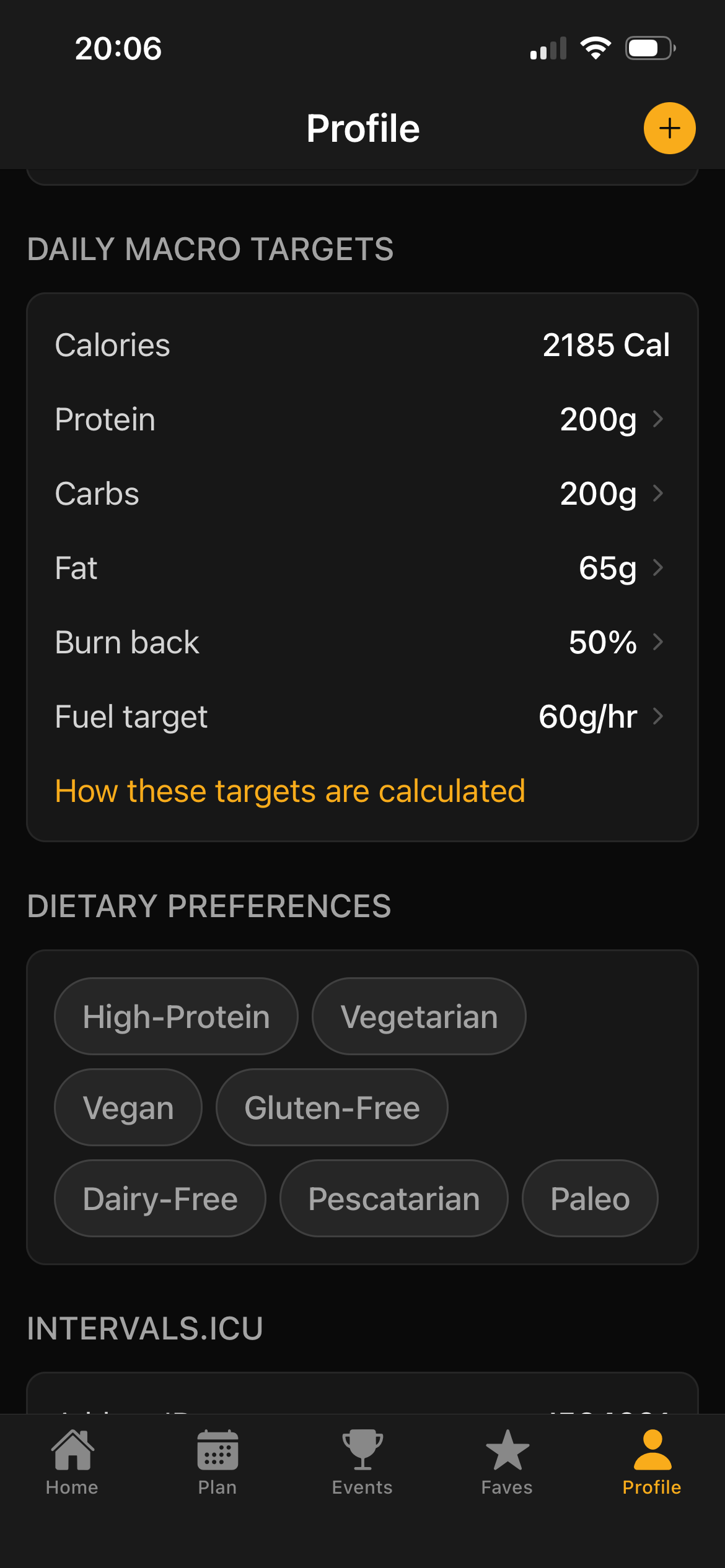
In the mobile screenshot below the daily cal total is calculated by profile base daily calories (not shown, but same for each day), mine is 2185 + 1480 for fuel (used in the workout) + 360 from ‘burn back’. Burn back is like free cals you can consume based on the difference in cals between how you fuelled the workout and what you used in the workout .. So 2200 cals (as projected) - 1480 consumed is 720 - and 50% of ‘burn back’ gives me 360 free cals to use.

I also have a few spare cals because my meals is only 2104 and my daily caloric target is 2185.

MacroBurn won’t tell you what to eat, but you can decide what to eat up to that limit. :slight_smile:

Barcode scanning is currently in planning and hope to have that released soon. Today’s major update paved the way for the underlying mechanisms there.

I am a Garmin user as well, and that is also on the roadmap. :slight_smile:

This is a serious project and just getting started so your feedback is very much appreciated.

Cheers
Richard

Just downloaded. Looks promising but you need barcode scanning. The macros from a pic are hit or miss. Not accurate.

1 Like

Any change for integration with apple health? I track via macrofactor because of the food database. Would be nice if that syncs to macroburn!

1 Like

At least this sounds like an other kind of AI app, not the repeating “The AI coach who reads your daily readiness and adapts to your whatever” :smiley:

Why? The load is independent from your actual work (or power), so it can be the same load for a rider who rides 5h @100w and one for 5h @200w. The first needs about 1800kcal while the latter needs 3600kcal.

2 Likes

Hey Christian, Thanks for the suggestion. Currently just syncing weight via Apple Health. It’s great idea - will put on the road map. :star_struck::folded_hands:t2:

Hey R2Tom, :man_facepalming: Great point. A much more accurate approximation would be to factor FTP, duration and intensity to produce the estimate. Will rework along those lines. Thanks so much for the feedback., Really appreciate it. :folded_hands:t2:

I’ve been using this app for the last few weeks, so far it’s been pretty good and the improvements are looking good so far.

I use TrainerRoad to plan my workouts and these sync through to Macroburn as I sync my TR calendar to Intervals via my Google calendar, this works pretty well as Macroburn reads the estimated burn from the calendar entry.

What I find odd though is the protein and carb ratios that change, carbs doesn’t change much, but protein changes quite a bit.

For example I have a base calorie for maintaining my weight of 2700 cal which is 144g P, 315g C and 96g F.

If I have a ride planned for an hour of around 750 calorie burn it only increases my carb intake for the day to 401g but protein up to 183g and fat to 122g. The protein should really stay the same since you only need to increase it more if you’re trying to drop weight, but carbs should see the largest increase up to 509g and protein\fats stay the same. The overall expected calorie burn shown in Macroburn is correct though.

It just seems to me that the % changes built in are a little too much for protein and not enough for carbs.

Hopefully that makes sense and maybe @elricho can explain how Macroburn works out the % changes?

1 Like

Hey Nathan,

Thanks so much for the excellent feedback so far - It’s really great.

If you do a workout with a 750 cal burn and you don’t add fuel against that workout specifically then the ‘burn back’ % percentage (from your profile) of unused cals gets credited against your daily totals. Burn back in the profile defaults to 50% so you would have a credit of 325 cals.

If you do fuel against a workout and lets say you have a clif bar for 40g of carbs (210 cals) and a sports drink 36g carbs (144 cals) then you’re left with 750 - (210 +144) = 396 x 50% (burn back) = 198 cals of credit.

So, depending on where you’re placing the workout fuel (in the workout, or outside the workout) will change how the macros line up.

Cals of credit get apportioned to macros based on the same distribution that they appear in your profile under Daily Macro Targets. A profile that’s 36% carbs by calories gets 36% of the bonus calories converted to carb grams.

It’s a great point you make about being able to have flexibility in how the re-distribution happens. For fine grained control I could add something like a redistribution control .. It can default to the profile based distribution above, and it could be overridden with whatever you like eg. P 20%, C 60%, F 20%. - Would that make sense?

For example : 200 cals left over on P20%, C60%, F20% split would translate into P10g, C30g and F4g.

Thanks Nathan and thanks again for the feedback.

1 Like

Release 2.42 is out (for iOS, in play store review for Android - should be up soon)

Barcode scanning. Point your camera at any packaged product, a gel, bar, drink mix or whole food, and log it in a tap from the Foods tab or while you’re building a recipe. There’s a two-frame confirmation step, so a misread barcode can’t quietly drop the wrong product into your day.

Snap a nutrition label. No barcode, or the product isn’t in the database yet? Photograph the front of the pack, the nutrition panel and the ingredients, and MacroBurn reads the macros straight off the label and fills the food in for you.

Scan straight into workout fuel. Building a session’s fuel plan? You can now scan the exact gels, bars and drinks you’ll carry right from the fuel screen, instead of hunting for each one.

An improved amount picker. Adding or editing a food now opens a quick amount picker: switch between servings, grams, ounces or millilitres, tap ¼, ½ or ¾ for a common portion, and watch the macros update as you go. Same picker whether you’re logging from the Foods tab, from a scan, or building a recipe.

A bigger, fresher food library. Millions more packaged products, and the catalog now refreshes every week, so newly-launched products show up fast.

Release notes

1 Like

Thanks so much for the nudge @R2Tom

I’ve reworked how MacroBurn estimates calorie burn for workouts synced from intervals.icu. Cycling workouts with an IF and a profile FTP now factor those into an estimate of work and convert that to calories. For cycling without power and for every other sport, MacroBurn uses industry standard MET tables, selecting a value by intensity, so a wide range of activities gets a proper estimate rather than a training-load approximation.

Estimates are now built from a combination of activity type, intensity where present, and duration. Where there is no intensity signal, each activity uses a defined default effort instead of a generic middle tier, which keeps easy sessions from being overstated.

MacroBurn now recognises every intervals.icu activity type, including Ride, Run, Swim, Rowing, Gravel Ride, MTB, Nordic Ski, Tennis, and Yoga, so workouts outside cycling return a much better estimate.

:folded_hands:

2 Likes

Release 2.44 is out as an OTA update.

This mostly fixes the search experience. The keyboard pop-up would overlay action buttons and was not great at hiding itself. Also, a few cosmetic UI consistency fixes and the font sizing is now a more uniform 16px, which makes viewing a little easier.

Release notes

Hey elricho, may I know which food databases you are using?

Hey @b3nschiii ,

Using Open Food Facts (sanitised) and USDA FoodData Central mainly.
Food Standards Australia NZ has a minor role.

Interesting that a few days back user contributions via barcode scanning has passed the FSANZ db in entries.

when trying to connect with intervals.icu and provide id and api key always get message that profile already exists?