You can now create a training plan that will start after your current training plan ends to plan ahead.
Multiple followup plans are supported so you could for example make seasonal training plans with a different focus for each season.
When you want to edit your training plan via ‘Edit Plan’ in chat, LeCoach will assume the currently active plan but you can switch the plan via the user interface.
To create a followup plan go to the plan details page, scroll to the bottom and click on the ‘Create follow-up plan’ button. Any upcoming plans you have already created will be shown here as well.
Shipped a small improvement - V1.137 - Tables and other markdown styling supported inside chat.
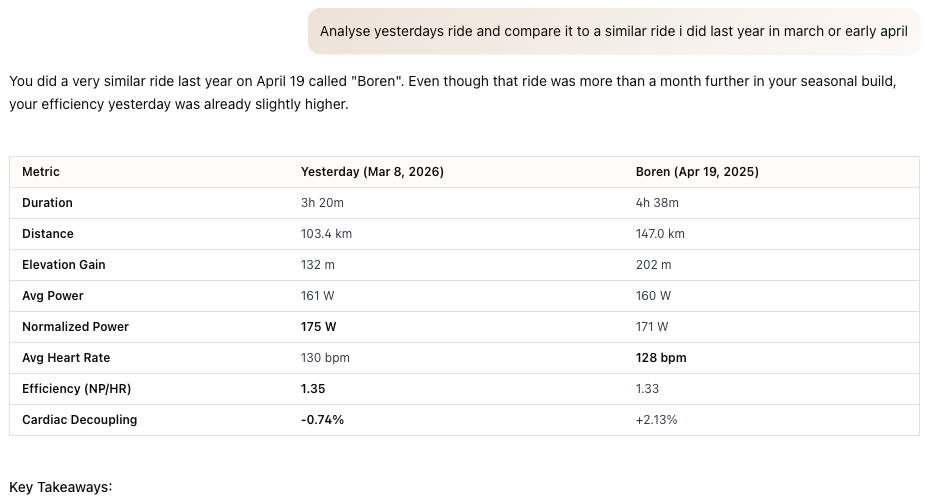
When asked to analyse rides or wellness data LeCoach often outputs this in markdown tables but until now the ui did not pick up on this. Now it does. Here is an example of a chat I just did myself (ps. I find this a pretty cool capability that helps compare my form now vs other seasons).
Hi! I had a feature idea that might fit well with an AI-based training platform.
Would it be possible in the future to upload a GPX file of a race or route and have the AI generate a pacing strategy? For example, the system could analyze the elevation profile and break the course into segments, then suggest target power ranges based on the rider’s FTP to help manage effort across climbs, flats, and descents.
It could be especially useful for preparing races or gran fondos, where pacing mistakes early on can really affect the overall result.
Not sure how complex it would be to implement, but it feels like a natural extension of AI-driven training and performance analysis.
Just wanted to share the idea in case it’s helpful!
Nice idea! My initial reaction was that there are dedicated platforms for this that probably do a better job.
However you made me curious. I’m actually training for the Maratona dles Dolomites, a famous italian gran fondo.
So I asked LeCoach to make a pacing plan for me based on what it knows about me (rides and wellness synced from start of 2025) and public knowledge about that gran fondo.
It made a surprisingly good plan. I also did this gran fondo in 2023 and had similar ftp back then and the pace plan it made per climb and the total estimated time was very close to what i achieved back then. It shaved 15m off the time i had back then and honestly that was what i felt i could have gone faster (went reaaaally slow the first 2 climbs).
So whilst other dedicated platforms such as bestbikesplits are more focused on this I think LeCoach can do an ok job.
Two big caveats though:
There is no gpx import (yet?). So it will only work with relatively wellknown gran fondos of which our ai model has public knowledge of the course. Or: you should describe the course segments in detail.
It will only make good recommendations if it knows you and your capabilities and your ride history really well. For example when i asked LeCoach, it knew my strength is fatigue resistance, it saw a gran fondo i did last year in France, my ctl etc etc. If it does not know that, the recommendation will be general and potentially massively overshooting or undershooting. But then again, in best bike splits you have to enter your ftp and desired intensity and it will work on that, so no actual analysis involved based on user profile/history etc as far as i know…
Log story short: give it a go and if more users like this idea i can add something dedicated for this
I have a tool in development that does exactly this, without AI. I won’t say too much or make promises since my time is limited and honestly I’d rather just be out running! But I do have something in the works.
Hi all, I’ve started working on supporting running plans and mixed plans (running+cycling). The problem is: I’m not a runner at all
Running intervals can apparantly be
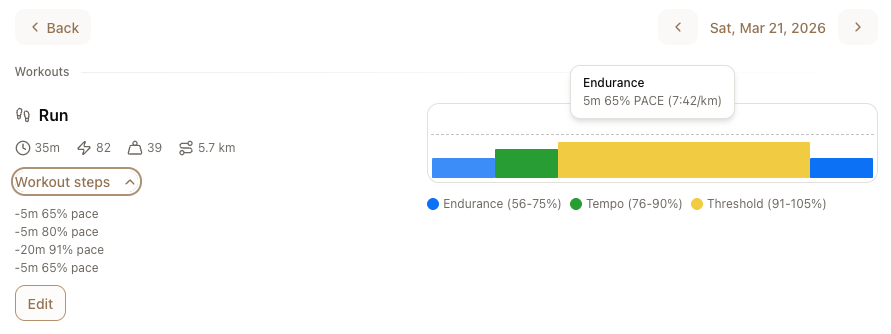
PACE_PERCENT (-20m 80% PACE)
PACE_ZONE (-20m z2 PACE)
PACE_ABSOLUTE (-20m 5:00/km Pace)
HR_PERCENT
HR_ZONE
LTHR_PERCENT
So could any of you runners perhaps tell me:
I see join.cc uses absolute pace. What do other apps like runna use? is there a standard?
Do athletes prefer one or the other? Like does one person only really want pace % and the other only pace zone?
Would this matter / differ per workout or is universal standard or perhaps user preference setting enough?
Similarly for distance or duration targets. I see join.cc always gives duration targets. Is that the standard that other running apps also use? i can imagine some apps will give you a 10k workout where 1k this, 1k that pace target? Also here, ideally one universal rule (time or distance) would make things easier.
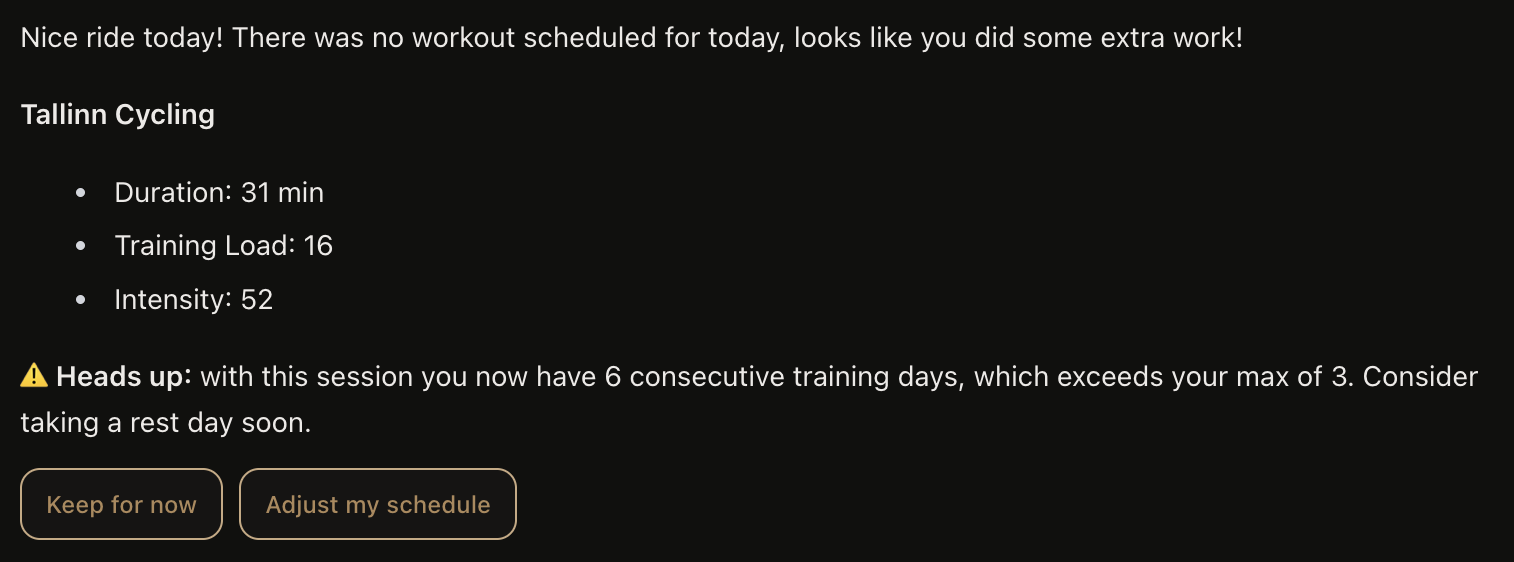
I have this minor issue where Le Coach considers my commutes as part of consecutive training days. I have added to memory that it wouldn’t do that anymore, but not sure it actually works. Does it see the commute flag from intervals.icu?
Hi, thanks for reporting. LeCoach should know when a ride is a commute but at the same time is instructed more top level to look at number of consecutive activities, so indeed that might be considered more promiment by Lecoach. We can fine-tune that.
Also, commutes are currently not filtered out from our reports and other ui components. That is also something we could handle ‘smarter’.
Could you share more details, ideally screenshots of where and in what scenario’s it considered commutes as part of the consecutive days. You can share them here or via DM if you want.
I’d like to understand the issue truly before implementing a quick fix, since for some users or scenario’s we maybe would actually want commutes to be included, for example if the commute essentially equalled the endurance workout or generally if commutes are longer etc.
Hi
Currently, I have a problem because activities that I deleted from intervals.icu still appear in my schedule. Is there a way to remove them from the schedule?
Sorry for the quality of my English!
My commute is typically ~30min one way. So it could total to 5h of z1 riding per week. I wouldn’t want to make them a permanent part of training plan either, because some days I work from home or the weather is shit etc.
It was giving me the warning in summary emails and in the chat after ride was uploaded. For now I’ve increased my max consecutive days to 6. But potentially I could exceed that too if I ride both days on the weekend and commute every workday.
Oh, one more thing. If I commute before I do the planned workout, the commute gets automatically paired with the workout and I have to unlink manually. Ideally commutes would be excluded from pairing.
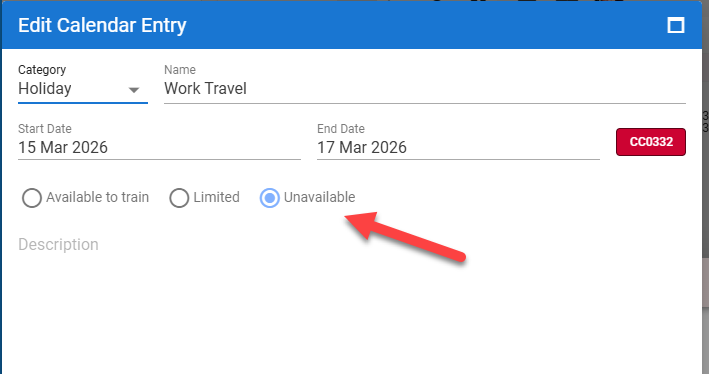
I’m wondering if, before creating a training plan, we set “Unavailable” in Notes and Holiday. It would be nice if the calculation could account for that and avoid the marked days. I can ask this in the chat, but I noticed it only adjusts the days surrounding it unless you explicitly ask it to recalculate the entire training plan.
Hi, we just tested this internally and everything here appears to work as expected. If you have Intervals connected in Settings - Integrations activities or workouts that you delete in Intervals should also be deleted in LeCoach. However it could take up to 60 seconds for these changes to show up. Could you perhaps confirm that Intervals is connected in Settings and then try to delete another activity. If you dont want to delete an actual activity you can simply create a manual activity in intervals and delete that after a few minutes. If the problem persists, please send me a dm with the email you used to sign up and i will investigate further.
Today we had someone sign up and sync over 10.000 activities. If you’re reading this, respect!
System could handle it well but noticed some spikes and decided to spend the rest of the day working on further performance improvements for these situations anyway! So V1.142 is now live.
V1.143 is now live, this release includes better date handling and the first steps in managing illness, injury and holidays within LeCoach
Improved - LeCoach now better handles dates when referring to yesterday, today etc. The context of previous interactions often confused LeCoach about what was really today and what was actually yesterday. Now it’s crystal clear to LeCoach!
Improved - LeCoach now nows exactly what time it is when you ask him, making him even more date and time-aware.
Added - First step in full support for managing illness, injury and holiday. If you make these calendar entries in Intervals they will now show up in LeCoach properly.
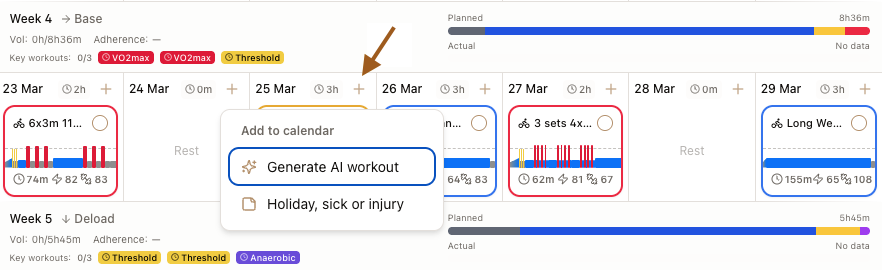
Added - Second step in full support for managing illness, injury and holiday. You can now add these entries yourself within LeCoach as well. This will sync to Intervals. To do this click on the + icon in your agenda (see screenshot below). You can also edit or delete these entries in Lecoach.
To do: dynamically adjust your training plan based on these calendar entries. So this means (suggesting to) remove workouts, change workouts, shorten workouts and change the days after the illness, injury or holiday appropriately.
Hey Rutger,
Thanks for the great app’
It gives clear insights both on activities and planning.
One caveat I see though, as I live in a mountain area, is to take into account the activity’s elevation profile when commenting on a finished activity. Typically my rides start or end with a 800m+ downhill or climb. Each time I get comments on too much Z1 (which is normal since I coasted down 14km at the beginning), so I have to re-explain the coach each time about this fact so he reminds why. this would also be enable it to understand that recovery period between reps’ is done still climbing, rather than coasting back down. or, that would be amazing, to offer a training exercise adapted to a given tour/gpx’s elevation profile (for now I do explain the coach the profile of the tour I’m about to ride, so it adapts the workout).
Just improvement ideas for people riding in mountains, but overall very happy !