Hi Zdenek, as far as I can see OpenAI is changing the app(s) right now. I suggest that you prompt with ChatGPT to find the settings for your setup/subscription. I have a Business account and can’t test it for every other configuration.
I have updated intervals-icu-sync/docs/gen_ai_setup_step_by_step.md at main · rbrands/intervals-icu-sync · GitHub to reflect that the configuration of MCP servers is now at “Plugins” in the new ChatGPT version. But you should find “Developer Settings” in your account/workgroup settings.
The new version of intervals-icu-sync intervals-icu-sync/CHANGELOG.md at main · rbrands/intervals-icu-sync · GitHub has now the training load of the last 4 weeks included in the dataset to give the AI coaches more context. You should update input_schema.md for your GenAI tool as described in intervals-icu-sync/docs/gen_ai_setup_step_by_step.md at main · rbrands/intervals-icu-sync · GitHub Or use https://training-architect.com without any setup.
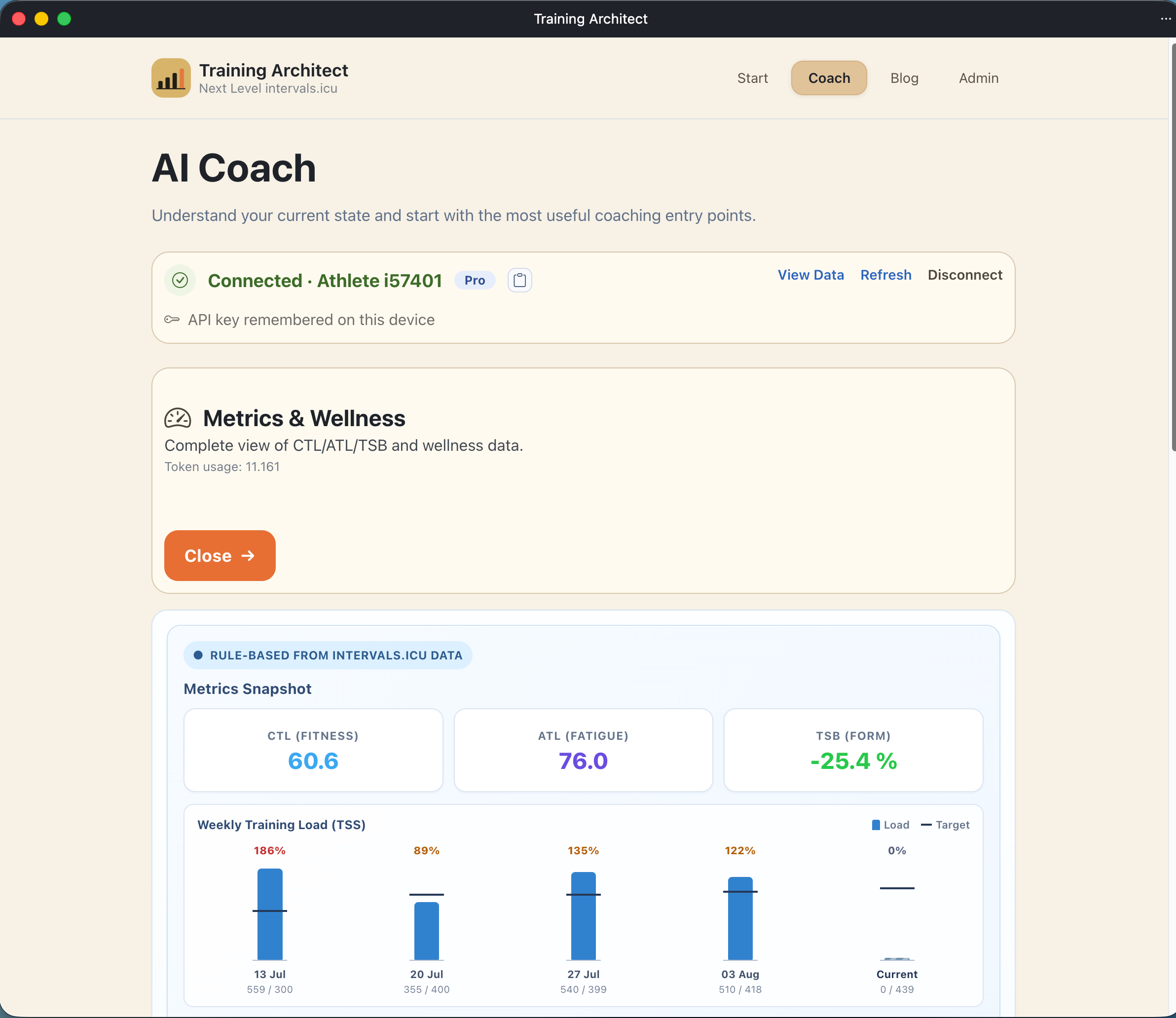
Another option to get the “Curated Dataset” (The Curated Dataset — What the Coach Actually Sees · Training Architect) is the API you can use via tools like Postman. The endpoint of this interface is https://training-architect.com/api/dataset the Swagger for it see https://training-architect.com/swagger
Post 1 of 2, really pleased with IcuSync so far…Using on the phone is excellent…
One small request. Every workout pushed through the connector gets an icusync tag added, and there is no way to remove it selectively, I think?
-
Passing an empty tag array clears everything, including icusync
-
Passing any non-empty array re-adds icusync alongside my own tags
So the only two reachable states are “my tag plus icusync” or “no tags at all.”
That matters because I use tags as a classification system rather than as labels. Every session carries one of six training-type tags, and I filter and report on them. Having a tool tag sitting in the same namespace means every filter and export needs a manual exclusion.
Either of these would solve it:
-
A setting to turn the tag off
-
Moving the provenance marker to its own field, so it still shows in the API response but stays out of the athlete’s tag list
I get why it exists — knowing which events came from IcuSync is probably useful. The ask is only that it not share a namespace with the athlete’s own tags.
Post 2 of 2, would it be possible to add a tool returning raw activity streams — time, distance, altitude, heartrate, velocity?
At the moment the finest resolution available is one km, at least for me. get_activity_detail returns per-interval aggregates plus per-km splits, and get_extended_metrics is aggregated per interval. Both are useful, but neither lets you compute anything below the km scale.
My use case is mountain ultra training. I detect sustained climb segments from the altitude stream — resample at 50 m, track grade, bridge short dips, then compute VAM for each segment. That needs the more raw arrays. Working from 1 km splits I can approximate it, but climbs shorter than roughly 2 km get noisy, and there is no way to split a long climb where it flattens onto a shelf.
More broadly, streams would unlock anything custom — decoupling across an arbitrary window, segment-to-segment comparisons, pacing analysis against a known route.
On the obvious objection, yes, streams are large. A few things would make it workable:
-
Downsample to a fixed point count. Another intervals.icu MCP already does this at 300 points and it works well in practice
-
Let the caller choose which stream types come back
-
Accept a distance or time range, so you can pull only the section of interest
Happy to test whatever you build.
The MCP server on its own doesn’t write tags - they come from the caller. That means: Are you using a GenAI tool with the prompts provided bei intervals-icu-sync? Then you could change the system prompt. Or are you using training-architec.com? In this case I could add a checkbox to suppress sending the tags.
1 Like
I have added a new MCP tool to the server: get_activity_streams_sampled
Returns a compact, down-sampled activity stream payload for a single activity. Accepts activity_id, optional stream_types (for example ["time", "distance", "altitude", "heartrate", "velocity"]), max_points (default 300), and optional time/distance windows via start_time_s, end_time_s, start_distance_m, and end_distance_m. Useful for sub-km analysis without huge payloads.
Activity Id was added to get_latest_activities and prepare_week_data.
HTH
1 Like
Just sawn: Perhaps you have mixed this up with IcuSync. That another tool Here we are talking about rbrands/intervals-icu-sync: Connect any GenAI tool to your intervals.icu data — includes MCP server, Python scripts, system prompts and coaching logic based on Joe Friel. and rbrands/training-architect: AI-powered cycling coaching web application (Tier 3 “Training Architect”). Blazor frontend with .NET orchestration, an Azure AI Foundry agent, and intervals.icu integration. Generates structured, methodologically grounded training plans following Friel/Coggan (TSS/IF/CTL/ATL/TSB) with human-in-the-loop confirmation.
But to be clear: We are here talking about my intervals-icu-sync “Next level intervas.icu” with training-architect.com as a frontend. Please don’t mix this up with IcuSync or other tools. Thx
Ah apologies ! I thought this was ICU sync
News · Training Architect The update today is around “planning”. It is now supported that workouts from you library are used. The prompts have been changed for this. See the News article for all details and links.
- CTL/ATL/Form data alongside training load history of the last 4 weeks now in the dataset
- New prompt “Check Consitency” to get tips about what you should include into your data in intervals
- The Metrics prompt now checks if your discipline goals fits your current power profile
This week: Get out of the “curated dataset” from intervals a dashboard view with:
- Overview Training-Load
- FTP classification
- VO2Max classification
- Wellness state
- Fueling of the last week
- Power profile type
Hi Robert,
I found a specific limitation when using intervals-icu-sync with ChatGPT Plus.
Your MCP connection itself works correctly. I connected it according to your current guide:
Developer Mode → Create App → https://intervals-mcp.training-architect.com/mcp → OAuth 2.0.
I also use two regular ChatGPT apps in the same conversation: AI Endurance and Fitness AI Connector (Garmin data).
In a new ChatGPT conversation, I can initially select all three and the first request works. However, after the intervals-icu-sync Developer MCP has been used, subsequent requests to AI Endurance or Fitness AI Connector fail with this exact error:
“This conversation is restricted to developer MCPs”
So the problem seems to be that once the conversation uses the developer MCP, ChatGPT restricts subsequent tool calls to developer MCPs and regular ChatGPT apps can no longer be called.
My goal is to use Intervals.icu + AI Endurance + Garmin data repeatedly in one normal ChatGPT conversation.
Have you encountered this limitation?
And would it be possible to publish Training Architect / intervals-icu-sync as a regular ChatGPT App rather than requiring Developer Mode?
Alternatively, since Training Architect already exposes the curated dataset through /api/dataset, do you see another way to make that dataset accessible to a normal ChatGPT conversation without activating the Developer MCP?
Thanks!
Oh, no I am not aware of this limitation. I will look into this. Are you using the upload_plan method?
To get the MCP server in the public app/plugin directory I would have to adapt this (Metadata, website etc,. etc) only for ChatGPT. Then I must do through a submission process, seems not to be easy. For now thats too much overhead, I have to focus on the features of the MCP server and training-architect. In the meantime I suggest the following workaround: Grab the curated dataset from training-architect.com (only connect, don’t use the AI features). There is a small button to get it straight into the clipboard. Altogether 2 clicks to get the dataset. Paste this into the chat and use the other tools in your sessions. I hope this helps …
News · Training Architect Update from today: Running activities are now included in the curated dataset.
Hi Robert,
First of all, thank you very much for your previous replies, advice and for taking the time to look into this. I really appreciate it.
I tested your suggestion with the curated dataset from Training Architect, and it works very well for the read side. I downloaded the coach_input JSON and uploaded it into a normal ChatGPT conversation. ChatGPT was then able to analyse the Intervals.icu data from the dataset and, in the same conversation, successfully access my AI Endurance and Garmin/Fitness AI Connector data.
So this effectively solves the Developer MCP restriction for combining the data sources. Thank you for pointing me in this direction.
There is just one important part of my original use case that I would still like to solve: writing changes back to Intervals.icu.
One of the main reasons I originally connected your MCP was not only to read and analyse my training data, but also to allow ChatGPT — after my approval — to modify, replace or reschedule workouts directly in my Intervals.icu calendar.
For example, my ideal workflow would be:
Intervals.icu → Training Architect curated dataset → ChatGPT
AI Endurance → ChatGPT
Garmin recovery data → ChatGPT
ChatGPT then compares all three sources, we decide together whether a planned workout should be kept, modified, replaced or moved, and after I approve the change:
ChatGPT → Intervals.icu → updated workout/calendar
With the downloaded coach_input JSON, the first/read part now works nicely, but of course the JSON itself cannot write the agreed changes back to Intervals.icu.
Do you think there could be a simple way to handle the write side without invoking the Developer MCP in the conversation?
For example, since Training Architect already provides the curated dataset outside the MCP, could there perhaps also be a simple API endpoint for creating/updating/rescheduling workouts or uploading an approved plan back to Intervals.icu?
I don’t know whether this is technically practical — I just wanted to explain my complete use case, because your curated dataset already solves a large part of it.
Thanks again for your help and for developing Training Architect / intervals-icu-sync. The curated dataset is extremely useful for what I am trying to achieve.
Good to hear, that this works for you. And yes, I will implement the same approach for uploading a plan: You will create the plan in ChatGPT, copy it to the clipboard and paste it into training architect. I will come back with the details if it is available.