When I try and import historic data from my Concpet2 logbook, it says it will import 114 records, but only about 20 get picked up. It looks like I has grabbed the last month, then the first month, but everything in between gets ignored. Could you take a look at the issue?
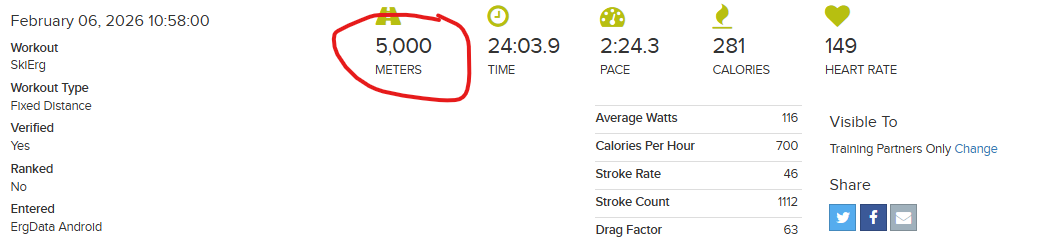
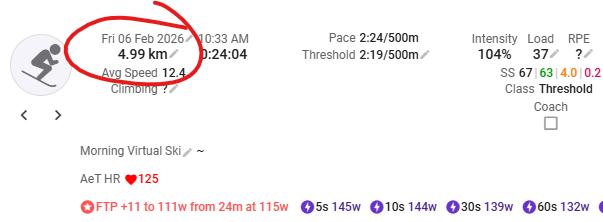
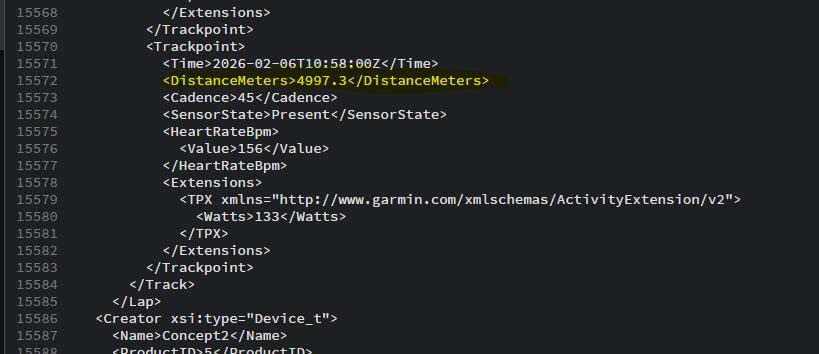
There also appears to be some issue with the exact format of the import, because despite almost all rows being exactly 4K, they get reported as between 3.95K and 4K. This looks like it is something to do with the import format being at 3s resolution, despite the C2 website (where the data is stored) and rowsandall.com (which imports the data) showing the correct length.
In terms of the length issue, having looked at the raw data used by rowsandall.com, I can see it matches that data displayed in intervals.icu. I guess there must be some logic in rowsandall to round up the workout length based on the likely distance covered in the remaining 3s (the resolution of the raw data). Would it be possible to incorporate the same logic, as the current behaviour is extremely irritating?
I have managed to track the import issue down to two particular workouts early in the season that won’t import (30th April, 4th May 2025). I’ve managed to grab the rest by manually adjusting the import range to avoid these dates. I don’t know if it might be an issue with the use of the comments field?
Looking back at my logs, the two problematic workouts were where the PM5 disconnected from the ErgData tablet. It appears the export CSVs have suspect data, with the readings for the various intervals not being in the correct order (the distance doesn’t always increase). I assume this causes the import to fail, but then rather than just marking that workout as suspect, the import stops entirely, not continuing with the later records.
Might it be possible to add additional error handling for this case? (I will hold off deleting the two corrupt workouts, in case there is a desire to test an enhancement.)
In terms of the total length/time, having looked I would guess that rowsandall.com using the data from the log record (which includes total distance and time) to complement the data in the csv file.
There were some more users with probably similar issues importing workouts.
So your findings maybe could help @david to improve the import. Maybe you can share him an example workout which didn’t import.
Hi @david
Has there been any progress on the incorrect‑length issue with Concept2 imports.
I’m seeing workouts come in slightly short — for example a 5,000 m effort is imported as 4.99 km — which means those efforts don’t register correctly as best efforts. It looks like the rounding logic for the final few seconds of a 3‑second‑resolution C2 file might be the cause.
Yep this will happen , last time David correct my activity ; now i think the only option is manual edit - Sad but true , C2 issues just like the rest intervals.FOr the rest intervals, i tried to build some python code, to “reset” Power based on Cadence when is 0 , but sometimes cadence show errors too