How to use ChatGPT for training without screenshots and manual context

Hi Dimitris, thanks for your patience and for reporting this — it really helped us find the issue.

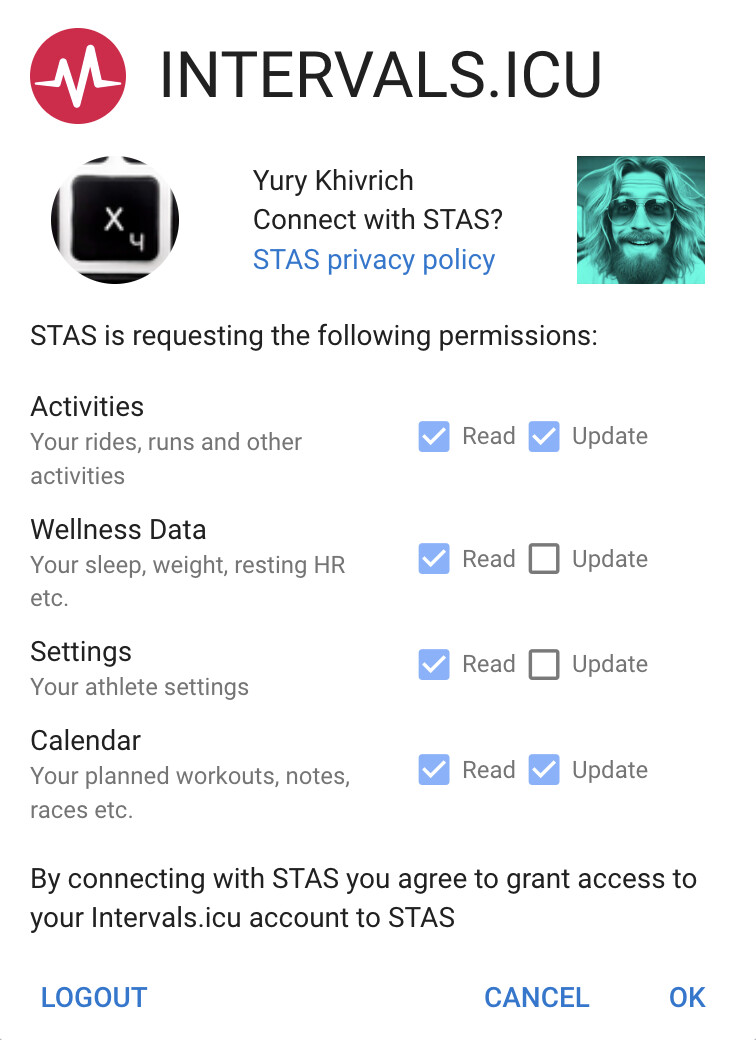
What happened: When you connected Intervals.icu, the permission was set to read-only. That’s why STAS GPT can see your trainings but can’t write plans to your calendar.

What you need to do:

  1. Go to stas.run → Profile / Intervals.icu and click Reconnect Intervals.icu
  2. On the Intervals.icu consent screen, make sure to select Update access (not just Read)
  3. After that, STAS GPT will be able to write workout plans to your calendar

About Telegram reports: Your workouts from before registration were loaded as history. When you complete your next workout, you’ll get a Telegram notification from telegram bot with a “Write report” button — that’s how you submit feedback about your training. These reports help STAS GPT make better plans.

About ChatGPT Free vs Plus: Custom GPTs with API actions work very poorly on the Free tier (strict limits on requests). For reliable use, ChatGPT Plus is needed — this is an OpenAI limitation unfortunately.

About Google Gemini: Unfortunately, Gemini doesn’t allow connecting to external data sources the way ChatGPT does with Custom GPTs, so we can’t offer STAS on that platform.

Let me know if you have any questions!
For the MCP I don’t do much processing of the data behind what intervals API offers up - Sonnet/Opus 4.6 Extended thinking does a superb job of pulling it together, going back for more info if it needs, processing it and wrapping it all up. It does well with prompts like “should I adjust next week’s plan?”, “compare my current training, wellness and fitness with this period last year”, “I’m feeling fatigued, modify my upcoming workouts to reduce the intensity”. Oh, I also generally use it inside a project that has my overall training goals and “athlete overview” type info which probably helps steer it. That said, even outside the project it works well as it can pull my profile from intervals with the MCP.

I do more pre-processing of intervals data (akin to your idea) for other uses - I’ve got a Vestaboard split flap display that shows post run and wellness summaries when I get home - I calc possible relevant metrics then hand that to an LLM to interpret and format for display.

Happy to share the details!

The stack

It’s a Cloudflare Worker written in TypeScript, deployed via Wrangler. The key dependency is Cloudflare’s agents package, which gives you an McpAgent base class that handles all the MCP protocol plumbing — you just extend it, define your tools, and deploy. All done on Cloudflare’s free tier.

How it works

The MCP server wraps the intervals.icu REST API. Each tool is basically: accept some parameters (validated with Zod), build a fetch() call to the intervals.icu API, shape the response into something LLM-friendly, and return it. The athlete ID and API key live as Cloudflare Worker secrets (environment variables), so nothing sensitive is in the code.

Authentication to intervals.icu is Basic auth — API_KEY:<your_key> base64-encoded.

A simplified example of one tool:

this.server.tool(
  "get_activities",
  "Fetch completed running activities with load, HR, pace etc.",
  { oldest: z.string().optional(), newest: z.string().optional() },
  async ({ oldest, newest }) => {
    const r = await fetch(
      `https://intervals.icu/api/v1/athlete/${athleteId}/activities?oldest=${oldest}&newest=${newest}`,
      { headers: authHeaders(apiKey) }
    );
    const data = await r.json();
    return { content: [{ type: "text", text: JSON.stringify(data) }] };
  }
);

The real tools do a bit more — filtering to runs only, converting m/s to sec/km pace, doubling cadence values (intervals.icu returns half-rate using cycling conventions), etc. — but the pattern is identical for every tool.

Connecting it to Claude

Once deployed, you add the Worker URL as a custom MCP connector in Claude.ai settings. Claude then discovers all the tools automatically and can call them during a conversation.

The tools I ended up with (~17 total)

A mix of reads and writes: fetch recent activities, drill into a single activity’s interval breakdown, pull wellness data (HRV, sleep, fatigue), fitness/CTL/ATL trends, pace curves, HR curves, search by name/tag — and on the write side, create or bulk-create planned workouts on the calendar.

Resources to get started

  • Cloudflare MCP docs — the quickstart gets you a working server in minutes
  • intervals.icu has a solid API reference under Settings → API

The whole thing is maybe 700 lines once you include all the tools, and the majority of that is just data-shaping logic. The MCP infrastructure itself is surprisingly thin.

1 Like

I think we have different definitions of super easy :grinning_face: I am super greatful for you taking the time to share with me. I might give it a shot.

Oh yes, if I were building this only for myself, I would probably go exactly that way. But I wanted to experiment with creating a real product/service — with authentication, users, scenarios, automations, neural models, and all of that. For me it was both a sports interest and a professional one at the same time.

But it seems to me that your approach with projects and MCP is limited by the fact that the model can only use your information. If I were going that route, I would use Claude Code instead, so it could also create reports and files, write to “memory,” and so on. Then it would effectively have an unlimited context that it continuously enriches itself, and that would be a completely different experience.

This looks like a very cool project. Any chance to get it decoupled from Telegram? I deleted my account when they paywalled basic privacy features and refuse to go back to that cesspit.

What would you suggest instead?

As for basic login capacity, adding maybe Gmail or just an email-based login system.

I understand that the written interaction with the LLM (prompts) is provided by a Telegram bot? That is trickier as you would need to deploy a fully alternative front-end. Open Web UI or LibreChat come to mind as possible alternatives, but I cannot really give good advice here, I’m a stranger to the ecosystem.

I currently use general-purpose Copilot by feeding it the FIT files of my runs, and I see how a customized system would be a huge improvement. Kudos for your work!

1 Like

Thank you for your comments. Gmail authorization is indeed possible. But I also use Telegram for notifications and for writing workout reports. I think there could be an alternative, but it would have to be a messenger, and I can’t think of anything as convenient.

I do appreciate that the Telegram front-end has unique advantages that are difficult to replicate, and LibreChat et al cannot work in the same way. Maybe e-mail would be a feasible alternative? E.g., send emails with notifications / workout reports, and accept replies for prompting the system, carrying the interaction as an e-mail thread.

Hi I would love see the json code :heart_eyes:

HI! Thanks, but how can I remove the chat from my GPT list? It really slows things down and crashes Chrome :frowning:

I’m so sorry to hear that. I don’t even understand how this is possible. It’s just another chat, just like the others. Well, you can just right-click to delete the chat and hide GPT from your sidebar. That’s it.
Sorry

1 Like

Basically, it’s just automatically loading data and recommendations using GPT so you don’t have to copy screenshots and activities, right?

absolutely
it connects your sport watches and chat gpt + helps to collect your general info independently to make it accessible from the chat. it also sends training plans right to Intervals

I would like to check that out as well!

It works great for me! I will be using this.

1 Like

All good, testing in progress :slight_smile:

1 Like

I would be very hesitant in sharing data with ChatGPT or any other AI model, unless operating offline.
Check this forum on the darksides of commercial AI models: https://discuss.privacyguides.net/
Especially when we talk about health/personal related topics, i would be very cautious.

2 Likes

I’ve tried to connect via Telegram multiple times, but don’t seem to receive the confirmation message. The phone number (in international format) I give and the phone number attached to my Telegram account are exact matches. Any ideas?

EDIT: But, weirdly (or worryingly?), I did receive an email from Facebook with a “code to confirm” my account at exactly the time I was attempting to do the above. I haven’t touched Facebook today…