How to estimate Critical Power (or eFTP) and W' with intervals under 3 min (my first web app)

Hey everyone,

I’ve always loved creating spreadsheets to help with my training, and I’ve even shared some here before. I’ve always wanted to create a more practical and user-friendly way to share some of the tools I’ve developed for myself, but my programming knowledge is, well, zero!

I enjoy testing, but we all know that getting an accurate Critical Power (CP) estimate usually means multiple, long, and exhausting maximal efforts. Same goes for FTP—the thought of a 20-minute all-out test just fills me with dread (plus, I’m not a big fan of that method since it only gives me an idea of my 20-minute power, not my whole power curve).

This past week, I managed to develop a tool in a web app and wanted to share it here for anyone who wants to play around with it.

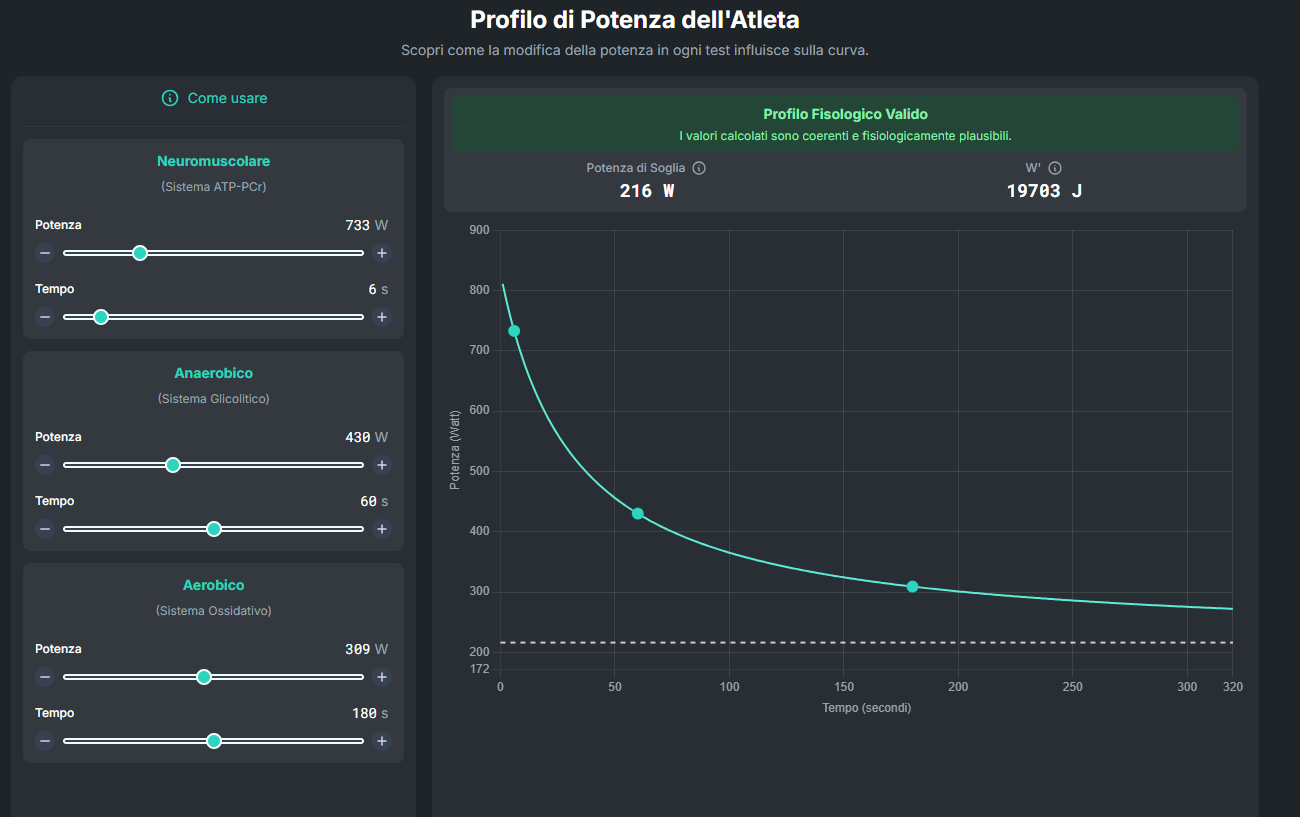
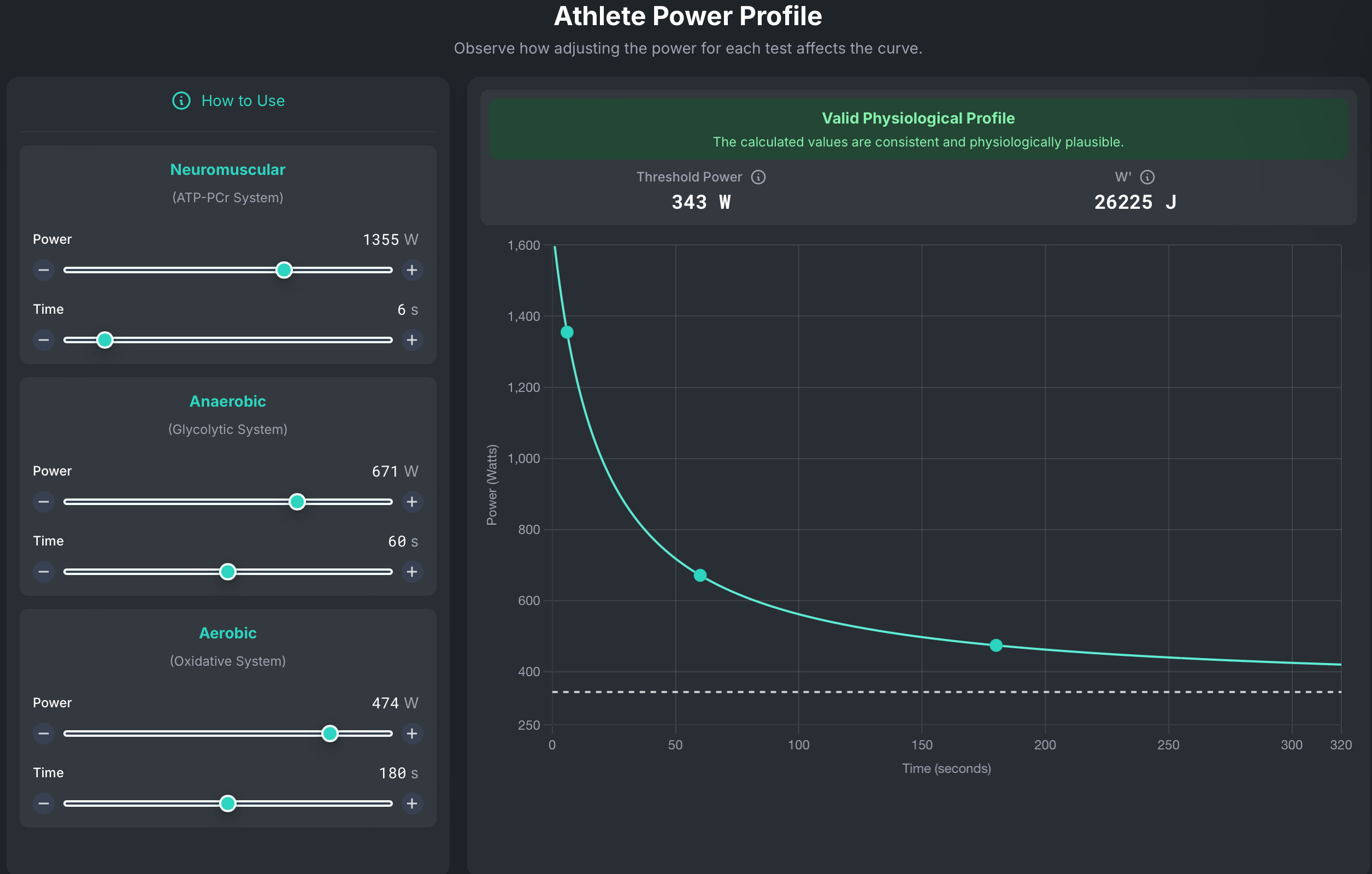
Essentially, it estimates your Critical Power/FTP (I’ll use these interchangeably for simplicity, even though I know the conceptual differences) and W’ with just three ultra-short maximal efforts. I use intervals of approximately 10 s, 60 s, and 3 minutes with great results. I like these durations because they give me a good idea of my three energy systems (ATP-PCr, anaerobic glycolytic, and aerobic oxidative).

To use it, simply test yourself at these intervals. I do all mine in the same 50-minute workout. Just input your data and see your threshold and W’ estimate. You’ll also see how changes in power for each interval affect the threshold estimate.

Just for comparison, here are the intervals I did in my indoor test this week (Sorry if some words in the pictures are in my native language!).
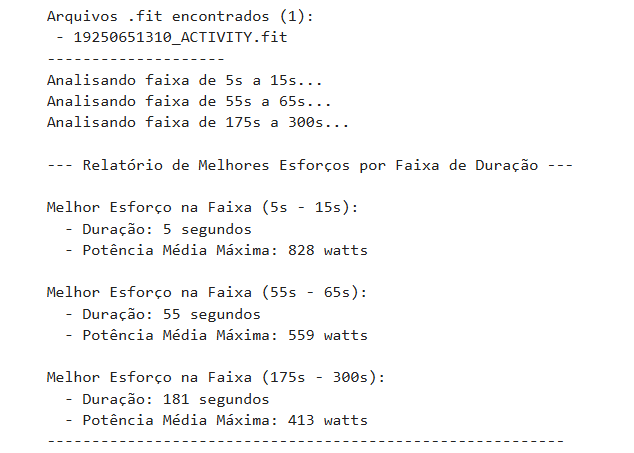
Tri System Test intervals

Below, you’ll see my estimated CP and W’ using those numbers…
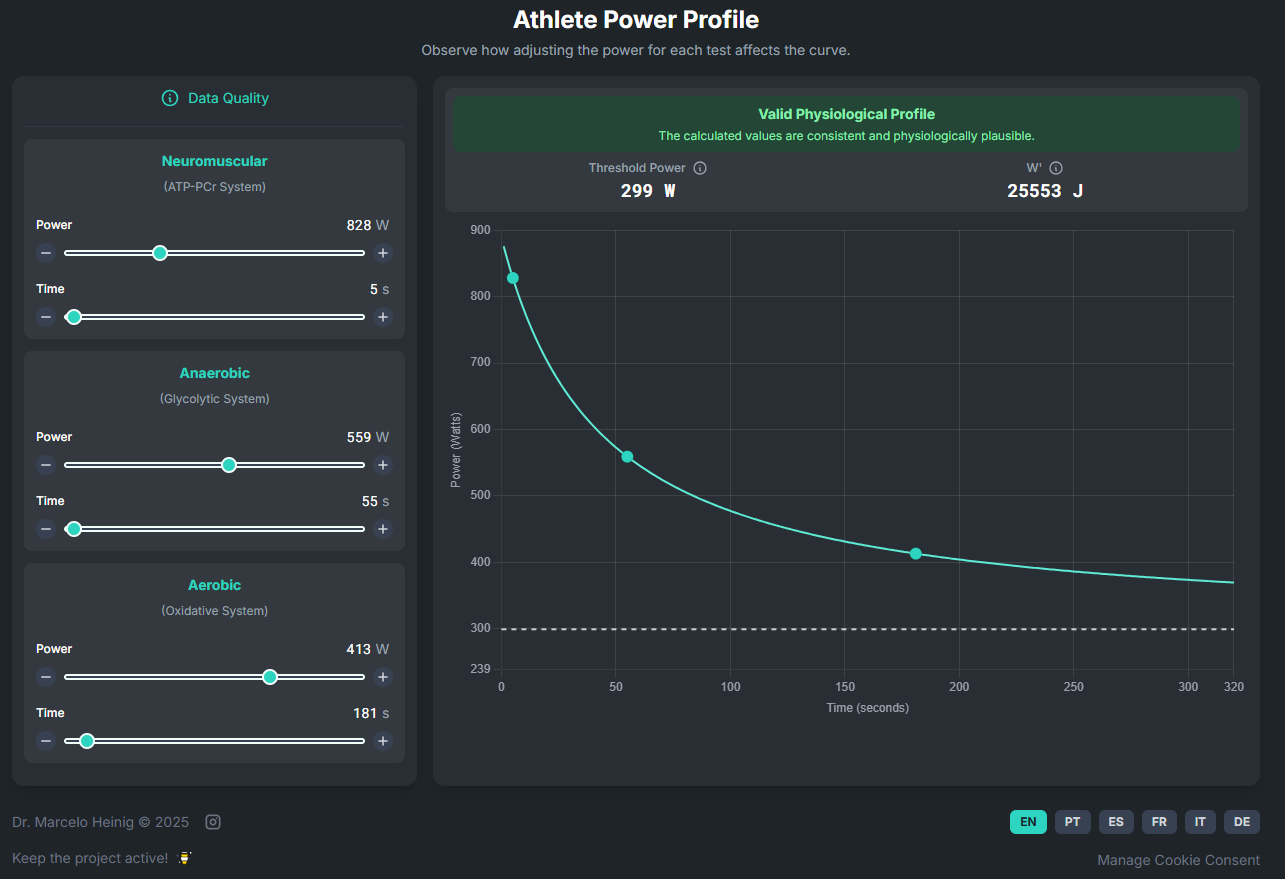
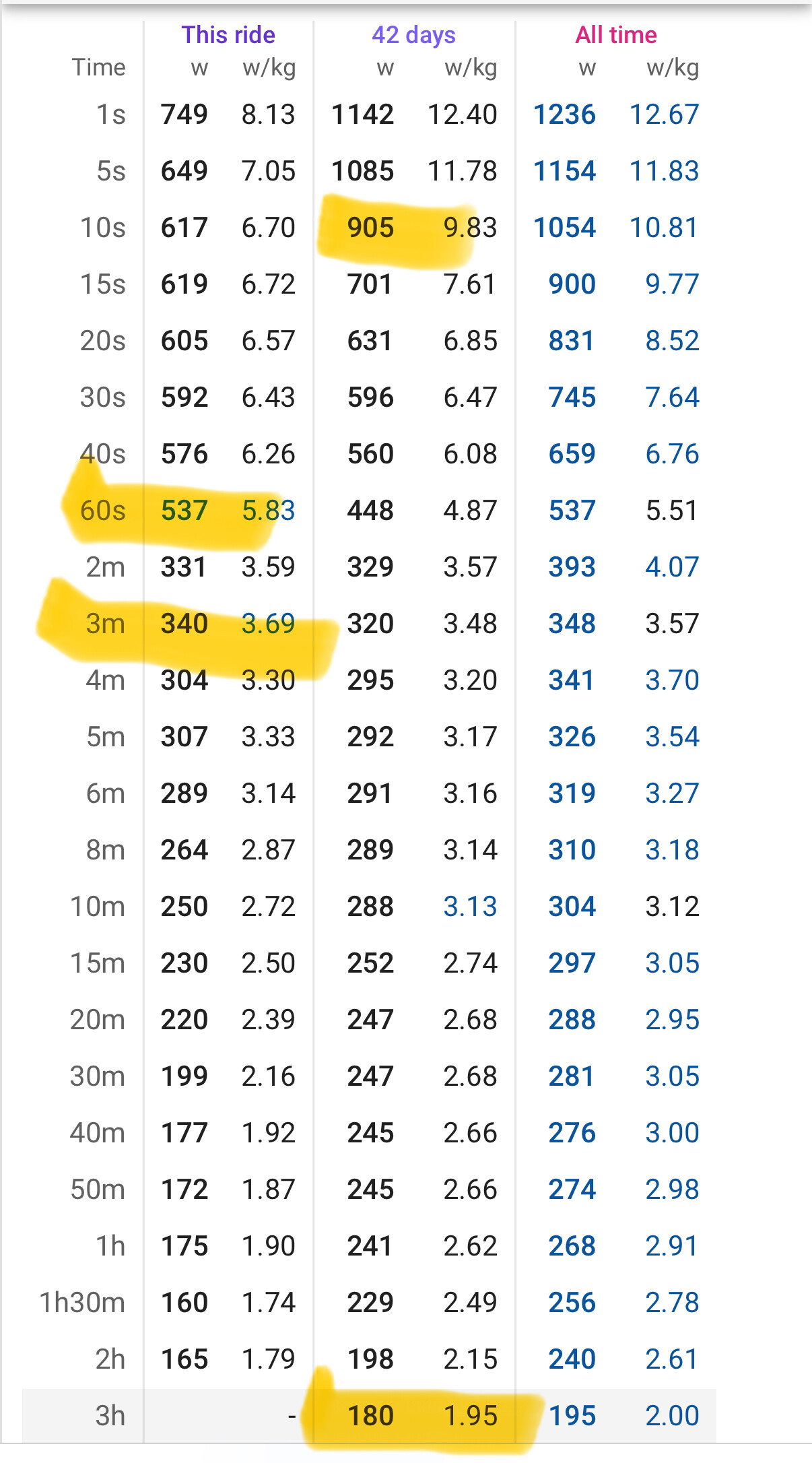
and here… what my Garmin says my FTP is today.

GarminFTP

Ultimately, I’m really glad I finally managed to build something shareable. I’ll leave the link here (https://www.powerlab.icu/) for anyone who wants to test it out, find potential bugs, or suggest improvements. It’s my first web app project, so please forgive any possible flaws!

Marcelo Heinig

22 Likes

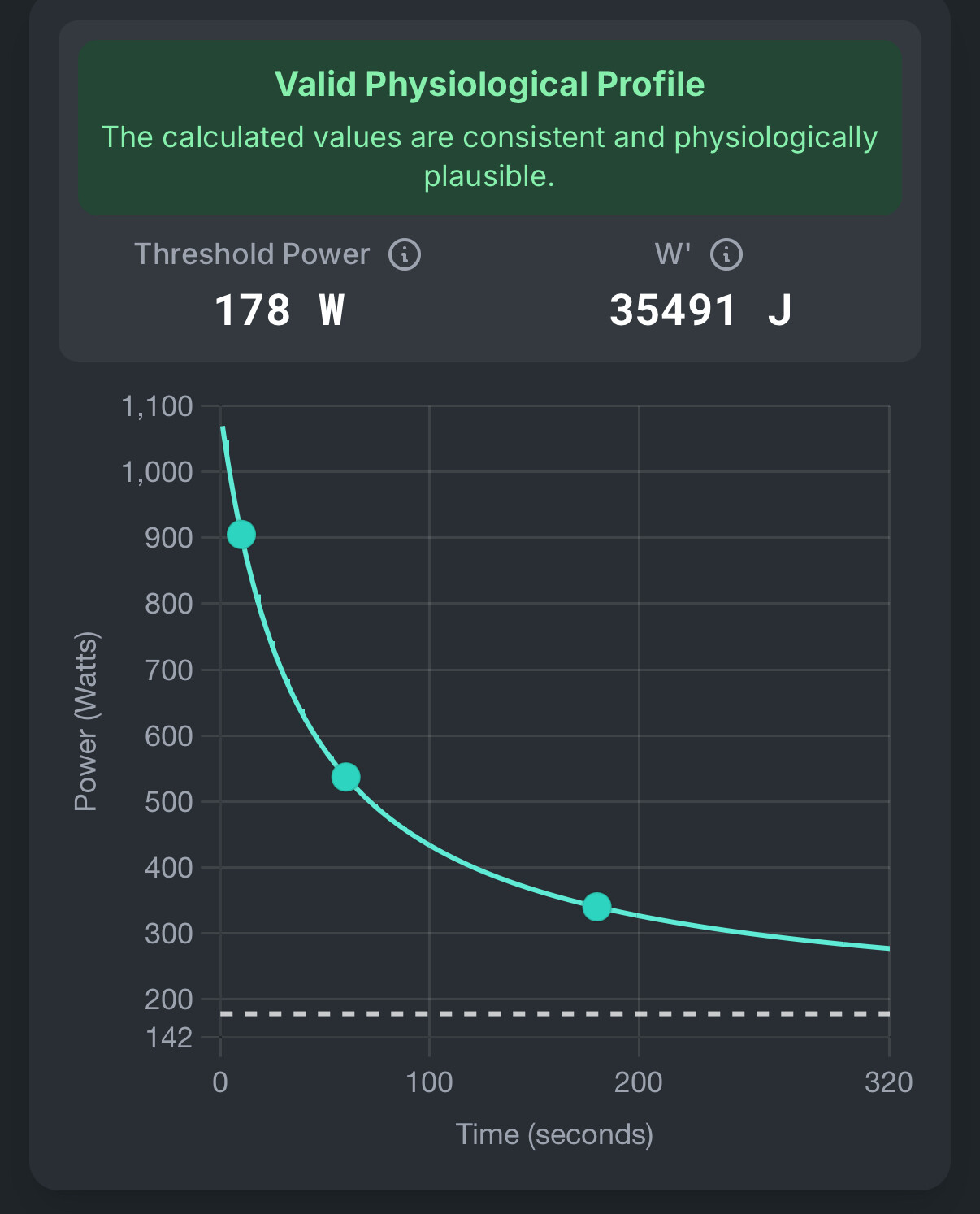
i gave it a try (i hate 20-min ftp test too :slight_smile: ), these are my results:

a bit underestimating FTP in my case: with the same data, intervals give me an FTP of 242, which it is more or less very close to a test i did (237 W butr not the best day on bike) .
i guess it depends on the type of rider you are. a bit overestimating if you are more glycolitic rider, or underestimating if you are more aerobic /longer effort guy. very intersting though, thanks for sharing.

1 Like

Cool little tool. Is within a percent or two for me with my (slightly old as I hate doing them) 20min max effort based FTP of 335W.

This approach gives me some comfort and enthusiasm to test far more regularly. Is this similar model to the eFTP model that intervals uses?

The tool uses a mathematical variation of the critical power model with 3 intervals (a variation adjusted to work with such short intervals). Intervals has available 2 and 3 parameter methods for the CP/eFTP model (which will not be suitable for such short efforts) and a single-effort method, which, if I remember well what I saw David write years ago, compares your 1-interval effort with an average of curves from a database and from that estimates CP. After estimating CP, it calculates W’ based on a short interval.

I specifically developed this variation because it allows me to re-evaluate myself frequently. When I feel good, I update these intervals and always maintain a recent estimate of my curve. Interesting uses I’m seeing are re-evaluating the curve in different situations (indoor vs. outdoor, flat vs. climb, road vs. TT position, test after fatigue, low carb vs high carb).

5 Likes

Hmm, first try I get eFTP/eCP that is below my 3 hour power.

Input data:

Is all the data at maximum effort? Especially the 3-minute and sprint data? Even a few watts below maximum has a significant impact on the calculation, as you can see by changing the sliders… reaching maximum in these intervals is something I see as a difficulty for many people.

Thats a awesome web app, can you extend functionality to also calculate Vlamax and Fatmax?

Yes. And yes.

My all time shows wrong; it shows CP equivalent to a range of my 9-12 minute best.

Last~ and current season (only 1 month old) are close to what I know is possible. But then I enjoy doing testing across the range (5, 12, 20, 30 and occasionally 45 and 60).

1 Like

It already does that on my spreadsheet… If I have the time I will implement that.

1 Like

The biggest problem, it seems to me, is the sensitivity of the calculations to a difference of just a few watts over a short interval, which will significantly affect the CP and W’ estimations.

In recent weeks, while testing with friends, I’ve seen several “maximum effort tests” that, when repeated in less than a week, showed power outputs that were 10-20% higher. This indicates they hadn’t truly been maximal efforts.

However, this is a clear limitation of the method.

I’m not a fan of using “dirty” data from a user’s history. I’d rather retest myself at the three intervals on a given day, in the specific cycling position or situation I’m interested in (e.g., after fatigue or dietary manipulation). The tool will create the curve based on the power I demonstrate during those intervals at that moment. If I’m not having a good day, the curve will reflect that, regardless of whether I was in much better shape a few weeks prior. On that specific day, I didn’t “deliver” my best form, and the tool sees that. The math is reasonably simple: if there’s a significant drop in power from the 60-second to the 3-minute interval, that will determine the curve’s shape and how much CP will drop relative to the 60-second and 3-minute values.

I even considered integrating the tool to pull data from platforms like intervals.icu, for example. However, the high possibility of “dirty” data impacting the estimate doesn’t seem like a good idea to me.

Anyway, I’m glad more people are testing; it helps expand my “n.”

The biggest problems I saw when testing with different people were them using submaximal data. This included submaximal data from their history or even maximal efforts that weren’t confirmed as truly maximal in subsequent tests.

2 Likes

I suspect this estimation method works better for people with power curves like yours.

1 Like

I’ve had good results with different rider profiles… sprinters, punchers, time trialists, and climbers… but with a small n…

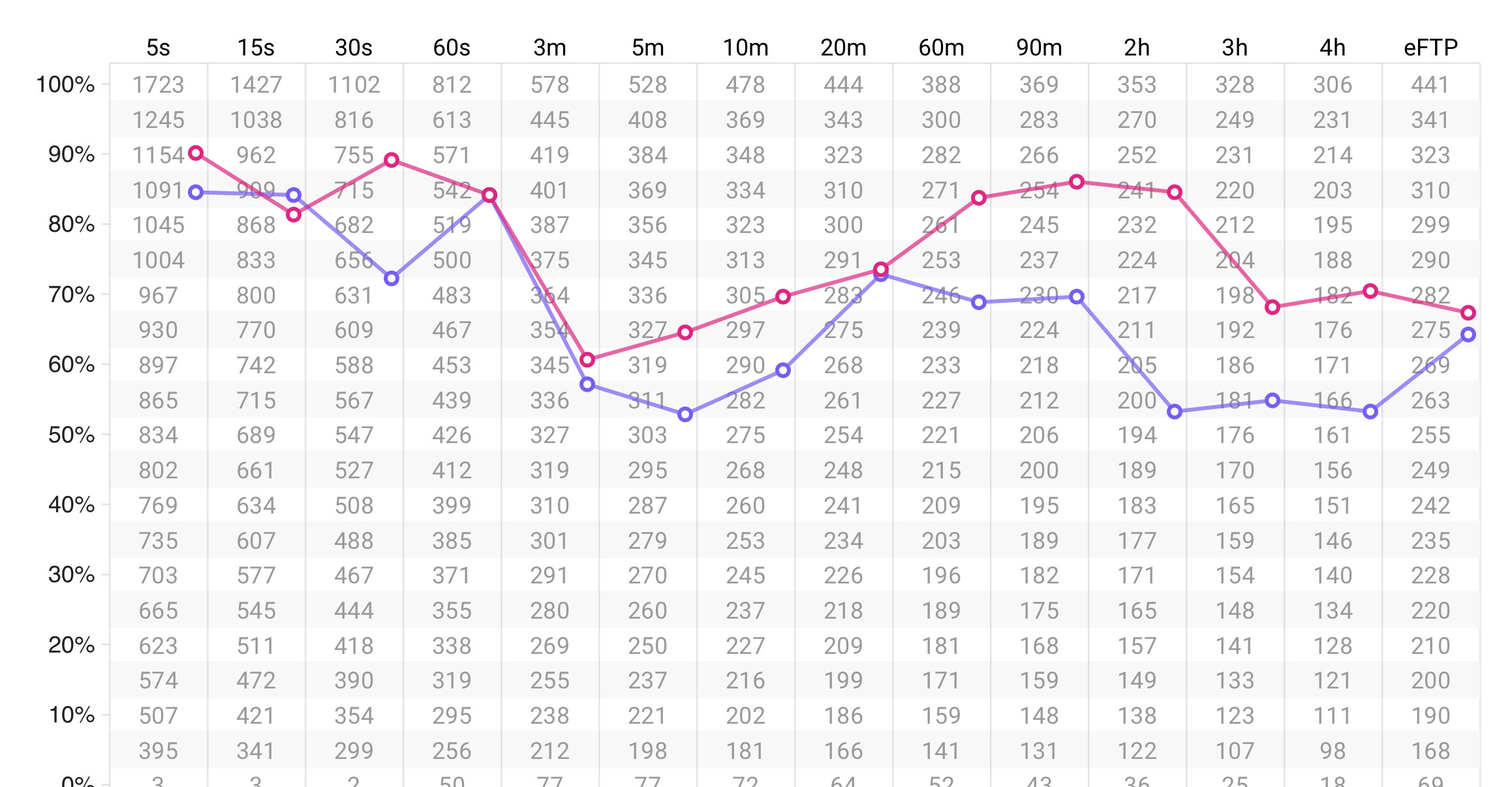
Red = 9 years ago. CP 272 / W’ 22,620 J / FTP 276. Max efforts out to 65 minutes.

Purple = 2 years ago. CP 268 / W’ 22,800 J / FTP 274. Max efforts out to 22 minutes.

Playing with numbers the best I got from your estimator was ~220 for the 2 years ago data. And as low as ~180 using the known max effort data posted earlier.

Thanks for posting the website.

1 Like

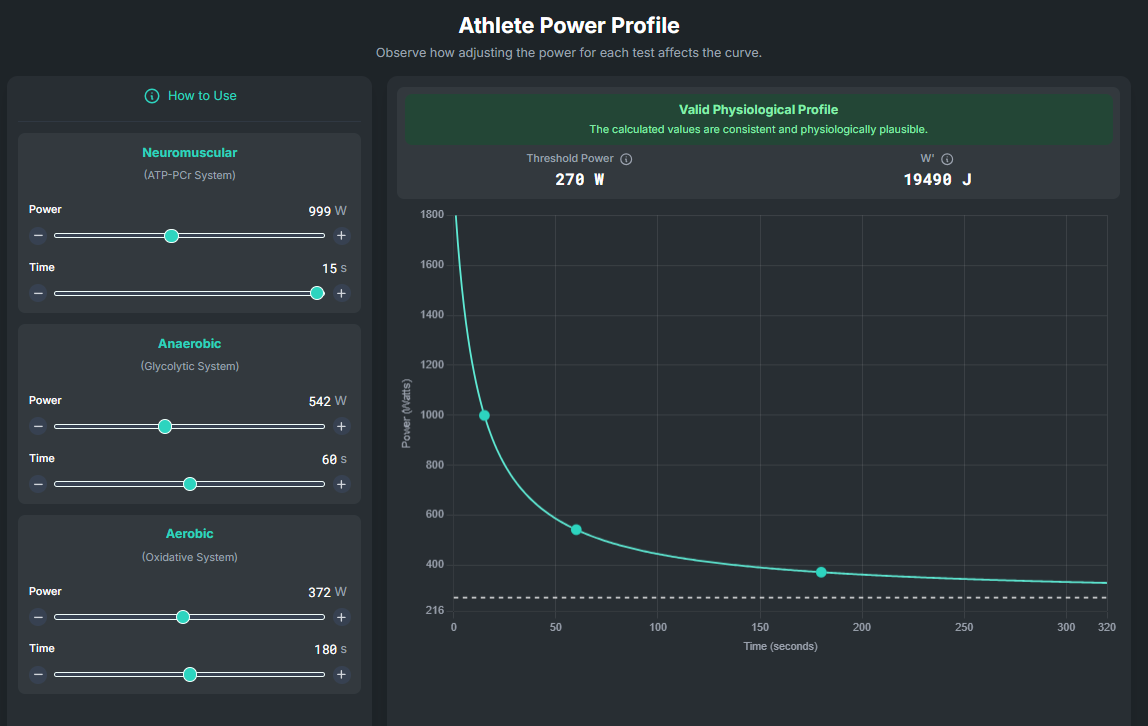
The tool is quite sensitive because it uses short intervals. If we consider your 15s at 999 watts and 60s at 542 watts, you’d need to maintain 372 watts for 3 minutes. That doesn’t strike me as an absurd power output for a 270-watt threshold.

But this brings up a crucial question: Are those 3-minute interval data point specific to a prior all-out 3-minute test without pre-fatigue? Or were they collected during races or training sessions?

If it wasn’t a specific 3-minute interval test, you might actually be capable of sustaining closer to 370 watts. That would be approximately 137% of your threshold.

I see this all the time. As an example, just last week a friend tested his 1-minute power and the most he could do was 400 watts. I jokingly told him my 9-year-old could do that! He did the test again a few days later and held 475 watts for a full minute. It just goes to show how much more you can push when you’re truly motivated or the test conditions are optimal.

However, if 340 watts is your maximum in a specific 3-minute test, then it’s clear the tool isn’t quite working for you as intended.

Anyway, I really appreciate you taking the time to test the website. It’s only by testing and making adjustments that we truly learn and improve!

Marcelo

2 Likes

I’m in my early sixties. I can out-sprint a fair number of guys in their twenties.

348 is my all-time 3-minute best. It was fresh. It was all out. Enough practice on all out efforts to know how to do them. Top 5 are 337-348.

1 Like

This is also applicable to longer duration tests, specifically the shortcut methods to estimate FTP. The fundamental flaw is not FTP itself, but human nature that higher is better.

The problem with using a model-based system is that it can only tell you what you have done, and not what you’re capable of, based on the data provided.

That is why I look at sub-maximal efforts to see if there’s consistency between maximal efforts, and when they were performed (fresh, in a race, after a certain amount of kJ, etc.).

2 Likes

I totally agree… on a daily basis, I use submaximal tests a lot to track my improvement (or worsening). It’s unthinkable for me nowadays to do a long maximal effort test… I simply don’t have the disposition to suffer in such a test (unlike a race, for example). And as you said… these models will show what you have done and not what you are capable of. My own eFTP/eCP from Intervals.icu is never updated because I never do maximal intervals to update it. For these reasons and out of mathematical curiosity, I adapted the critical power model for short intervals (the commonly used 2-parameter CP model overestimates CP and underestimates W’ as already shown in the literature about 30 years ago). But even so, the stimulus for maximal effort isn’t easy… I even had an external stimulus in my recent 3-min test (413 watts)… a friend said that at my age and training volume I would NEVER do 400 watts or more… if I did, he would pay for a 1st class ticket to Dubai! I aimed for 401 watts and it worked! The worst part of the test was realizing I held a higher power than expected during the 1-minute interval. That meant I already knew I’d have to push even harder than anticipated in the upcoming 3-minute interval to get an accurate Critical Power (CP) estimate. :slight_smile:

This is cool. I get 305w for last season, eFTP is 293w. My best power compared to others is in the 1-5 min range so I suspect that short efforts only will overestimate a bit.

1 Like