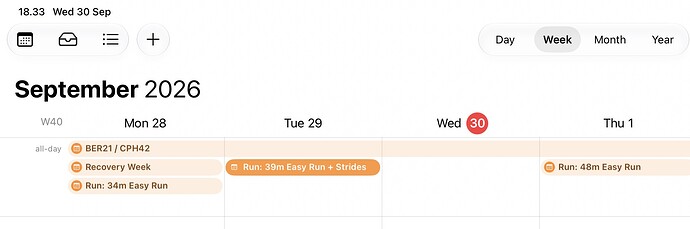
I enjoy the feature to export the Intervals.icu calendar so I can see my planned workouts in my normal day-to-day Google Calendar. However, I’d like to hide the Notes, since they’re generally not relevant on that calendar.
Somehow I managed to do this last year with my season goals that I recorded in a season-long note, but this year I can’t seem to figure out how to do this. Am I overlooking something simple, or was the last time some sort of bug?
I recently discovered the possibility of using multiple-day notes to frame various training periods in the fitness chart.
It’s so cool!
However, a little annoying for me is that these notes are included in the calendar export and take up space on each day in my personal calendar, where I don’t need these at all.
It would help if I could individually specify for each note whether or not it should be included in the export (while keeping include=yes as default).
I hope this would not be a difficult change to make.
Bump! Would really love to be able to filter what goes to the exported calendar. I set my training blocks with a note over the whole block. However, when exported it bloats my google calendar.
I am in the same boat! Would love some sort of filter to control what is actually shown im my personal calendar. I would like only the planned workouts.
Bumping this one - and copying my post from a different thread.
When I subscribe to my Intervals.icu calendar in my native calendar app (iOS), it looks like this. I would prefer to only have my actual workouts. I get that some may have other preferences, so I would love to be able to tick off what exactly should sync to my calendar