Gregaria-mcp: Remote MCP server for Intervals.icu (no local setup)

EN

gregaria-mcp: a remote MCP server for Intervals.icu (no local setup, no exposed secrets)

First, a thank you to @david for his collaboration in making this integration possible on the Intervals.icu side — much appreciated.

Most Intervals.icu MCP integrations out there require IT expertise, i.e running a local server — cloning a repo, installing Node/Python, managing an API key in a config file. That works fine at a desk, but it kills the actual use case for most of us: checking your training plan or logging a quick note while you’re on the bus, train, or subway.

gregaria-mcp (https://mcp.gregaria.app/) is a remote MCP server. No install, no local runtime, works from any device — phone included.

A few reasons I think this is the better approach:

**•	Zero setup.** Add the connector URL in Claude, log in with Intervals.icu OAuth, done. No cloning repos, no dependency hell.

**•	No secrets in plain text.** Direct API calls mean pasting your API key somewhere --- a script, a config file, a chat window. OAuth means Intervals.icu handles the auth, and you can revoke access anytime from your account settings, same as any other connected app.

**•	Nothing stored server-side.** The server doesn't keep a copy of your data --- it's a pass-through to your own Intervals.icu account.

**•	Works anywhere.** Since there's no local process to keep alive, it works the same from your laptop, your phone, or any MCP-compatible client --- not tied to one machine.

**•	No maintenance burden.** No updates to pull, no runtime versions to keep patched, no risk of a stale local server with old permissions lying around.

Right now it’s built for Claude. I’m planning to bring support to other AI providers as well — ChatGPT is on the radar, though testing there currently requires a paid subscription, so that’ll take a bit longer.

If you’re intimidated by the local-setup route, or just want to check your TSS from the platform between stops, this might be for you: https://mcp.gregaria.app/

ES

gregaria-mcp: un servidor MCP remoto para Intervals.icu (sin setup local, sin secretos expuestos)

Antes que nada, gracias a @david por su colaboración para hacer posible esta integración del lado de Intervals.icu — muy agradecido.

La mayoría de las integraciones MCP para Intervals.icu que hay dan vueltas alrededor de expertise de IT, por ejemplo correr un servidor local: clonar un repo, instalar Node o Python, guardar una API key en un archivo de config. Eso funciona bien sentado en un escritorio, pero mata el caso de uso real para la mayoría de nosotros: chequear el plan de entrenamiento o dejar una nota rápida mientras vas en el bondi, el tren o el subte.

gregaria-mcp (https://mcp.gregaria.app/) es un servidor MCP remoto. Sin instalación, sin runtime local, funciona desde cualquier dispositivo — celular incluido.

Algunas razones por las que creo que este enfoque es mejor:

**•	Cero setup.** Agregás la URL del connector en Claude, te logueás con OAuth de Intervals.icu, y listo. Nada de clonar repos ni pelear con dependencias.

**•	Sin secretos en texto plano.** Las llamadas directas por API te obligan a pegar tu API key en algún lado --- un script, un config, una ventana de chat. Con OAuth, Intervals.icu maneja la autenticación, y podés revocar el acceso cuando quieras desde la configuración de tu cuenta, como cualquier otra app conectada.

**•	No guarda nada del lado del servidor.** El server no se queda con una copia de tus datos --- es un pasamanos hacia tu propia cuenta de Intervals.icu.

**•	Funciona desde cualquier lado.** Al no depender de un proceso local corriendo, funciona igual desde tu notebook, tu celular o cualquier cliente compatible con MCP --- no está atado a una sola máquina.

**•	Cero mantenimiento.** Sin updates que bajar, sin versiones de runtime que parchear, sin riesgo de un servidor local viejo con permisos olvidados dando vueltas.

Por ahora está armado para Claude. La idea es sumar soporte para otros proveedores de IA más adelante — ChatGPT está en el radar, aunque probar ahí hoy requiere una suscripción paga, así que eso va a llevar un poco más de tiempo.

Si el setup local te frena, o simplemente querés chequear tu TSS desde la plataforma entre parada y parada, esto puede servirte: https://mcp.gregaria.app/

3 Likes

This is a great idea. I actually thought about making this exact thing a few months ago and added it to my long list of things I want to build but glade someone else did.

Is it free?

Absolutely free! :slight_smile:

2 Likes

Is the full interval.icu API exposed to the MCP?

Right now it supports the following:

Athlete

  • get_athlete_info — profile (FTP, LTHR, power/HR zones, weight)
  • get_power_curve — mean-max power curve
  • get_fitness_summary — CTL/ATL/TSB over time
  • get_athlete_sport_settings — per-sport settings
  • update_sport_settings — updates zones/thresholds (FTP, LTHR, max HR)

Activities

  • get_activities — recent activities
  • get_activity_details — single activity detail
  • get_activity_intervals — detected intervals
  • get_activity_streams — time-series data (power, HR, etc.)
  • get_activity_messages — activity comments
  • post_activity_message — post a comment/feedback
  • update_activity — update metadata (name, description, type)
  • delete_activity — permanently delete an activity
  • update_activity_interval — fix or create an interval

Events (calendar)

  • get_events — events in a date range
  • get_event_by_id — single event detail
  • add_or_update_event — create/update an event (planned workout, note)
  • delete_event — permanently delete an event
  • delete_events_by_date_range — permanently delete events in a range

Analysis

These tools aren’t Intervals.icu endpoints themselves — they’re server-side aggregations gregaria-mcp builds by combining several real Intervals.icu API calls, then returns the processed result as
JSON.

The other tools (get_activities, get_athlete_info, get_wellness, etc.) are near 1:1 mappings of a single Intervals.icu endpoint. The analyze_* tools are gregaria-mcp’s added-value layer, so the LLM doesn’t have to do that fan-out itself and burn tokens/round-trips.

  • analyze_activity — comprehensive analysis of a single activity
  • analyze_progress — athlete’s progress over a period
  • analyze_training_load — training load and recommendations

Wellness

  • get_wellness — HRV, RHR, sleep, subjective feel
  • update_wellness — log manual wellness for a day

Note on multi-athlete use: any tool that takes an athlete_id (e.g. get_activities, get_wellness, analyze_progress) works for other athletes too, not just yourself — but only if your Intervals.icu account is coaching or following that athlete with the right permissions. That check happens on Intervals.icu’s side; if you’re not authorized for an athlete, you’ll get a 403 back.

If you need any tool that is unlisted, feel free to ask and I’ll add it ASAP.

It is open source? I would love to take a look at the prompts.

I had a bit of a brain storming session back when I first thought of this idea and I am trying to remember all the things that it should have.

It should require user permission for any delete, update, or add events. I want to make sure I am granting permission before its making any updates.

It should include prompt instructions for drawings some standard jsx graphs like TSB, load progression that kind of thing.

I can make the repo public, no problem—nothing to hide.

Just to clarify, since it’s an MCP (a bridge between Claude and Intervals.icu), it doesn’t contain any prompts. Those would live in a plugin, skill, or agent (essentially markdown files).

This repo is almost a 1:1 wrapper for the Intervals.icu API endpoints, with the exception of the analyze_* tools that orchestrate calls to multiple endpoints to avoid fan-out. Its sole purpose is to act as a connector, rather than defining the specific criteria that each coach or athlete would provide through projects, skills, etc.

Permissions are fine-grained and managed by Claude itself, defaulting to “ask-first” for every tool offered. You can, of course, also set them to “never” or “always”.

As for the name Gregaria, it’s a nod to the domestique in cycling—the selfless rider who does the dirty work so the team leader can take the win.

I was actually trying to build a generic agent for this (gregaria), but I ended up scrapping it. The reality is that every sport (triathlon, running, trail, cycling, swimming), athlete profile (pro, father of two), coaching philosophy (pyramidal, polarized, etc.), and personal situation (dealing with the World Cup :joy: :argentina: , schedule, recovering from injury, balancing work and family) is completely different. A one-size-fits-all approach just doesn’t cut it.
When I say “context,” I mean all of that: the specific demands of the sport, the coach’s unique philosophy, the exact target event and its timeline (training for a Full Ironman is worlds apart from a Sprint, just like a Gran Fondo is completely different from a Criterium), current or past injuries, and the athlete’s real-life constraints.

For the domestique to actually be useful, they need to know the specific race plan—which is exactly why we can’t skip the initial “interview” to gather all that crucial context. That interview itself is a skill that should persist within the AI project or memory, so Gregaria can continuously reference it as it supports the athlete.

I have never built an MCP myself but from what I understand I thought they did or could contain prompts.

I assume it would be very similar to how your analyze tools function.

1 Like

I just pointed GPT 5.6 Sol at this repo and asked about adding graphing prompts and this is what it said.

Yes. This MCP can expose MCP prompts alongside its existing tools.

Right now, the server only calls registerTools(server) when it initializes. The tools themselves are split into modules and registered centrally from lib/tools/index.js. You could follow the same pattern for prompts.

For example:

// lib/prompts/index.js
import { z } from "zod"

export function registerPrompts(server) {
  server.registerPrompt(
    "build-fitness-chart",
    {
      title: "Build a fitness chart",
      description:
        "Instructions for creating a JSX graph showing fitness, fatigue, and form.",
      argsSchema: {
        chartGoal: z
          .string()
          .optional()
          .describe("What the user wants the graph to communicate"),
      },
    },
    ({ chartGoal }) => ({
      messages: [
        {
          role: "user",
          content: {
            type: "text",
            text: `
Create a JSX chart for Intervals.icu fitness data.

Goal:
${chartGoal ?? "Show fitness, fatigue, and form over time."}

Graph rules:
- Use a time-series line chart.
- Use date as the x-axis.
- Plot fitness, fatigue, and form as separate series.
- Keep fitness and fatigue on the same scale.
- Clearly distinguish negative form values.
- Include readable tooltips and a legend.
- Handle missing data without connecting misleading gaps.
- Prefer a responsive React component.
- Return complete JSX, including imports.
- Do not invent data fields. Use the exact fields returned by the MCP tool.
            `.trim(),
          },
        },
      ],
    })
  )
}

Then update the MCP route:

import { createMcpHandler, withMcpAuth } from "mcp-handler"
import { registerTools } from "../../../lib/tools/index.js"
import { registerPrompts } from "../../../lib/prompts/index.js"

const mcpHandler = createMcpHandler(
  (server) => {
    registerTools(server)
    registerPrompts(server)
  },
  {},
  { basePath: "/api" }
)

The important limitation

An MCP prompt is generally user-selectable, not permanent hidden instructions automatically injected into every conversation.

So there are three different approaches:

1. MCP prompts

Best when you want explicit workflows such as:

  • build-fitness-chart

  • build-power-curve-chart

  • build-weekly-training-load-chart

  • build-activity-comparison-chart

The user or MCP client selects the prompt. This is the cleanest standards-based solution.

2. Tool descriptions

Best when the instructions must influence the model whenever it calls a particular tool.

For example, the description for get_fitness_summary could say:

Returns data suitable for fitness, fatigue and form charts. When visualizing
this result, use date on the x-axis and the exact fitness, fatigue and form
properties returned by the tool. Do not calculate substitute values unless
the user requests it.

This improves how the model interprets that particular tool, but tool descriptions should not contain several pages of JSX guidance. Excessively long descriptions consume context and can make tool selection worse.

3. MCP resources

Best for a substantial charting reference guide, reusable JSX examples, schemas, component conventions, and edge cases.

You could expose resources such as:

gregaria://guides/jsx-charts
gregaria://guides/fitness-chart
gregaria://guides/power-curve-chart

Then a prompt can tell the model to use the relevant resource, or the user can explicitly request it.

What I would use here

I would combine all three:

  • Short semantic guidance in each tool description

  • Detailed chart specifications and examples as resources

  • One prompt per major chart type that combines the tool workflow and chart guide

For example, a build-power-curve-chart prompt could direct the model to:

  1. Call get_power_curve.

  2. Preserve duration values correctly.

  3. Choose logarithmic or categorical duration spacing appropriately.

  4. Distinguish watts from watts/kg.

  5. Produce the exact JSX structure you prefer.

  6. Read gregaria://guides/power-curve-chart for a canonical example.

That is more reliable than stuffing every instruction into the MCP server’s general initialization. Also, these prompts will only help clients that properly support MCP prompts. Since this repository is specifically aimed at Claude custom connectors, you should test whether Claude’s current connector UI exposes or automatically uses server prompts the way you expect. The underlying MCP support and the client’s UX are separate issues.

The repo already uses @modelcontextprotocol/sdk and mcp-handler, so this is an incremental change, not a redesign.

It looks like you are using claude code for this so basically just ask Fable to spin up and orchestrate some opus/sonnet sub agents to add this feature and should be able to implement this feature in a few minutes.

Thanks for digging into this — you’re right that MCP prompts are a real primitive, that was never in question.

The reason I’m not adding them isn’t technical, it’s a design choice. Today, with zero extra code, you can already ask Claude “compare the TSB of these two athletes as a JSX chart” and it’ll do it — it has the data through the existing tools, and it’s smart enough to write the chart on the spot, including things I’d never think to pre-build (multi-athlete comparisons, whatever cut you want). A canned build-fitness-chart prompt would actually be more limited than that, not less — it locks you into one shape someone else decided in advance.

And it doesn’t save tokens either — the model still has to read the same data and emit the same JSX either way. A stored prompt template only saves you typing the request once; it does nothing for cost or latency. So there’s no efficiency case for moving it into the server.

Where I want to keep gregaria-mcp is: a thin, reliable connector — auth, per-athlete isolation, clean data. That’s the part that’s actually hard to get right and worth owning. Rendering is a presentation choice best left flexible, at the model/skill layer, not baked into a fixed catalog on my end.

Appreciate the engagement — keep the feature requests coming on the data/tools side, that’s exactly where I want this to grow.

2 Likes

That makes sense and is probably the better long-term approach. Frontier LLMs should have no trouble working out the required steps as needed.

On the confirmation request, would it be possible to implement a hard permission check rather than relying on the model to ask for confirmation?

From looking at the GitHub code, it appears to be a soft instruction to request confirmation, rather than a technical restriction that prevents write actions until the user explicitly approves them. If that is correct, the AI could theoretically modify data without asking first.

I may be misunderstanding how this is implemented. I have never built an MCP server myself, but I use AI extensively and have some experience working with MCP.

Just tried using the MCP and it seems to work well from what I’ve see so far. The GitHub page gives a “not found” now though, has it moved?

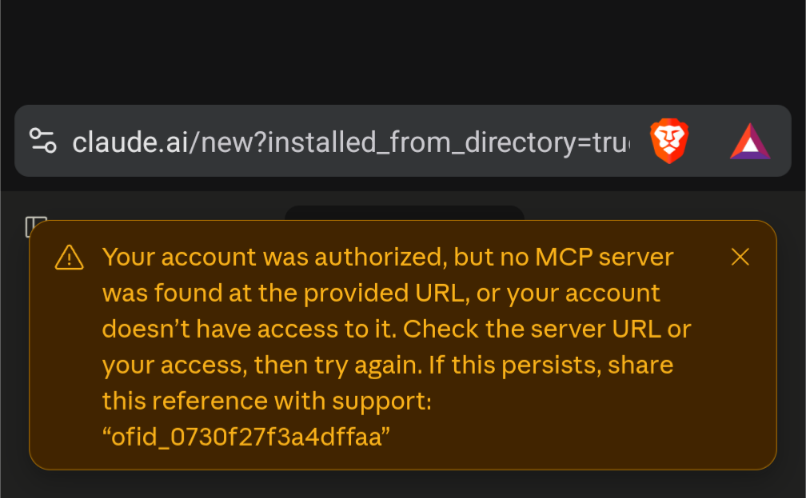
Using Claude app on Android, I don’t see this in the list of connectors, am I missing something?

Here’s what I see after oauth completes

Never mind, initially i had the mcp address in as simply mcp.gregaria.app, Only visiting that website did I get the full mcp url:
https://mcp.gregaria.app/api/mcp

does the get_wellness function return only these parameters?
if so, can you make it get all wellness variables, including custom ones (or add another call for that)?

Hey , could you add some functions to create notes, races , manual activities,… ?

Thanks

Given the concerns about data handling, I’ve made the repo public again. This is just hosted on Vercel — nothing too fancy - (free-tier). I built it burning some Claude tokens. I got tired of local setups (MCPs that aren’t hosted remotely), since I just want to be able to query things “on the go / cellphone.”

I accept PRs, yes, but only if: they don’t aim to store information, manage prompts, or try to do things that LLMs already handle well (e.g. permission control).

This is an adapter, nothing more. It does write workout notes and training plans, though — it’s basically a copy of the most-used operations from David’s public API. why? to avoid exposing api-keys.

The additional goal is to simplify setup (via OAuth). For now I have no intention of adding capabilities or heavy processes to it (that’s what skills are for). It runs on free infrastructure. It may have a “cold start” since it’s serverless (free-tier), so the first response might take a bit while it warms up. Folks, this is an attempt to share something that’s useful to me and a few friends. If it turns into more of a headache than anything else, I’d rather put that time into my training, and I’ll make it private again (you can always clone it and host your own infrastructure, or burn your own tokens).

Hopefully David ends up adding an MCP to his official stack!

2 Likes

Many, many thanks! This works great!