I’ve done a few longer rides recently and switched my Garmin to UltraTrac to help stretch the battery life. Once uploaded and processed, the activities show roughly half of the total time that Garmin recorded. All of the data is there in the graphs, but the top-line activity time isn’t correct. I know UltraTrac decreases the GPS ping rate, so the distance tends to be slightly short due to cutting corners, but is the reduced number of GPS pings somehow impacting the total activity time in Intervals?
Go to the Actions - Settings menu and check ‘ignore velocity data’.
That will avoid Intervals considering the ‘no new GPS’ data, as ‘not moving’.
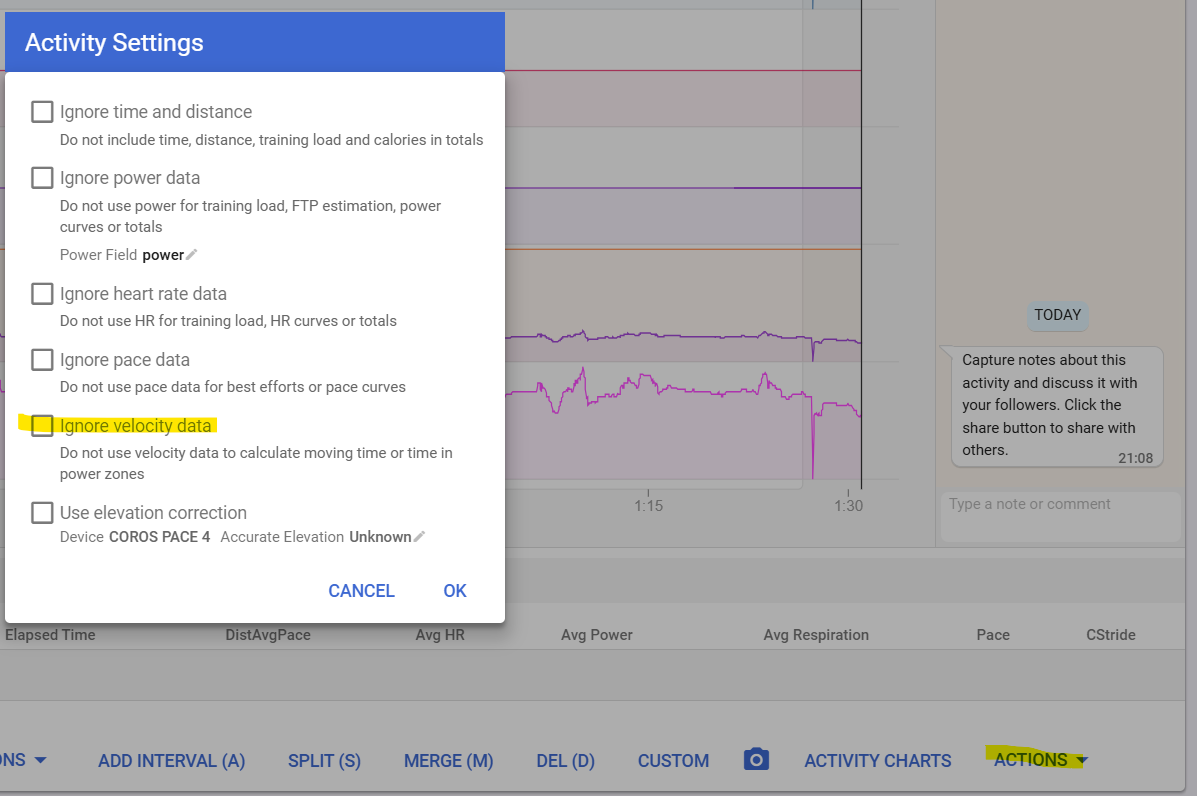
I have never heard of UltraTrac, but I guess it is an extension to Smart Recording. Intervals wants second by second data for everything to work by default. The above setting will probably solve your issue. If not, screenshot the Actions - Edit data to see how much data is in the activity file, or even better, make one of those available for download, here or per PM. You can also send one per mail to [email protected] describing your issue (but keep in mind that he is very busy…)
EDIT: a quick google search shows that data recording is limited to one point per minute in UltraTrac… That is for most people ‘unusable’ because you loose way to much info.
Source: https://www.reddit.com/r/GarminFenix/comments/1481jpv/ultratrac_gps_mode_vs_normal_gps_mode_for/
You are talking rides. How long are those? If multiday bike-packing, there are other solutions to keep up with battery life.
Awesome thank you!
And just 5+ hour rides being recorded on an older Garmin watch. I’m not necessarily looking for accurate distance via the watch, just the power and HR data, but want the time to match for when I’m back at training time.
From what I can tell its only the GPS data that has the reduced recording rate. HR and Power appear unaffected.