In a recent trail run the GAP calculation is off by a lot. Especially on a descent section where I was running at constant pace, it jumps up and down and shows paces completely unrelated to my actual effort. Below is a chart showing altitude, pace (blue) and GAP (red) of my run:
GAP is the result of a calculation from speed (pace), elevation change and body weight.
Issues usually come down to an erratic elevation profile.
Elevation can come from:
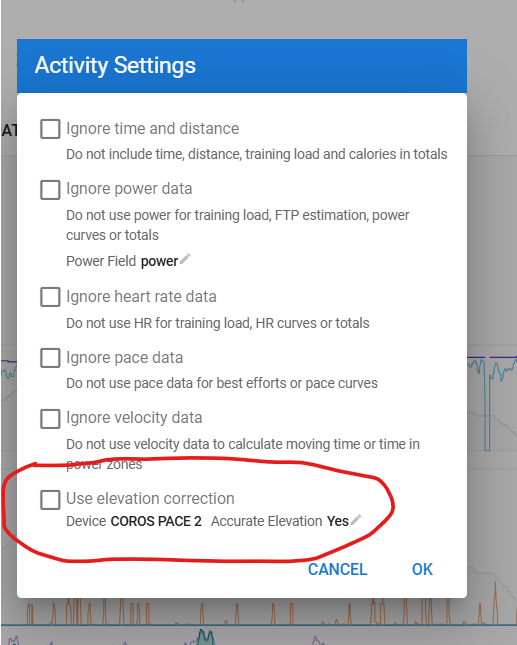
baro sensor in your device which can be faulty. In Intervals you can set your device and from a list of devices, it is known as having or not having a baro sensor. If you know that yours is defective, you can modify the use of it. Those settings are under the Actions - Settings menu.
If you don’t have a baro-sensor in your device, you can set to use elevation correction. Elevation is then queried from online maps. The quality of those maps depends on your region. The quality of the elevation from those maps depends on the quality of the GPS signal (and thus also on your device). A GPS signal that is low in quality will put you ‘next’ to the road your following iso on the road. That can cause huge errors when travelling mountainous areas. City courses can also give errors caused by bridges and tunnels.
Modern devices with correctly working baro sensor will give the best result. Devices without baro sensor and good quality GPS data, will normally do well too, but depend on the map quality. No baro sensor and poor GPS quality is a nightmare.
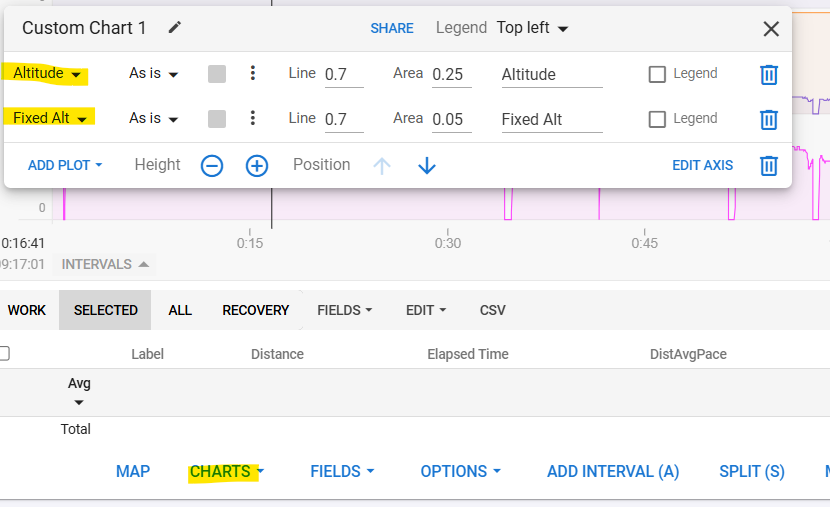
You can plot ‘fixed altitude’ next to ‘altitude’ if you want to check which one best suits your situation.
From you screenshot, I would think that you have a device with correctly working baro-sensor because the altitude stream seems correct. But you probably have the Elevation correction active and a GPS signal that is less good in quality (can be just because it was a run in a forest where GPS isn’t always clear).
Sorry for the late reply, I was traveling without reliable internet access. I can confirm that the problem is resolved when disabling elevation correction. I had tried to disable it before posting but must have missed something with “reprocessing the file” as I couldn’t get the result to show up correctly.