Hello,
I’d like to import files from my Calibre Biometrics tool, but currently I can only access them in CSV format. Is it possible to import them into Intervals or combine them with a .fit file that I save separately? I’m on a Mac, and the online file editing tools aren’t great.
If someone could explain this to me or see if it’s possible, I can send them the original files.
Thanks in advance.
I think you can using Download and upload activity streams CSV - #15 by david and a modified version of GitHub - mjcpires/combine_calibre_bio_garmin_csv: combinar 2 ficheiros CSV, um do calibre biometrics e outro de uma atividade desportiva num so ficheiro for csv export, ask the autor mjcpires · GitHub for help doing that.
But, if you don’t have privacy concerns about them, please share the original files.
Better for privacy, share your garmin´s Intervals.icu streams.csv without location and your Calibre Biometrics csv files.
Thank you for your reply.
Updated
Meanwhile a short cut:
Procedure: Creating a Combined Streams File for Intervals.icu
This guide outlines the steps to merge data from your Garmin Fit file (via Intervals.icu) with your Calibre CSV file using Microsoft Excel.
Prerequisites:
- Ensure your phone/computer and Garmin/Edge device have their times synchronized recently.
- Have the streams.csv file from Intervals.icu and your Calibre CSV file ready.
Step 1: Ensure Time Synchronization before doing a recording.
Accurate data merging requires perfectly synchronized timestamps.
- Reset your phone to ensure a fresh state for syncing and update from time servers.
- Re-sync time in your Garmin Edge device with that phone Garmin Connect.
- If possible, start recording on both devices at the same time.
Step 2: Prepare the CSV Files in Excel
- Check activity streams (power, heart rate, cadence etc.) and custom streams. Only these will be exported,
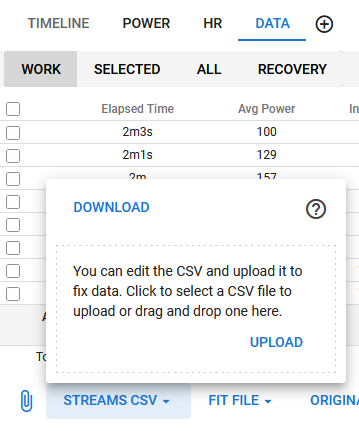
- Export streams.csv file from activity Data TAB
- Open the CSV file in Excel
- Open the CSV file exported from Calibre.
- You should now have both files open in separate Excel windows.
Step 3: Copy Data from Calibre to Intervals.icu File
- In the Calibre CSV file, identify and select the columns containing the data you need (e.g., Vo2, VCO2, RER…..).
- Copy these selected columns.
- Switch to the Intervals.icu streams.csv file.
- Click on the cell in the first empty column where you want the data to begin (e.g., column Z).
- Paste the Calibre data into this column, ensuring the rows align correctly with the corresponding timestamps(or Heart Rate or Power).
Important: Use the “David VO2 Master Customs Streams” and Missing some data from Tymewear - #11 by david as a reference for correct naming conventions and data mapping.
Step 4: Finalize and Upload
- Remove Unnecessary Columns from the combined file:
Delete any Calibre columns you don’t need, but keep all columns from theIntervals streams.csvfile to simplify the data and avoid potential conflicts. - Save the modified Intervals.icu file, ensuring you maintain the CSV format.
- Check that column headers in the CSV match Code in custom activity streams Type definitions. Create missing custom activity stream using the headers in the combined streams.csv as Code.
- Upload this combined streams.csv file back to the corresponding activity on Intervals.icu.
- Ensure persistence: Activity>> Data>>Export Fit File
2 Likes
Thank you so much, I’ll try that.
Yes thanks
Custom fields to create for Calibre Biometrics , what do you think about ?
Calibre HR,(bpm)
Calibre VO2kg,(ml/kg/min)
Calibre VCO2kg,(ml/kg/min)
Calibre VO2,(slpm)
Calibre VCO2,(slpm)
Calibre RER,(%)
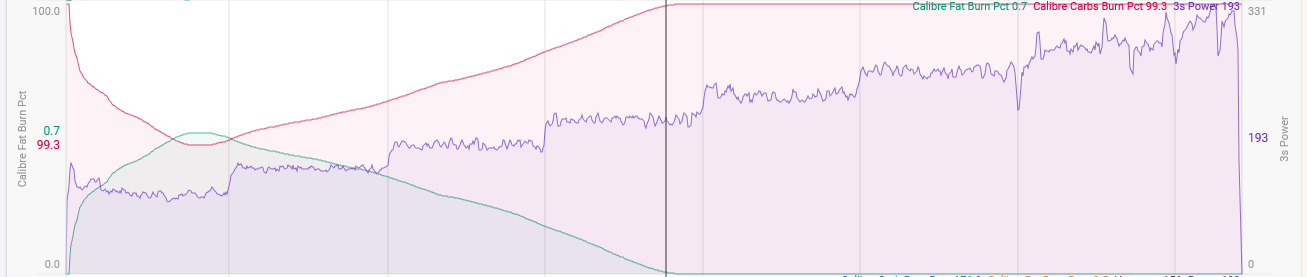
Calibre Fat Burn Pct, (%)
Calibre Minute Volume, (l/min)
Calibre Calorie Rate, (cal/min)
Calibre Respiratory Rate,(breaths/min)
Calibre Tidal Volume,(l)
Calibre VeqO2,(ratio)
Calibre VeqCO2,(ratio)
Done and public
1 Like
Great, that’s fantastic, thank you very much.
Question, have you ever used node.js ?
The parsing scripit i created uses node.js command line
Usage:
node CalibreIntervalsCSV.js <intervals_file.csv> <calibre_file.csv> <output.csv>
1 Like
No, I don’t know. I’m just as useless with computers as I am with cycling😂 I’ll take a look later. Thank you for your patience and availability.
This is the updated merger
https://storage.googleapis.com/intervals-icu-images/attachments/bcb3e5c4-8777-40ff-8b32-df1335c6969c
1 Like
Now working great
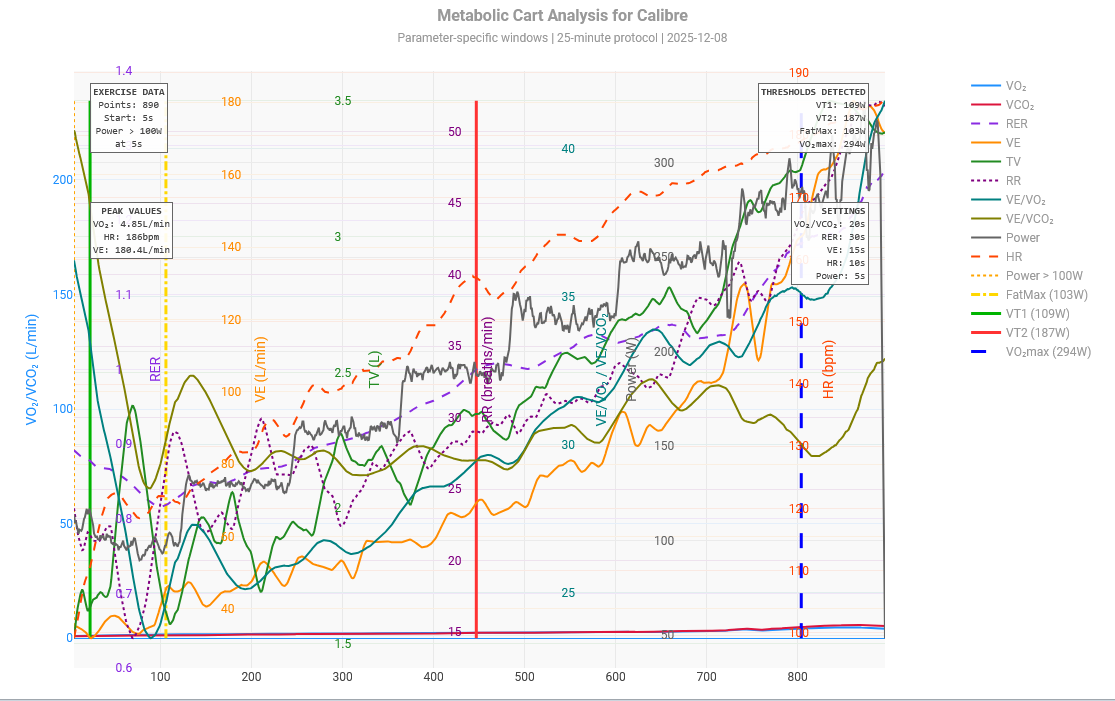
@GIGANON_BASTIEN Do you have any incremental tests with Calibre to estimate VTs and VO2max?
I haven’t had the sensor for long; I’ve only done a 30W/2’ test.
Wow, amazing.
Hello,
I follow all the suggested steps, but upon uploading the new streams.csv file, I am getting a popup notification saying “internal server error”. Any idea what is going wrong?
Thanks
Hassan