Export: a Intervals.icu FIT vs Dowload Original FIT

Hi @David,

I’ve done a detailed byte-level analysis comparing original Garmin FIT files against the same files exported by Intervals.icu. I found several issues I wanted to report with concrete evidence.

Before anything else — if I’m missing something obvious or there’s already a known workaround for any of this, please let me know. Happy to be corrected.


Bug #1 — General: exported FIT uses dev fields instead of standard FIT SDK fields

This is probably the most impactful issue for interoperability across all activity types (running, cycling, swimming…). When Intervals.icu exports a FIT file, it stores its data in developer fields (dev fields) rather than the standard FIT SDK field definitions.

The consequence is that any device or platform that reads the exported FIT — like Coros — either ignores or cannot parse the dev fields, so a significant portion of the activity data is silently lost on re-import. This affects all sport types, not just swimming.

The expected behaviour would be that exported FIT files use standard global message numbers and standard field definitions from the FIT SDK profile, with dev fields only used for Intervals-specific data that has no standard equivalent.

Is there perhaps an export mode or flag I’m not aware of that produces a cleaner, standard-compliant FIT? I searched the docs and the forum but couldn’t find one.


Bug #2 — General: standard fields present in the original FIT are dropped and re-added as dev fields

This compounds Bug #1 significantly and again affects all activity types. Several fields present in the original Garmin FIT using their correct standard FIT SDK field numbers are not passed through on export. If you then try to re-add them via custom streams or custom fields in Intervals.icu — even explicitly naming them with the correct FIT SDK standard name — they are still exported as dev_fields rather than mapped to their standard field number.

This is particularly painful for running and cycling where fields like these are well-defined in the FIT SDK and natively understood by platforms like Coros:

  • Left/right power balance (standard field: left_right_balance) — present in original FIT, lost on export, re-added via custom stream as dev_field, Coros cannot read it
  • Stride length (standard field: stride_length) — same situation
  • Any other standard metric added via custom streams suffers the same problem

This makes it impossible to use Intervals.icu as an intermediary for editing or enriching FIT files intended for re-import into Coros, Garmin Connect or similar platforms, because even well-intentioned additions using the correct standard field names end up invisible to those platforms.

The ideal fix would be a mapping layer in the exporter: if a custom field or stream name matches a known FIT SDK standard field name, export it using the correct standard global message and field number rather than as a dev_field.


Bug #3 — Swimming: length messages (msg #101) are lost on export

The exported FIT for swimming activities is missing all per-length data. Specifically:

  • Original file (from Garmin): 60 × length messages (global msg #101), each containing total_strokes, total_timer_time, cadence, avg_speed and length_type per 25m length
  • Exported file from Intervals.icu: 0 length messages

This means any tool that re-imports the exported FIT (Coros, TrainingPeaks, Golden Cheetah, etc.) loses all stroke count, per-length SWOLF, and per-length cadence data entirely. Combined with Bug #1, the exported swimming FIT is essentially unusable for re-import.


Thanks for the incredible work on Intervals.icu — these are edge cases but they matter a lot for athletes who want to use their data across multiple platforms.

3 Likes

Did you read that?

Yes, I read that! In my case though, I’m not syncing via Garmin API — I export my data from Apple Health using HealthFit. In the original FIT file the running dynamics records are all there, but when I download the modified version from intervals.icu (not the original), many of those FIT records are missing. So it seems like something is being stripped out during intervals’ processing as well.
It’s easy to check — if you download both files (the original and the intervals.icu version), and load in fitfileviewer.com you can clearly see the difference.

I don’t understand - did you download the Original Fit File or the one from intervals after analyzing?

Because, if you didn’t download the original fit file, it should obviously not be the original one …
The Original Fit File was for me always the same as the “Original” (from the original source). But it’s some time ago, I checked last

Yes, I downloaded both — the original FIT file and the one processed by intervals.icu — and there are clear differences between them.

Here’s my typical workflow: I upload the original FIT file to intervals.icu, then I make some adjustments within the platform — fixing occasional HR recording errors, tweaking a few values, reviewing the activity, etc. (not something I do often, but sometimes the file doesn’t record correctly). After that, I download the processed FIT file using the menu you showed.

The issue is that in the processed file, many of the standard fields defined in the Garmin FIT SDK are missing. The data is sometimes still there, but stored as developer fields instead of being mapped to their proper standard FIT message fields. So the processed file is not a clean equivalent of the original — it loses the standard field structure, which breaks compatibility with other tools and platforms that rely on the official FIT SDK field definitions.

Hoping this clears up any doubt.

1 Like

Actually, I know I can already do something similar workflow with fitfiletools.com — but the whole point is that doing it directly from intervals.icu would be much more streamlined and flexible. Being able to edit the binary FIT data straight from the platform is really powerful: it lets you fix values that apps sometimes miscalculate, or even add extra fields that are missing. I know it’s not a common use case, but I wanted to ask just in case I’m missing a menu or option somewhere — or whether this is a known limitation, a bug, or simply something not yet supported. Cheers!

That’s not supported. There’s only basic data in the intervals exported FIT.

Hello, @MedTechCD, yes and no.
I mean fair point — but that’s actually where the issue lies. Custom fields and streams added to an activity are already included in the downloaded FIT file, but they come out as developer fields (dev_fields) instead of being mapped to their proper standard FIT SDK equivalents. That’s exactly what breaks compatibility with other platforms.

The ideal fix would be a mapping layer in the exporter: if a custom field or stream name matches a known FIT SDK standard field name, export it using the correct standard global message and field number rather than as a dev_field. This way it would be automatic for everyone — the only requirement is naming the custom fields consistently with the FIT SDK standard, which honestly isn’t hard to do, especially with AI-assisted mapping.

Right now I handle this with a Python script on my end, but it’s quite tedious. Having this natively in intervals.icu would make FIT exports significantly more compatible across the board and open up some really useful workflows. Just putting it out there as a suggestion!

As example, download from intervals.icu and open on: https://www.fitfileviewer.com/


and open on: https://www.fitfileviewer.com/
The official FIT SDK standard reference: FIT SDK | Garmin Developers

It’s not supported at this time, so it’s not a bug.
Put it in Feature requests.

Clarity required. What;s your original source data? A Garmin Device? Apple Watch? Because you stated HealthFit.

HealthFit does not represent original data. It is re-constituted data as well and it also strips out stuffs (as not everything is supported via Apple Health)

The fields you show in the screenshot above, these are not normal FIT Standard Fields. Some are but most aren’t

The Intervals.icu generated fit file is created from the processed data in Intervals.icu. So stuff that didn’t make it out of the original file into Intervals.icu won’t be in it. The laps are from the Intervals.icu intervals and not the original laps. Intervals.icu doesn’t preserve the original lengths.

Regarding custom fields that match standard fit file fields, I can look at that. Can you provide some examples?

2 Likes

Hello @David and @app4g, of course, let me provide some examples. I’ll try to explain this as clearly as I can, though it’s a somewhat complex topic.

That is exactly the behavior I expected from Intervals.icu. At this point, Intervals.icu is my final command center for data management — regardless of where I record a workout, I always make sure it lands in Intervals.icu first.

Sometimes it’s necessary to fix corrupted data, remove artifacts, or add data that wasn’t captured by a specific app or device. For example, Stryd does not include calories in the FIT files exported from PowerCenter. So I import those files into Intervals.icu, edit or enrich the data, and then export the result to distribute it to Apple Health / COROS / Suunto.

To handle this, I’ve built custom flows in Intervals.icu for all my data sources (Stryd in this example, or any other), and I’ve created custom fields that mirror the standard FIT fields — specifically the data I want to preserve, since Intervals.icu rebuilds the FIT file from scratch on export.

However, here is the problem I’m running into. When I export a FIT file from Intervals.icu, all the custom fields I created — whether in the session, record, or other messages — are written as developer fields (0_dev_fields), following the FIT 2.0 developer data spec. While this is technically valid, it causes serious interoperability issues because FIT files are binary and field positions are fixed. Apps like COROS expect to find stride_length at a specific field definition number in the standard message structure — not in the developer fields section.

That’s why I proposed the improvement: if I name a custom field using the exact same name as a standard FIT field, the exporter should write it to its original, standard field position in the FIT message — rather than dumping it as a developer field prefixed with 0_dev_.

Of course, here are some concrete examples:
Stryd Running at file file:

  • RECORDs:
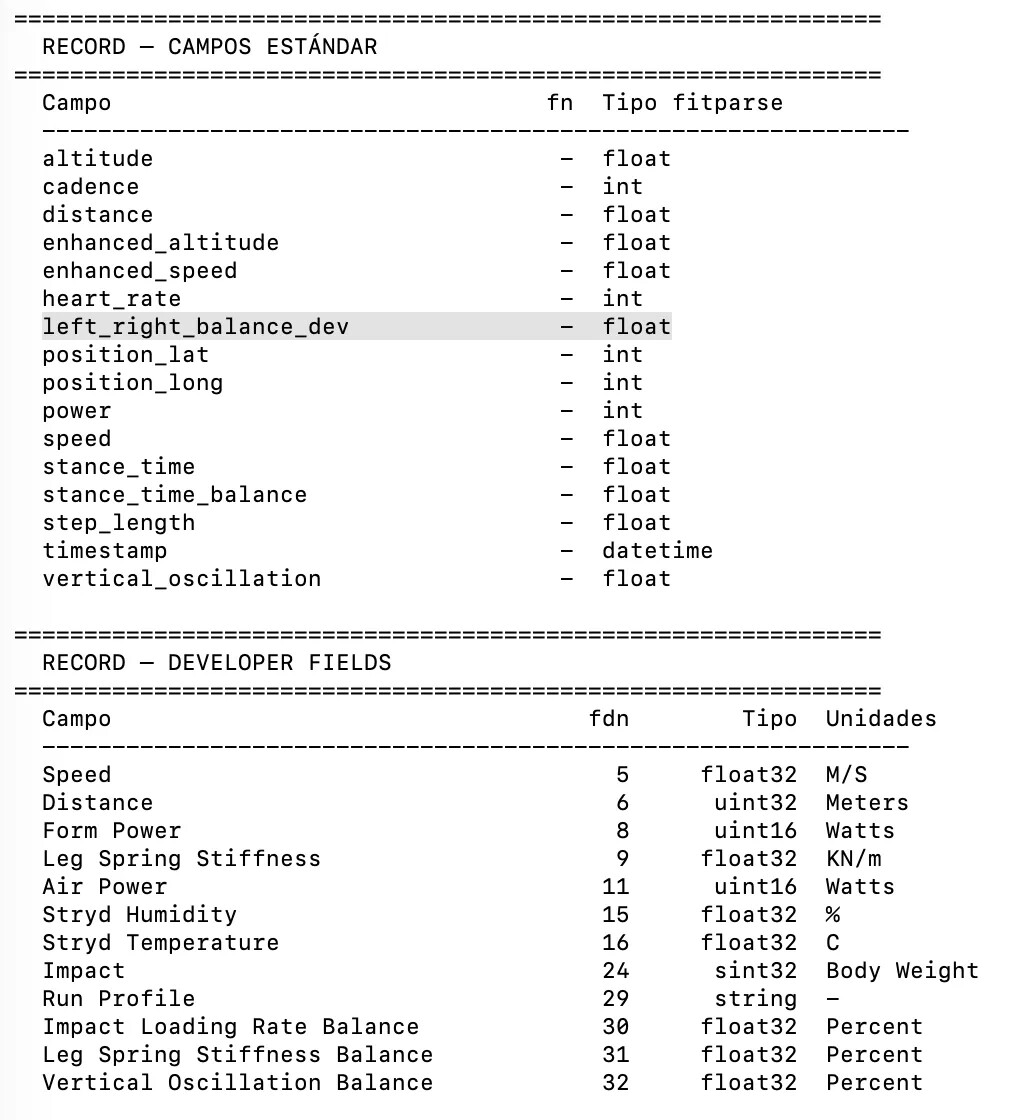
timestamp	position_lat	position_long	heart_rate	cadence	distance	power	**vertical_oscillation**	**stance_time**	**enhanced_speed**	**enhanced_altitude**	**stance_time_balance**	**step_length**	_x_Air Power_0_11	x_Form Power_0_8	x_Leg Spring Stiffness_0_9	x_Speed_0_5	x_Distance_0_6	x_Stryd Temperature_0_16	x_Stryd Humidity_0_15	x_Impact_0_24	x_Leg Spring Stiffness Balance_0_31	x_Vertical Oscillation Balance_0_32	x_Impact Loading Rate Balance_0_30_

standard ||dev_fields for stryd

Developer for stryd:

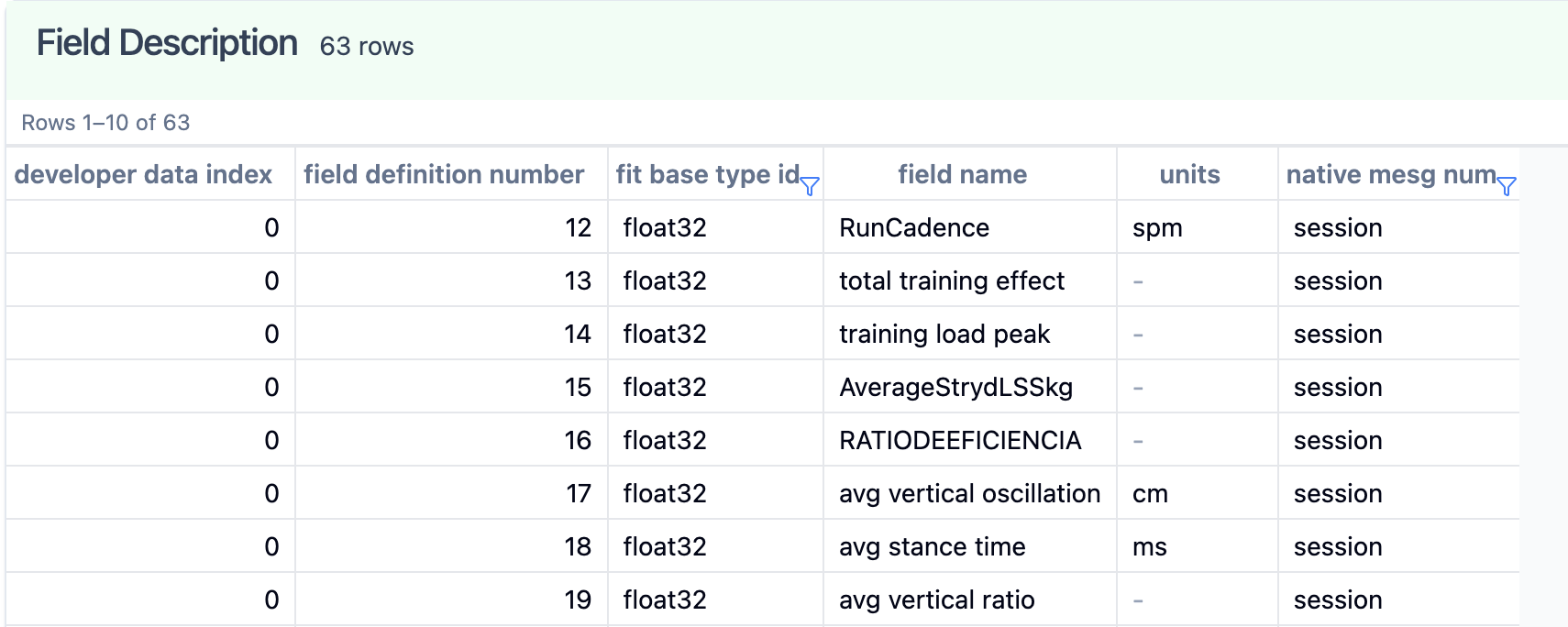
developer_data_index field_definition_number fit_base_type_id field_name units native_mesg_num
0 11 uint16 Air Power Watts
0 8 uint16 Form Power Watts
0 9 float32 Leg Spring Stiffness KN/m
0 5 float32 Speed M/S bike_profile
0 6 uint32 Distance Meters sdm_profile
0 16 float32 Stryd Temperature C training_settings
0 15 float32 Stryd Humidity %
0 24 sint32 Impact Body Weight
0 31 float32 Leg Spring Stiffness Balance Percent
0 32 float32 Vertical Oscillation Balance Percent
0 30 float32 Impact Loading Rate Balance Percent
0 29 string Run Profile

LAPS:

timestamp	message_index	event	event_type	start_time	start_position_lat	start_position_long	end_position_lat	end_position_long	total_elapsed_time	total_timer_time	total_distance	avg_power	lap_trigger	sport	wkt_step_index	enhanced_avg_speed

SESSION:

timestamp	event	event_type	start_time	start_position_lat	start_position_long	sport	sub_sport	total_elapsed_time	total_timer_time	total_distance	avg_cadence	avg_power	total_training_effect	first_lap_index	num_laps	trigger	enhanced_avg_speed	enhanced_max_speed**	_x_Run Profile_0_29_

standard ||dev_fields for stryd


Now the same for Download intervals.icu file (processed):

Records:

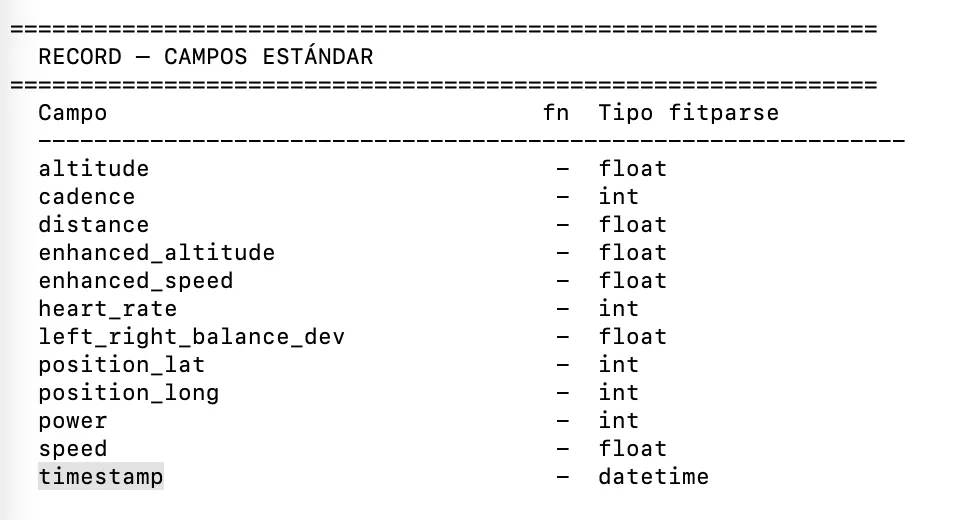
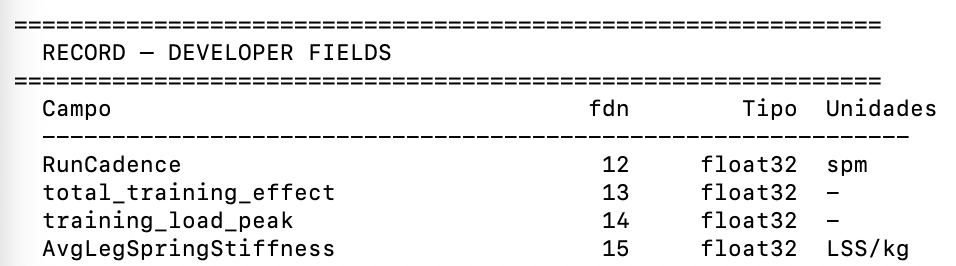
timestamp	position_lat	position_long	heart_rate	cadence	distance	power	enhanced_speed	enhanced_altitude	**x_stance_time_0_48**	**x_step_length_0_49**	x_Air Power_0_50	x_Form Power_0_51	x_Stryd Humidity_0_52	x_Impact_0_53	x_Impact Loading Rate Balance_0_54	x_Leg Spring Stiffness_0_55	x_Leg Spring Stiffness Balance_0_56	x_stance_time_balance_0_57	x_Stryd Temperature_0_58	x_Vertical Oscillation Balance_0_59	x_vertical_oscillation_0_60	x_RunCadence_0_61

SESSION:

timestamp	message_index	start_time	sport	sub_sport	total_elapsed_time	total_timer_time	total_distance	avg_heart_rate	max_heart_rate	avg_cadence	max_cadence	avg_power	max_power	total_ascent	total_descent	first_lap_index	num_laps	normalized_power	training_stress_score	intensity_factor	threshold_power	total_work	enhanced_avg_speed	enhanced_max_speed	enhanced_avg_altitude	enhanced_min_altitude	enhanced_max_altitude	x_RunCadence_0_12	x_training_load_peak_0_13	x_AverageStrydLSSkg_0_14	x_RATIODEEFICIENCIA_0_15	**x_avg_vertical_oscillation_0_16**	x_avg_stance_time_0_17	x_avg_vertical_ratio_0_18	x_total_cycles_0_19	x_AvgStrydAirPowerPercent_0_20	x_AVGStrydTemp_0_21	x_AVGFormPower_0_22	x_AVGRITMOwork_0_23	x_AVGHR_0_24	x_IndiceRunning_0_25	x_DecouplingHR_0_26	x_CosteCardiaco_0_27	x_Economiadecarrera_0_28	x_RatioFormPower_0_29	x_RatioWorkReco_0_30	x_IntensidadRelativa_0_31	x_RatioGCTZancada_0_32	x_AVGStrydOscilacionVertical_0_33	x_RESUMENACTIVIDAD_0_34	x_AVGStrideLength_0_35	x_AVGEficienciaEF_0_36	x_AVGPotenciaMedia_0_37	x_RatedPerceivedExertion_0_38	x_AVGStrydHumidity_0_39

Concrete examples — comparing the original Stryd FIT file vs. the Intervals.icu export:

Field FIT SDK Standard (field def #) Intervals.icu export
stance_time Field 41 Dev field 48x_stance_time_0_48
step_length Field 85 Dev field 49x_step_length_0_49
stance_time_balance Field 84 Dev field 57x_stance_time_balance_0_57
vertical_oscillation field 39 dev field 60 → x_vertical_oscillation_0_60

These are just a few examples from the standard FIT SDK field definitions. There are more — and beyond these generic ones, Stryd also has its own manufacturer-specific nominal fields, but that might be a separate and more specific conversation. Getting the standard fields mapped correctly would already be a massive improvement.

Why does this matter? Because these fields are written as developer fields instead of their native standard positions, they break compatibility with virtually every downstream consumer. The field name is preserved, but since it lives in the dev data section rather than at the expected binary offset, parsers like COROS, Suunto, and Apple HealthKit simply don’t recognize them.

I’m currently working around this in a Python script — I scan for the field name and remap it to the correct standard field definition on export — but it would be far cleaner and more reliable to have Intervals.icu handle this natively. The logic would be straightforward: if a custom field name matches a standard FIT SDK field name, write it to the standard field position instead of as a developer field.

I hope this is clear enough — happy to share actual FIT file samples directly if that helps. I have examples from running with Stryd, running without, and swimming — the same issue appears across all of them, as many fields that exist in the original file don’t survive into the Intervals.icu export in their standard form.


I’ve already tried to meet Intervals.icu halfway on this — when creating my custom fields, I deliberately used the exact same names as the standard FIT SDK fields (stance_time, step_length, stance_time_balance, etc.), hoping the exporter might recognize them and route them to their native field positions.

I understand that correctly mapping every possible standard field is probably the most complex part of this to implement. But the reverse logic should actually be quite simple: if a custom field name matches a known standard FIT SDK field, write it to the standard message field definition instead of the developer data section. No ambiguity, no guesswork — the SDK field definitions are fixed and well-documented.

It’s essentially a name lookup on export. The hard work of defining the fields has already been done on the user side.

This issue also affects swimming workouts — and arguably even more so, since it’s a less popular sport and therefore receives less attention from both device manufacturers and third-party apps. The result is that swim-specific FIT fields are even less likely to survive the export pipeline intact, and the ecosystem support for catching or correcting those gaps is much thinner.

Thank you very much for taking the time to look into this, David — it’s genuinely appreciated. I know this is a niche use case and the implementation details are not trivial, so I’m grateful you’re willing to consider it. As always, if you need actual FIT file samples to work with, I’m happy to share them directly. Keep up the great work with Intervals.icu — it truly is an outstanding platform.

Please, you don’t have to put every answer through AI.
No one will blame you if your answer isn’t perfect. I’m sick of reading repetitions just in other words spit out by a chatbot.

Jajaj, fair point! The reason my posts are a bit elaborate is that Spanish is my native language — it’s simply easier for me to explain complex technical concepts in Spanish first and then have AI translate them into English. That way the communication is clearer for everyone in the forum rather than me struggling through a broken English explanation. Hope that makes sense.

2 Likes

Also guilty. haha.

Just include in your prompt to “be direct and to the point, no fluff”.

Hi @david, @app4g :

After further testing and analysis over the past few days, I want to provide a more detailed and structured report. I’ll keep it concise.


Problem 1 — left_right_balance_dev not read by Intervals.icu

Stryd FIT exports from PowerCenter include left_right_balance_dev as a standard field (visible in Image 1). Intervals.icu does not read it — I’ve checked the default Balance stream and it loads no values at all. The field is also not available as an option in the custom streams selector.

Problem 1.1 — Swimming FIT fields (Apple Workout)

Same issue with swimming workouts recorded via Apple Workout. Many fields present in the original FIT (e.g. stroke type) are simply not available as selectable custom streams. I won’t extend this further here — happy to send a sample FIT file directly if you provide an email.


Problem 2 — Standard fields lost on export, remapped as Intervals dev fields


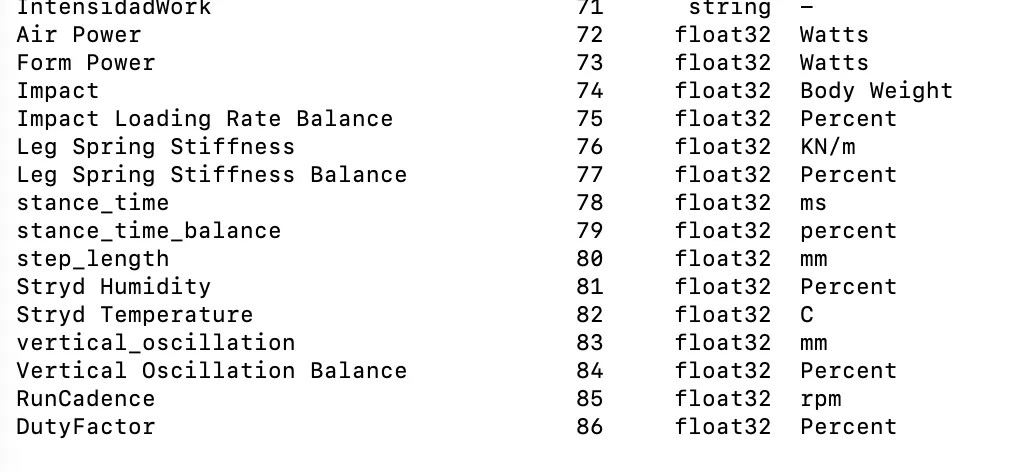
Comparing the original Stryd FIT (Image 1) vs. the Intervals.icu export (Images 2 & 3):

Field Original (standard fn) Intervals export (dev fdn)
stance_time fn 41 fdn 78
stance_time_balance fn 84 fdn 79
step_length fn 85 fdn 80
vertical_oscillation fn 39 fdn 83

These fields exist in the original file as standard fields. After processing, Intervals exports them as developer fields — which no external app reads.

I’ve already mapped my custom streams using the exact same field names as the Garmin FIT SDK standard. They’re still exported as dev fields.

Proposal: If the exporter detects that a custom field name/number matches a known standard FIT SDK field, and the native position (fn) is empty, write it to the standard position instead of as a dev field. No conflicts, clean output, full interoperability.


Problem 3 — Naming collision: step_length vs stride_length

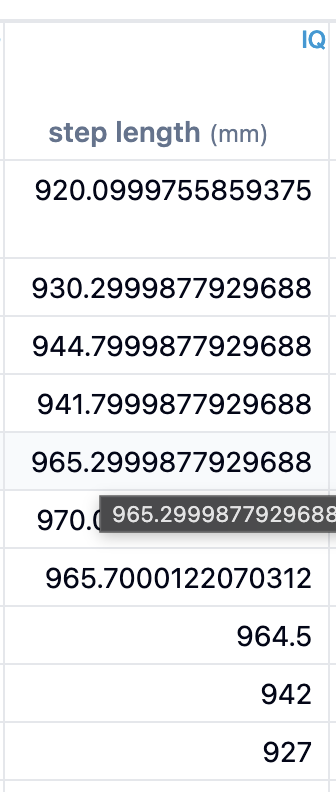
Intervals.icu stores the full stride value (~900mm) in a dev field named step_length. However, according to the Garmin FIT SDK, these are two distinct concepts:

  • step_length = a single step (one foot, ~450–500mm)
  • stride_length = a full stride, both feet (step × 2, ~900mm)

The value Intervals.icu is storing (~900mm) is correct for a stride, but it is being written under the wrong field name. This creates a direct semantic collision with the standard FIT SDK field step_length (fn 85, units: mm), which by definition stores the single-step distance.

The result is that any downstream parser reading fn 85 expecting ~500mm will receive ~900mm instead — silently doubling the actual step length with no error or warning.

The fix would be straightforward: rename the dev field from step_length to stride_length, which accurately reflects what is being stored and avoids the collision with the standard field definition.

This is easy to verify: downloading a FIT file from Intervals.icu and opening it with fitfileviewer.com clearly shows step_length values in the 920–970mm range — which are unmistakably stride values, not step values. A normal running step is ~450–500mm.


Thanks for your time reviewing this — it’s genuinely appreciated.