Endure HUD - Join the beta
Beta · Intervals.icu integration
Your Garmin data, live on your handlebars.
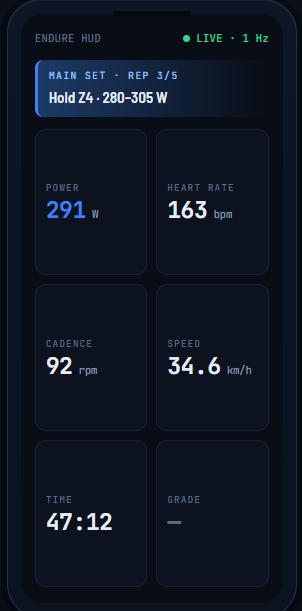
Endure HUD turns your android device into a training head-up display — big, glanceable numbers streamed from your Garmin watch, plus today’s planned workout and zones straight from your Intervals.icu account.
How it works
Three pieces, and you probably already own two.
Endure HUD doesn’t fight the Garmin app for the radio — it rides the bridge Garmin Connect already keeps open. A tiny data field on the watch relays your live metrics; the android app draws them.
Your Garmin watch
Runs the Endure Companion data field during your ride or run. It relays live metrics to your android device through the Garmin Connect bridge — no extra pairing, one connection.
The Endure HUD app
On your android device, in the bike mount. Reads that live feed and draws power, heart rate, cadence, speed, time and distance big enough to read at a glance. Screen stays on.
Intervals.icu (optional)
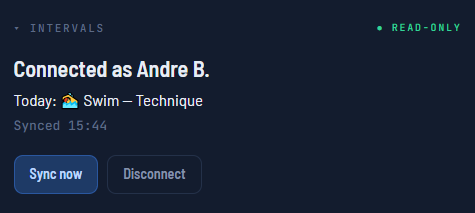
Connect your account and the HUD reads today’s planned workout and your zones — so the bars show your target for the current step, not just raw numbers.
Connect once. Your plan, on the bars.
This is the part I’d love this forum to kick the tires on. Endure HUD talks to Intervals.icu through its own OAuth app — read-only, nothing written back.
- ✓Today’s workout, structured. The HUD fetches your planned session at check-in and turns each step into a target on screen.
- ✓Your zones, auto-filled. Power/HR zones come from your Intervals settings — no re-typing them on the device.
- ✓Read-only & scoped. Only
CALENDAR:READandSETTINGS:READ. No webhooks, no writes, no surprises. - ✓Check-in model. One fetch when you connect and when the ride starts — tap Sync now anytime to pull a plan you just added.
Device support
Which Garmin watches work
The live feed needs a watch that can run the data field (Connect IQ 5.0+, so the field can transmit). The android device side runs on any modern Android.
Forerunner
- 970 · 965 · 955flagship
- 57042 / 47 mm
- 265 · 265SAMOLED
- 255 · 255S+ Music
- 165+ Music
fēnix
- 7 Pro · 7S Pro · 7X Progen 7
- 8 — 43 / 47 mmAMOLED
- 8 Solar — 47 / 51 mmMIP
- 8 Pro — 47 mmgen 8
Edge
- 540 · 840 · 1040gen 40
- 550 · 850 · 1050gen 50
- MTBoff-road
- Explore 2touring
Not supported: fēnix 5 / 5 Plus / 6, Edge 30 and older — Connect IQ on those is below 5.0, so the data field simply can’t transmit. It’s a platform limit, not a to-do.
Closed beta
Help me test it — three steps
I’m running a closed test on Google Play and looking for a handful of riders and runners to try it with real training data.
Send your email
Reply here, or email the Google account you use on your Android device to [email protected]. I add it to the tester list.
Accept the invite
Open the tester link and opt in:
play.google.com/apps/testing/com.endurelabbs.hud
Install & ride
Grab Endure Companion (free) from the Connect IQ Store for your watch, install Endure HUD from Play, connect Intervals, and go.
R$ 1,99/ ≈ US$ 0.95 in most countries
Heads-up: it’s a paid app, and Google charges the price even in a closed test. It’s a one-time purchase and it carries over to the final release — you won’t pay again.
Need: a supported Garmin watch**+** Endure Companion data field**+** an Android device
Endure HUD is an independent app. It is not affiliated with or endorsed by Intervals.icu — it uses the public Intervals.icu OAuth API with permission (a dedicated client, read-only).