nice
out of curiosity, which API endpoints will serve those 3 new information? /athlete/athlete.ID/sport-settings/ Haven´t found it yet 
nice
out of curiosity, which API endpoints will serve those 3 new information? /athlete/athlete.ID/sport-settings/ Haven´t found it yet
It is stored per sport on the wellness records. It should be on every day. That page pulls the 14 most recent days of wellness data and find the most recent sportInfo[] entry with eFTP for the sport.
So we can download a CSV from a custom chart on the Fitness page with an athlete’s eFTP history and upload those files as FTP.
edit: no, I can’t.
Any update on the checkbox?
I would definitely like the FTP is always eFTP option as suggested by @Gabriel_Vargas
How long is it gonna take? SIGH!
I’ve been playing with a custom activity field to set the activity FTP to eFTP, so its not changing the settings page but each activity is setup with the current eFTP. Anyone know a reason why this wouldn’t work? Thought it might be of interest to folk.
{
  activity.icu_w_prime = wellness.sportInfo[0].wPrime;
  activity.p_max = wellness.sportInfo[0].pMax;
  activity.icu_ftp = wellness.sportInfo[0].eftp;
}
The field is public called Fitness Signiture.
Oh! Exactly how do I use this?
Add another vote from me, this is great for beginners because the eFTP will keep updating as they improve.
Just for the record - this simple custom script will overwrite you FTP value of an activity with the eFTP value:
{
  activity.icu_ftp = wellness.sportInfo[0].eftp;
}
For planned workouts, you can use custom zones based on eFTP (I‘ve made one).
I haven’t used this feature before, does this have to be set up for each activity?
No, only once. Setup and done.
But maybe I should clarify the downside too:
You can’t overwrite the FTP value manually, it will always execute that script and overwrite it with eFTP again. It will also execute for every activity type, so it would be a better approach to include some activity type guards like an if statement for certain activity types.
Another approach could be to “only” overwrite the load value calculated by eFTP not by FTP. There is a thread in the forum where this was discussed and I remember I shared the script for that too. Downside again: if you forget that this script exists, you may wonder someday why the load is different than you might expect.
Third approach is to let FTP and eFTP live side by side, and create your own load calculation by eFTP (not overwriting the existing load value) and creating a custom fitness chart based on eFTP load.
Maybe nothing as easy as ticking an option box, but these are the current options to somehow get near that feature.
I wouldn’t expect that the original request is coming in the near future.
What makes this so frustrating is that the functionality already exists. eFTP is there but it’s just underutilized.
We simply need a way to use the data that’s already there (eFTP) in the FTP field, which already accepts manual values.
I’ve even suggested twice that the FTP field could simply accept a simple and single formula, such as =eftp, and that would solve it.
I just have my Claude Agent do that routinely in the background.
Absolutely, there are many other features that got prioritized over this one, I don’t understand @david
If the FTP field could accept entries like ‘=eFTP’, we could simply tell the system to use the eFTP as the FTP for that period (on list view, for example);
This could even be a continuous option for people who don’t want to rely on manually defined FTP values (on settings page);
But the main point is, the data already exists, and it seems like we only need a simple way for the FTP field to reference it!
Every time I bring a new athlete to Intervals who already has seasons and seasons of FTP history, it takes HOURS of manual labour just to add the correct values on the correct date windows… Honestly this is insane!!
Though I don’t disagree with you, a table with Start Date/ FTP entries would be awesome, where you easily could add new entries.
But for the moment this script could be a relief in your case. Add the script for the athlete after onboarding and reanalyse selected activities and it will overwrite the FTP value with eFTP. Afterwards delete the script for future manual changes or leave it to use eFTP also in the future.
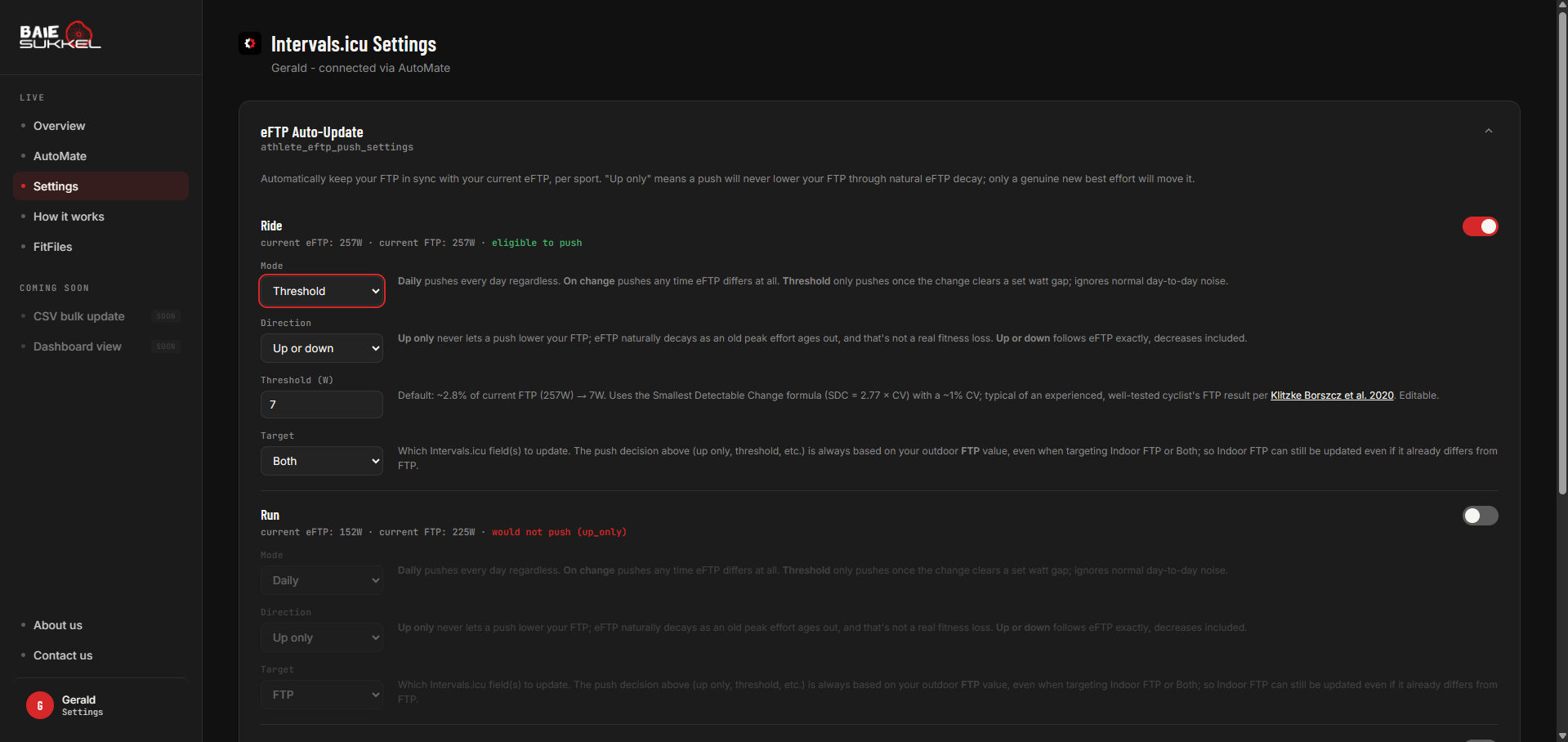
In my app, I haven’t worked on settings yet, but eFTP can update FTP through the OAuth pathway. Give me a few days to try it out myself, and I’ll let you know if you want to test.
It’s not difficult, just need to get the parameters setup.
For running power (Stryd if that matter) I have found the eFTP correlates very well with Stryd’s CP (critical power) measurement so 95% of the time when I see a CP increase notification on the Styrd app, I get a message from Intevals.icu of a eFTP increase too.
I would feel confident setting my running FTP to any new eFTP changes.
For those asking about using eFTP to update the FTP value. A few questions:
Do you wan to the ability to set indoor only, outdoor only or both?
There will be options to change FTP to match eFTP based on:
Let me know what you think…
2026/09/15, 21:56
The page is live, but not active.
Changes can be made, but it won’t push back to Intervals settings, yet.
There still some work to be done on the code.
Hope to have this operational by the weekend.