API access to Intervals.icu

Ok, I’m a noob obviously, but I’ve been trying for hours to get a script to run successfully and I’m stumped. I got my script to write a CSV file but json has been a no go. Curl gives me a 403 error as well when I run:

curl -u API_KEY:actual_API “https://intervals.icu/api/v1/athlete/i152623/activities?oldest=2020-01-01”

API is hidden above, but it’s correct when I run it. What am I doing wrong? If someone could point me in the right direction I’d be very grateful.

I have tried to link intervals to chatgpt, with my athletid and api key, but chatgpt responds with 404 error.

This is the end point it is using.

curl -H “Authorization: Bearer YOUR_API_KEY”
https://intervals.icu/api/v1/athlete/1836xxx/event?limit=1

I get the following error.

Unexpected response: 404
{“timestamp”:“2025-09-10T16:59:04.850+00:00”,“status”:404,“error”:“Not Found”,“path”:“/api/v1/athlete/1836xxx/event”}

Any ideas?

I think your athlete id is wrong. It is supposed to start with i. eg. i123413

The user number could be correct; mine and a friend on my coached list have the Strava ID as our athlete ID.

This endpoint doesn‘t exist. And you‘ve used Bearer Auth, but you have to use Basic Auth.

The correct endpoint should be

https://intervals.icu/api/v1/athlete/{id}/events{format}

e.g.:

https://intervals.icu/api/v1/athlete/12345/events.json

You can read and try this by yourself over there

1 Like

Hi R2Tom

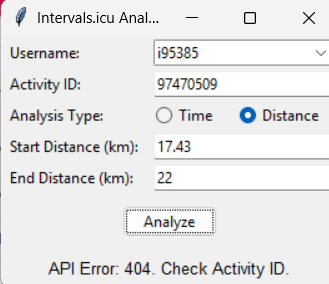
I have encountered similar error. I created a basic GUI that will analyze the normalized power and average power of a certain distance of a ride e.g. kilometer 3 to 23.

import tkinter as tk
from tkinter import ttk
import requests
import numpy as np
from requests.auth import HTTPBasicAuth

API_KEY = “my api key” # Replace with your actual API key

— MODIFIED FUNCTION —

def get_activity_data(api_key, activity_id):
“”"
Fetches and processes activity stream data from Intervals.icu.
“”"
# 1. Use the correct endpoint for streams
url = f"https://intervals.icu/api/v1/activities/{activity_id}/streams"
auth = HTTPBasicAuth(‘API_KEY’, api_key)
response = requests.get(url, auth=auth)
response.raise_for_status() # This will raise an error for bad responses (e.g., 404 Not Found)

# 2. Process the list of streams into a single dictionary
streams_list = response.json()
data_dict = {}
for stream in streams_list:
    # The API uses 'watts' for power, let's rename it to 'power' for consistency
    if stream['type'] == 'watts':
        data_dict['power'] = stream['data']
    else:
        data_dict[stream['type']] = stream['data']
        
# Check if essential data is present
if 'power' not in data_dict or 'time' not in data_dict or 'distance' not in data_dict:
    # This can happen if the activity doesn't have power data, for example.
    raise ValueError("Activity is missing required data streams (power, time, or distance).")

return data_dict

def hhmmss_to_seconds(hhmmss):
“”“Convert hh:mm:ss string to seconds.”“”
try:
h, m, s = map(int, hhmmss.strip().split(“:”))
return h3600 + m60 + s
except Exception:
raise ValueError(“Time must be in hh:mm:ss format.”)

def analyze_power(data, analysis_type, start, end):
# This function now works correctly because data is a dictionary
powers = np.array(data[“power”])
if analysis_type == “time”:
times = np.array(data[“time”])
mask = (times >= start) & (times <= end)
else:
distances = np.array(data[“distance”])
mask = (distances >= start) & (distances <= end)

selected_powers = powers[mask]
if selected_powers.size == 0:
    return 0.0, 0.0

avg_power = selected_powers.mean()
# Calculate Normalized Power (NP)
# Use a 30-second rolling average for the calculation
if len(selected_powers) >= 30:
    rolling_avg = np.convolve(selected_powers, np.ones(30)/30, mode='valid')
    norm_power = (np.mean(rolling_avg ** 4)) ** 0.25
else:
    # Can't calculate NP for durations shorter than 30 seconds
    norm_power = 0.0
    
return avg_power, norm_power

class IntervalsAnalyzerApp(tk.Tk):
def init(self):
super().init()
self.title(“Intervals.icu Analyzer”)

    # Username dropdown (for now, just your own)
    ttk.Label(self, text="Username:").grid(row=0, column=0, sticky="w", padx=5, pady=2)
    self.user_var = tk.StringVar(value="i95385")
    self.user_dropdown = ttk.Combobox(self, textvariable=self.user_var, state="readonly", values=["i95385"])
    self.user_dropdown.grid(row=0, column=1, sticky="ew", columnspan=2, padx=5, pady=2)

    # Activity ID
    ttk.Label(self, text="Activity ID:").grid(row=1, column=0, sticky="w", padx=5, pady=2)
    self.activity_id_entry = ttk.Entry(self)
    self.activity_id_entry.grid(row=1, column=1, sticky="ew", columnspan=2, padx=5, pady=2)

    # Analysis type
    self.analysis_type = tk.StringVar(value="time")
    ttk.Label(self, text="Analysis Type:").grid(row=2, column=0, sticky="w", padx=5, pady=2)
    self.time_radio = ttk.Radiobutton(self, text="Time", variable=self.analysis_type, value="time", command=self.update_fields)
    self.time_radio.grid(row=2, column=1, sticky="w", padx=5, pady=2)
    self.dist_radio = ttk.Radiobutton(self, text="Distance", variable=self.analysis_type, value="distance", command=self.update_fields)
    self.dist_radio.grid(row=2, column=2, sticky="w", padx=5, pady=2)

    # Start/End fields
    self.start_label = ttk.Label(self, text="Start Time (hh:mm:ss):")
    self.start_label.grid(row=3, column=0, sticky="w", padx=5, pady=2)
    self.start_entry = ttk.Entry(self)
    self.start_entry.grid(row=3, column=1, sticky="ew", columnspan=2, padx=5, pady=2)
    self.end_label = ttk.Label(self, text="End Time (hh:mm:ss):")
    self.end_label.grid(row=4, column=0, sticky="w", padx=5, pady=2)
    self.end_entry = ttk.Entry(self)
    self.end_entry.grid(row=4, column=1, sticky="ew", columnspan=2, padx=5, pady=2)

    # Analyze button
    self.analyze_btn = ttk.Button(self, text="Analyze", command=self.run_analysis)
    self.analyze_btn.grid(row=5, column=0, columnspan=3, pady=10)

    # Output
    self.output_label = ttk.Label(self, text="", font=("Helvetica", 10))
    self.output_label.grid(row=6, column=0, columnspan=3, padx=5, pady=5)

    self.update_fields()  # Set initial fields

def update_fields(self):
    if self.analysis_type.get() == "time":
        self.start_label.config(text="Start Time (hh:mm:ss):")
        self.end_label.config(text="End Time (hh:mm:ss):")
    else:
        self.start_label.config(text="Start Distance (km):")
        self.end_label.config(text="End Distance (km):")

def run_analysis(self):
    activity_id = self.activity_id_entry.get().strip()
    if not activity_id:
        self.output_label.config(text="Error: Please enter an Activity ID.")
        return
        
    analysis_type = self.analysis_type.get()
    try:
        if analysis_type == "time":
            start = hhmmss_to_seconds(self.start_entry.get())
            end = hhmmss_to_seconds(self.end_entry.get())
        else:  # distance
            start = float(self.start_entry.get()) * 1000  # km -> m
            end = float(self.end_entry.get()) * 1000      # km -> m

        self.output_label.config(text="Fetching and analyzing data...")
        self.update_idletasks() # Update the GUI to show the message

        data = get_activity_data(API_KEY, activity_id)
        avg_power, norm_power = analyze_power(data, analysis_type, start, end)
        
        # Show a more helpful message if no data was found in the range
        if avg_power == 0 and norm_power == 0:
            result_text = "No data found in the specified range."
        else:
            result_text = f"Average Power: {avg_power:.2f} W\nNormalized Power: {norm_power:.2f} W"
        
        self.output_label.config(text=result_text)
        
    except requests.exceptions.HTTPError as e:
         self.output_label.config(text=f"API Error: {e.response.status_code}. Check Activity ID.")
    except Exception as e:
        self.output_label.config(text=f"Error: {e}")

if name == “main”:
app = IntervalsAnalyzerApp()
app.mainloop()

i have entered the right API key and also the activity id straight from the address bar of intervals. i even removed “i” but still got the same error:

API error 404: Check activity ID. is there something wrong with this?
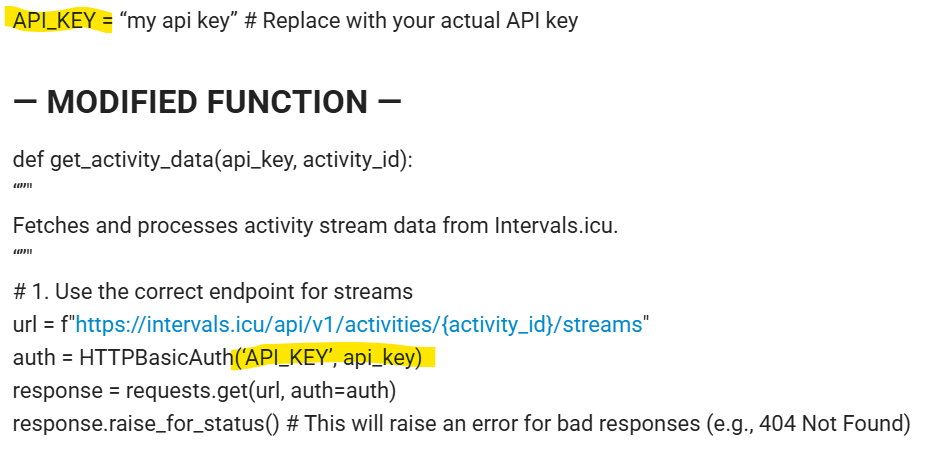
Something looks wrong with User/API_KEY combination

If you set the variable API_KEY (capitalized) to be your Intervals api-key, then the auth line a bit lower is wrong. The user for basic auth is “API_KEY” (capitalized).
The variable used should be api_key unless I’m completely not understanding.

1 Like

The url must be

https://intervals.icu/api/v1/activity/{activity_id}/streams{ext}

1 Like

Thank you for pointing that out. I have made the changes:
import tkinter as tk
from tkinter import ttk
import requests
import numpy as np
from requests.auth import HTTPBasicAuth

API_KEY = “copied and pasted from developer settings” # Replace with your actual API key

— MODIFIED FUNCTION —

def get_activity_data(API_KEY, activity_id):
“”"
Fetches and processes activity stream data from Intervals.icu.
“”"
# 1. Use the correct endpoint for streams
url = “https://intervals.icu/api/v1/activity/{activity_id}/streams{ext}
auth = HTTPBasicAuth(‘API_KEY’, API_KEY)
response = requests.get(url, auth=auth)
response.raise_for_status() # This will raise an error for bad responses (e.g., 404 Not Found)

I am still getting the API error: 404. Check activity ID.

the activity ID is directly from my own activity. in this case it is i97470509

i used i97470509 and 97470509 but still the same 404 error. I hope im not asking too much to check on this please. I really appreciate your patience

This is what I get when using the address bar

That’s what I would expect because I don’t have access to your data.

When I drop the leading ‘i’, I get this

Again what is to be expected because the Activity ID doesn’t exist

Something isn’t correct in the string composition if you ask my opinion.
Did you try it all out on the Swagger site? First authenticate at the top and then experiment to get what you’re after. You will then exactly see how the string should look.

1 Like

Maybe the brackets are in a wrong format. So replacing the {ext} with the wanted extension, as mentioned in the documentation would be a first step.
so if you want csv data, replace it with “.csv”, otherwise use “.json” (that’s not really necessary, but would be a cleaner approach).

Try it by yourself on the swagger page, as @MedTechCD has said. I think you got your code from Copilot or some AI. If it works in Swagger, give your AI the correct endpoint url, and it will update its code.

1 Like

I am having this same issue, keep getting 403 access denied

Thanks for letting us know, but it would be more helpfull for everyone if you copied in your curl statement.

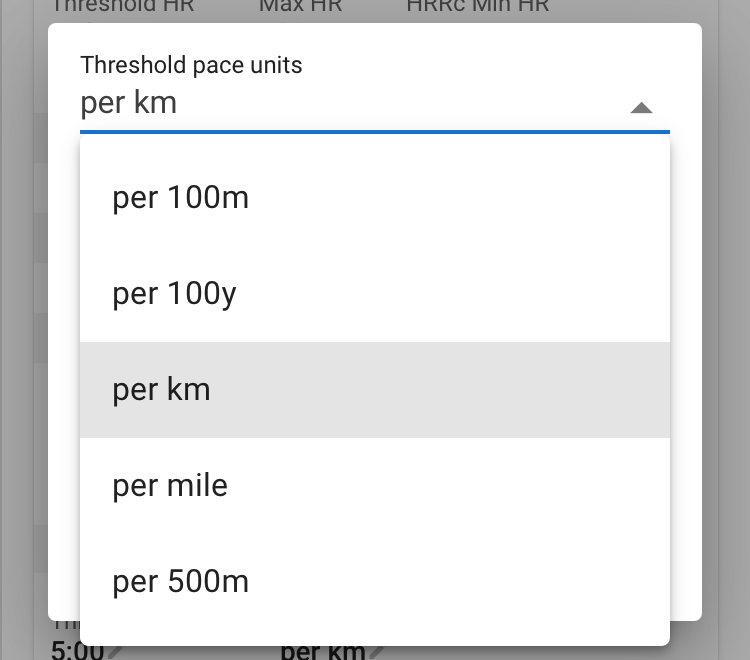
I am having a problem with the pace output. The query returns a number that is obviously in the format “m/s”. But the assigned unit is “MINS_KM”.

"threshold_pace": 3.4013605,
"pace_units": "MINS_KM"

The pace is therefore interpreted as 3:24 min/km and not as 4:54 min/km, which would actually be correct.

Is this due to a setting in intervals.icu (units) or is it an error in the API?

According to the API doc it seems to be the setting of the threshold pace unit. Not the unit of the returned value. This is always in m/s.

Hmm… but none of the units would match “m/s”. So there is no way that ChatGPT can interpret the correct pace from the JSON. Incidentally, this not only affects threshold pace, but apparently also the pace in workouts. How is everyone dealing with this?

As I said. The unit is always in SI units. So pace is always m/s. Always. Regardless of that option. It is meant for third party applications to do the correct conversion to the user defined unit.

1 Like

You probably need to put something between Intervals.icu and ChatGPT to convert. The Intervals.icu back-end and API always uses m/s for speed, meters for distance, kg for weight and so on. Conversion to user specified units is done in the web app.

Why does this work in Home Assistant:
sensor:

  - platform: rest
    name: ICU Run Distance YTD
    unique_id: icu_run_distance_ytd
    resource_template: >-
      https://intervals.icu/api/v1/athlete/1450737/activities?oldest={{ now().strftime('%Y-01-01') }}&newest={{ (now().date() + timedelta(days=1)) }}&limit=20000
    method: GET
    authentication: basic
    username: API_KEY
    password: !secret intervals_api_key
    headers: { Accept: application/json }
    value_template: >-
      {%- set RUN_TYPES = ['Run','VirtualRun'] -%}
      {%- set acts = value_json if value_json is iterable else [] -%}
      {{ (acts | selectattr('type','in',RUN_TYPES)
               | selectattr('distance','defined')
               | map(attribute='distance') | map('float') | sum / 1000) | round(1) }}
    unit_of_measurement: "km"
    scan_interval: 3600

and not this:

- platform: rest
    name: ICU Bike Distance YTD
    unique_id: icu_bike_distance_ytd
    resource_template: >-
      https://intervals.icu/api/v1/athlete/1450737/activities?oldest={{ now().strftime('%Y-01-01') }}&newest={{ (now().date() + timedelta(days=1)) }}&limit=20000
    method: GET
    authentication: basic
    username: API_KEY
    password: !secret intervals_api_key
    headers: { Accept: application/json }
    value_template: >-
      {%- set Ride_TYPES = ['Ride','VirtualRide','GravelRide'] -%}
      {%- set acts = value_json if value_json is iterable else [] -%}
      {{ (acts | selectattr('type','in',Ride_TYPES)
               | selectattr('distance','defined')
               | map(attribute='distance') | map('float') | sum / 1000) | round(1) }}
    unit_of_measurement: "km"
    scan_interval: 3600