I dont have any experience with local LLM’s but from what I remember when I looked into them quite some time about they were still significantly under powered compared to the frontier models from the top AI companies.
- The small details matter a lot less than they used to. Top models today handle typos, mixed languages, and incomplete prompts without missing a beat. The marginal value of obsessively polishing a system prompt is shrinking fast.
- Model churn makes that polish short-lived anyway. New models drop every few weeks, and a prompt carefully tuned for one often needs rethinking for the next.
On pricing, I’d love to be proven wrong, but I haven’t seen a commercial AI coaching app with a genuinely transparent, pass-through cost model yet. If someone built something on the latest models only (GPT-5.4 / Opus 4.6) and charged actual API token cost plus a 5–10% markup, we’d probably be talking less than $2 per month for a typical user. That would be a compelling offer. Until that exists, the DIY route at least has the honest advantage of knowing exactly what you’re paying for.
The $2 estimate would only be correct if your AI just slapped on some ‘AI insights’ like Strava does—and we all know how useless those are. To give you a real-world example: to generate this single answer reliably, my app burned through exactly 179,260 input tokens and 4,244 output tokens.
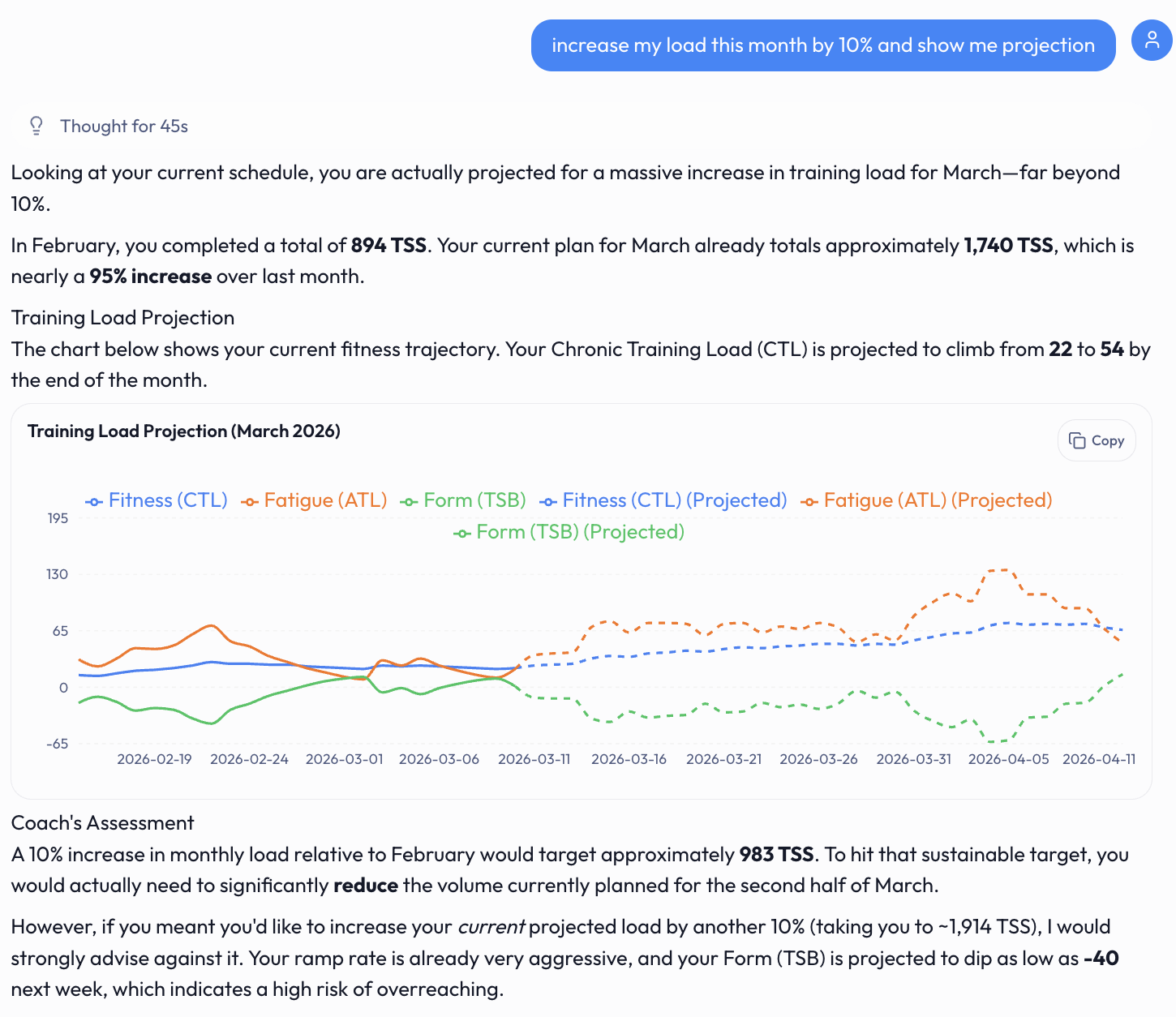
The realistic cost breakdown:
- ChatGPT 5.4 (Standard): ~$0.51 per query
- Claude Opus 4.6: ~$1.01 per query
How does that fit into a $2/month subscription if you’re analyzing your progress daily? Unless you’re referring to the heavily subsidized $20 tiers from Anthropic or OpenAI, those are unsustainable, they can’t lose money forever. The true cost of inference is reflected in the API pricing.
That’s a hell of a lot of input tokens. My entire intervals.icu health and activity history from the last year is only around 150k tokens. What context are you adding to get to 180k?
Couple of round trips it does internally, cross-validations using various tools, and context about these tools that also need to fit. This is all to minimize hallucinations, it’s the same thing that Claude Code or OpenAI Codex does, and cost of interaction using standard API prices is also ~0.5-1$ for these coding tools.
I see now, you are doing multiple round trip calls for things like determining what context to fetch abd what model to use. Well that is not fair to use that token count and simply multiply by the full Opus rate as the majority of those tokens would be optimization tokens not real usage.
This is exactly my point about why the lack of transparency in these apps is so frustrating. The complexity is not about better results, it is about saving on cost to increase the margin between AI token pricing and subscription revenue.
If Opus 4.6 is that expensive, why not just charge actual token cost plus a small margin and let the user pick the model and how much they want to use? Then you just need to make the app compelling enough that people want to use it more. Simpler business model and fully transparent.
I have no problem paying for AI, I spend hundreds of dollars a month on it already and would love a proper AI coaching tool that can automatically pull my training data and give me real advice. My issue is the lack of transparency with how these apps actually work and what you are paying for.
I can’t see how much your app costs but I assume you have a few tiers each with increasing usage before hitting a cap. What is the exact API cost of that cap compared to the price of the tier? That delta is essentially what each user is paying for, and until we know that number we cannot fairly assess the value of your app.
1 Like
Sorry, but I don’t get your point about optimization tokens. Agentic loop runs on the same tokens, using the same LLM, and tokens I showed you are what I got charged for this query.
@txuselo nicely put what you are paying for when using these commercial apps convenience and the value of time . You are clearly a power user, that wants to have full control, have knowledge and time to configure everything, and doesn’t want to depend on some app. I respect that.
1 Like
I assumed that when you said “a couple of round trips” you are making more than one API call to complete the response and that is how you are getting to 170k input tokens. For example, you take the initial prompt, attach a system prompt asking what user data is needed, send that to a cheap model, fetch the relevant data from intervals.icu, then reassemble it with the original prompt. You might even make another call asking something like “would a graph help visualize this response?” and if yes, tack on explicit instructions for rendering a CTL, ATL, TSB chart in the final output. So it is all these cheaper round trip calls that are jacking up the input tokens to 170k, which makes it misleading to simply multiply that token count by Opus rates.
If that is how it works then I could be wrong about the token breakdown. Internal agentic loop calls or reasoning tokens are charged as output tokens, so they would be included in the 4k output tokens you quoted, not the 170k input tokens.
Don’t get me wrong, this is the right way to build these interfaces. My concern is that when the final output is this data driven and I am basing my training decisions on it, I want to know that at least the final analysis is coming from a top tier model. That is all I am really asking for, just transparency on what model is being used where, and to pay accordingly without a crazy markup for a custom AI wrapper.
I get the convenience aspect of these apps but again until we know the true cost delta between token pricing and subscription rates we cannot fairly assess the value of that convenience.
1 Like
I was curious about this so I tested it myself. I used my AI prompt generator with the primary question “Increase my load this month by 10% and show me a projection graph” and sent that to Opus 4.6 with all my data from intervals.icu from the last 30 days. It came to 12,413 input tokens and 1,312 output tokens for a total cost of $0.09. EDIT: That would be ~$0.05 for sonnet 4.6 which seams to be the highest most expensive model any of these AI coaches are using in case anyone was wondering.
Below is my prompt (with my data stripped) and Opus’s response. Now this was run in a terminal so bless its heart it tried to draw the graph in ASCII, but given a proper environment where it could render JSX it would produce a much better visualization.
MY PROMPT:
The athlete’s primary question is: [Increase my load this month by 10% and show me projection graph.]. Anchor your analysis to answering this directly before covering broader trends.
AI Training Analysis Request
Role
You are a coach focused on endurance health, performance, and durability.
- Tone: direct and practical
- Response depth: concise
Context
- Goal type: Training analysis & feedback
- Sports emphasis: Run
- Date window: 2026-02-08 to 2026-03-10 (last 30 days)
How to approach this session
- Provide a practical analysis with clear next steps.
Term Definitions
- Load: Session training stress score (higher means harder overall workload).
- IF (Intensity Factor): Relative intensity vs threshold (1.00 = threshold effort).
- CTL (Chronic Training Load): Longer-term fitness trend from sustained load.
- ATL (Acute Training Load): Short-term fatigue trend from recent load.
- TSB (Training Stress Balance): CTL minus ATL; negative is higher fatigue, positive is fresher.
- For TSB/Form interpretation, use these Intervals.icu zones:
- Transition: > +20%
- Fresh: +5% to +20%
- Grey Zone: -10% to +5%
- Optimal (green): -30% to -10%
- High Risk (red): < -30%
- Cadence: Step rate (run) or pedal rate (ride), typically in steps or rpm.
- HRV: Heart rate variability, a recovery/readiness proxy.
- Resting HR: Baseline morning heart rate trend for stress/recovery context.
- NP (Normalized Power): Power estimate reflecting variable-intensity physiological cost.
- FTP/LTHR: Sustainable threshold markers used to set training zones.
Data Handling
- The data below is provided as CSV blocks. Use it as source of truth.
- If any zone setting data is missing or incomplete, do not guess or estimate HR, pace, or power zones.
- Call out missing or conflicting data before recommendations.
Response Format
- Return the response in Markdown.
- Use clear section headings and bullets.
OPUS REPONSE:
Load Increase Analysis & Projection
Direct Answer: Can You Increase Load by 10% This Month?
Not recommended right now. Here’s why, and what a safer path looks like.
Current Baseline
| Metric | Value |
|---|---|
| Recent 4-week avg weekly load | ~352 (weeks of Feb 9–Mar 8) |
| Current CTL | 32.9 |
| Current ATL | 47.9 |
| Current TSB | -15.0 (Optimal zone, but trending deep) |
| TSB low point | -18.2 (Mar 2) → touched near High Risk |
A straight 10% bump would target ~387/week → ~1,548 over 4 weeks.
The Problem
Several recovery signals are flashing amber/red:
- HRV dropped sharply: 7-day avg 96.4 vs prior 102.3 (−5.9), with today’s reading at 68 — your lowest in the entire window.
- Sleep collapsed: 7-day avg 5.7 hrs vs prior 7.1 hrs (−1.4 hrs). Last two nights: 2.55 and 5.45 hrs.
- Resting HR creeping up: 45.4 vs 44.6 (+0.8 bpm).
- Weight loss is aggressive: −0.42 kg/wk — fine if intentional, but combined with poor sleep this signals under-recovery.
- Long run concentration is extreme: ~80% of weekly km in a single session (week of Mar 2). This spikes injury risk.
Pushing load +10% on top of these signals is a recipe for illness or injury.
Projected Weekly Load: 10% Increase vs Recommended Path
Below is a text-based projection for the next 4 weeks (Mar 11 – Apr 7). The baseline uses your recent 4-week average of ~352/week.
Weekly Load Projection (Mar 11 → Apr 7)
────────────────────────────────────────────────────────────

Load
420 │                                              ╭── 10% Target (387)
400 │                                         ╭────╯
380 │                                    ╭────╯
360 │───────────── Baseline ────────╭────╯
    │              (352)       ╭────╯
340 │                     ╭────╯
    │                ╭────╯
320 │───── Rec. ─────╯                          ╭── Recommended (370)
    │    (317)  (328)  (345)  (356)  (363) (370)╯
300 │
    └────────┬────────┬────────┬────────┬────────┬──
         Wk1       Wk2       Wk3       Wk4    Wk5+
        Mar 11    Mar 18    Mar 25    Apr 1

    ── 10% Jump     Load: 352 → 387 immediately
    ── Recommended   Load: 317 → 370 (graduated ~5%/wk)
| Week | 10% Target | Recommended | Notes |
|---|---|---|---|
| Wk 1 (Mar 11) | 387 | 317 (−10%) | Recovery/deload — fix sleep & HRV first |
| Wk 2 (Mar 18) | 387 | 345 (baseline) | Return to normal if HRV >95 & sleep >6.5 hrs |
| Wk 3 (Mar 25) | 387 | 363 (+5%) | First true overreach week |
| Wk 4 (Apr 1) | 387 | 370 (+5%) | Consolidate; reassess for another bump |
| Wk 5+ | 387 | 387 (+10%) | Reach your 10% target with a solid base |
Projected CTL at +10% (immediate): ~36–37 by Apr 7, but TSB likely dips below −25 (High Risk territory).
Projected CTL (recommended path): ~35–36 by Apr 7, TSB stays in Optimal (−10 to −20).
What to Fix Before Adding Load
- Sleep is the #1 priority. Your last 7-day average of 5.7 hrs is insufficient for adaptation. Target ≥7 hrs. No load increase will produce fitness gains on this sleep.
- Distribute long run volume. Cap your long run at ≤60% of weekly km. Add a mid-week medium run (8–10 km) instead.
- Monitor HRV daily. If 7-day HRV avg returns above 100 and sleep stabilizes above 6.5 hrs for a full week, begin the graduated increase in Wk 2.
- Weight loss pace is fine if deliberate, but don’t stack caloric deficit + load increase + sleep debt simultaneously.
Bottom Line
You’ll reach your 10% target load by week 5 (mid-April) using a graduated approach, arriving there healthy and adapted rather than overtrained. The immediate jump is high-risk given your current recovery state. Fix sleep first, deload this week, then build.
END PROMPT
Before anyone comments asking if I am ok. I am sick and also on vacation sking everyday and sleeping in a hotel so yes but in a good way.
2 Likes
Of course there’s always room to optimize token usage, but in my case system prompt must carry all the information that’s required for it to know how to interact with the rest of the application. This is also for convenience and the value of time of end user.
I noticed we are repeating our points with different words. It’s great that many approaches to this problem exist, this way everyone can find something for themselves. I’ll leave this thread for others now.
A post was merged into an existing topic: MyTrainPal - AI Assistant connected to Intervals
Worth adding TrueFeel (truefeel.ai) to the list, it’s a different category from the AI coaches discussed here. It doesn’t write workouts or plans. It’s a readiness engine: connects Intervals.icu + Garmin/Oura/WHOOP, adds a quick subjective check-in (energy, soreness, motivation, stress), and gives you one Go/Modify/Bail call each morning. Works alongside whatever plan or coach you’re already using.
Any plans to add Polar direct integration? Polar wellness can be pulled from Intervals, however that requires one visit to Intervals home page to kick Polar data call… Direct integration would make the use of your TrueFeel app more simless.
Thanks for the interest! Not on the immediate roadmap but it’s a good callout. Right now TrueFeel pulls recovery data from Oura and WHOOP directly, and training load from Strava / Wahoo / Intervals.icu.
For Polar users the best path today is: connect Intervals.icu (which pulls your Polar wellness data) and connect Strava (which gets your Polar workouts via auto-sync). That gives TrueFeel your HRV, sleep, and training load, just through Intervals as the bridge.
I hear you on the extra step of visiting Intervals to trigger the Polar sync though. If there’s enough demand I’ll look into Polar AccessLink API directly. Appreciate the feedback, this helps me prioritize.
Well, I thought I explained in my post why connecting directly to Polar (which have very good API) is beneficial… Seems like your claim “gives you one clear answer every morning in 20 seconds” is just a marketing trick. You can pull workouts from Intervals just fine, but wellness data will only be available there if I visit the site first. And then there is an issue with mapping values from wellness - I went through this with Coach Watts - Intervals does not normalize readiness and sleep quality values, so I think your tool won’t map them properly either.
By the time you decide to implement it, I’ll make my own tool for the purpose - with the new AI coding tools help that is much easier now.
Fair, and I appreciate the bit about the wellness mapping issue.
I just implemented direct Polar AccessLink integration. TF pulls Nightly Recharge
(ANS charge + sleep metrics), sleep stages, and exercise data directly from Polar’s API.
Q: Which specific values weren’t normalizing correctly, was it the ANS charge scale, sleep score ranges, or something else? I want to make sure TrueFeel handles them properly from the start rather than shipping something broken.
If you’re up for it, I’d welcome you as an early tester for the Polar integration. You clearly know the data well enough to catch what others would miss.
Ok, this is great, I will sign up to test things out!
These two values: nightly_recharge_status - Polar’s range is 1-6 and is mapped to “Readiness” in Intervals and sleep_score - Polar’s range is 1-100 and has the same name in Intervals - both of them are not normalized to anything, so can’t be directly compared to, say, Garmin’s values…
What are you using in the app? As I understand it, nightly_recharge_status is based on values from sleep_charge and ans_charge, for simplicity, readiness would probably be the only value needed when combined with morning feedback… However, if you want to dig deeper, then using sleep_score (1-100) and ans_charge (-10 - +10) combined would provide more details… although I’d think Polar’s algorithm for nightly_recharge_status is good 
I’ve tried a few of these AI tools for training, and here’s what I’ve found. If you’re into having lots of data and visual progress, then tools like CoachWatts, IntervalCoach, and AIEndurance are great since they provide clear graphs and can adjust your plans based on data. But, if you’re more into just chatting with an AI to adjust your workouts, then Intervals.pro and LeCoach might be up your alley.
You can point an AI at the External Tools forum and have it summarize and compare them for some AInception. I’ve done similar stuff, it works well. The forum software does not seem to intentionally make this hard for GPTs.
You are completely right about standard LLMs falling short right now. A generic chat model can give decent surface level advice, but it cannot truly comprehend a complex power duration curve or nuanced fatigue metrics without hallucinating or giving generic answers.
By 2027, the real game changer will be specialized agents that can sit directly between your raw biometric data and your calendar. Instead of just sending summary emails, they will dynamically adjust tomorrow’s intervals based on tonight’s sleep and heart rate variability metrics automatically. Until then, using your own natural intelligence to fine tune the algorithm is definitely the smartest way to ride.
1 Like