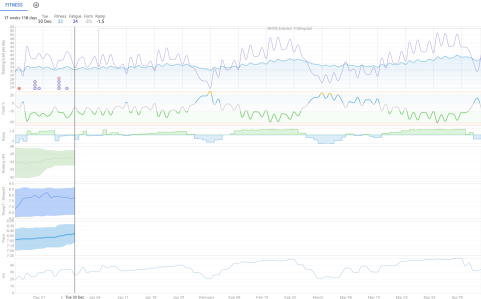
I would like to fix the date range of the Fitness page to 2025-12-15 … 2026-04-11, since that covers my current training up to a race. Until that race, I’d like to always have the page in that range, as it would then fill nicely from left to right.
But when I pick those dates on the calendar, then navigate away from the Fitness and onto it again, it defaults back to 2025-09-30 … 2026-04-11; i.e. the start date seems to be 90 days in the past.
Seems right, thanks Tom. If I pick an older start date, it sticks. Looks like today (2025-12-29) the earliest day that survives navigation is 2025-12-02.
Well I guess a workaround is to just store my preferred date range as a bookmark and not use the Fitness button in the main menu.
The goal is that whenever I enter the Fitness page during the next 4 months, I always get the same view from the start of my current training cycle until its natural end in the form of an A race.
It will fill up from left to right, always be the same scale, never show the future after my end date (which I haven’t planned out anyways), and always is a familiar view on what I’m doing now, without constantly having to reset the date range to those values. Kind of like a fixed dashboard.
Of course a very low priority in the grand scheme of things; I have made a separate feature suggestion for adding an option to fix the range but I’m sure the devs will know to prioritize it appropriately (lowly) - there surely are more pressing/interesting new features to implement first.
As the dates are also encoded in the URL, it’s also trivial to just use a bookmark to open the Fitness page in the future as a workaround.