Add gear/development statistics

Hi,

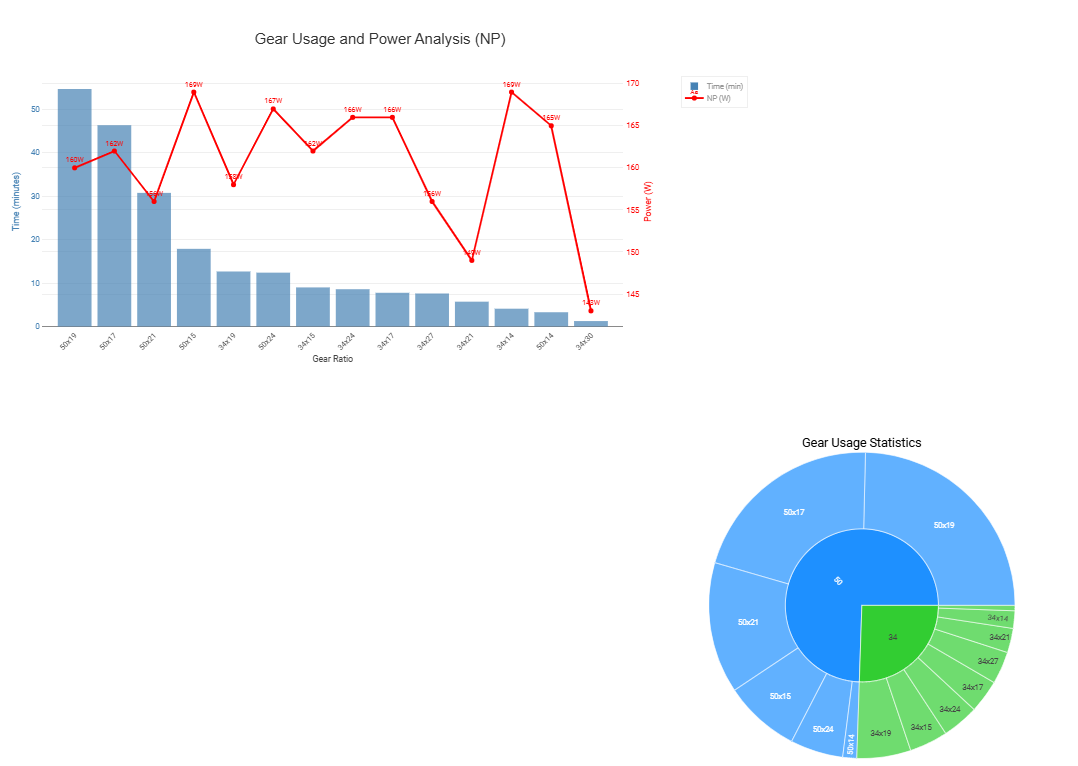
To analyze the relevance of development choices, it would be great to have the option to overlay a curve on the route showing the gear ratios, along with a table summarizing the usage of each gear ratio. For Shimano groups, this data is available in the .fit file because the bike computer can display the gear ratio in real-time, and it’s possible to extract this data using apps like GoldenCheetah.

Keep up the great work, and thanks again!

1 Like

Check the Custom Streams/Charts


Not aware of an overlay on the route.

Some of this can be done with a custom stream: Custom activity streams with Javascript - #15 by Jonas_H

There’s a heatmap chart I made described here: Custom chart: Gear selection heatmap (Di2/eTap/EPS)

And others you can find through search.

There sure are lots of nifty charts tho I personally don’t see how one can correlate these sort of things to performance on the bike.

Thanks Jonas & @MedTechCD
It’s probably me who’s missing something but none of these tools work on my files (garmin 530 / di2 well connected)

Try, in Settings, disconnecting Strava from Intervals, then import .fit file from Garmin.

1 Like

thanks but I’m not connected to Strava, my itvl is already only connected to garmin

You need to add the custom streams for front and rear gear first, then re-analyze the activity (or record a new activity). Only then will the charts produce data.
1 Like