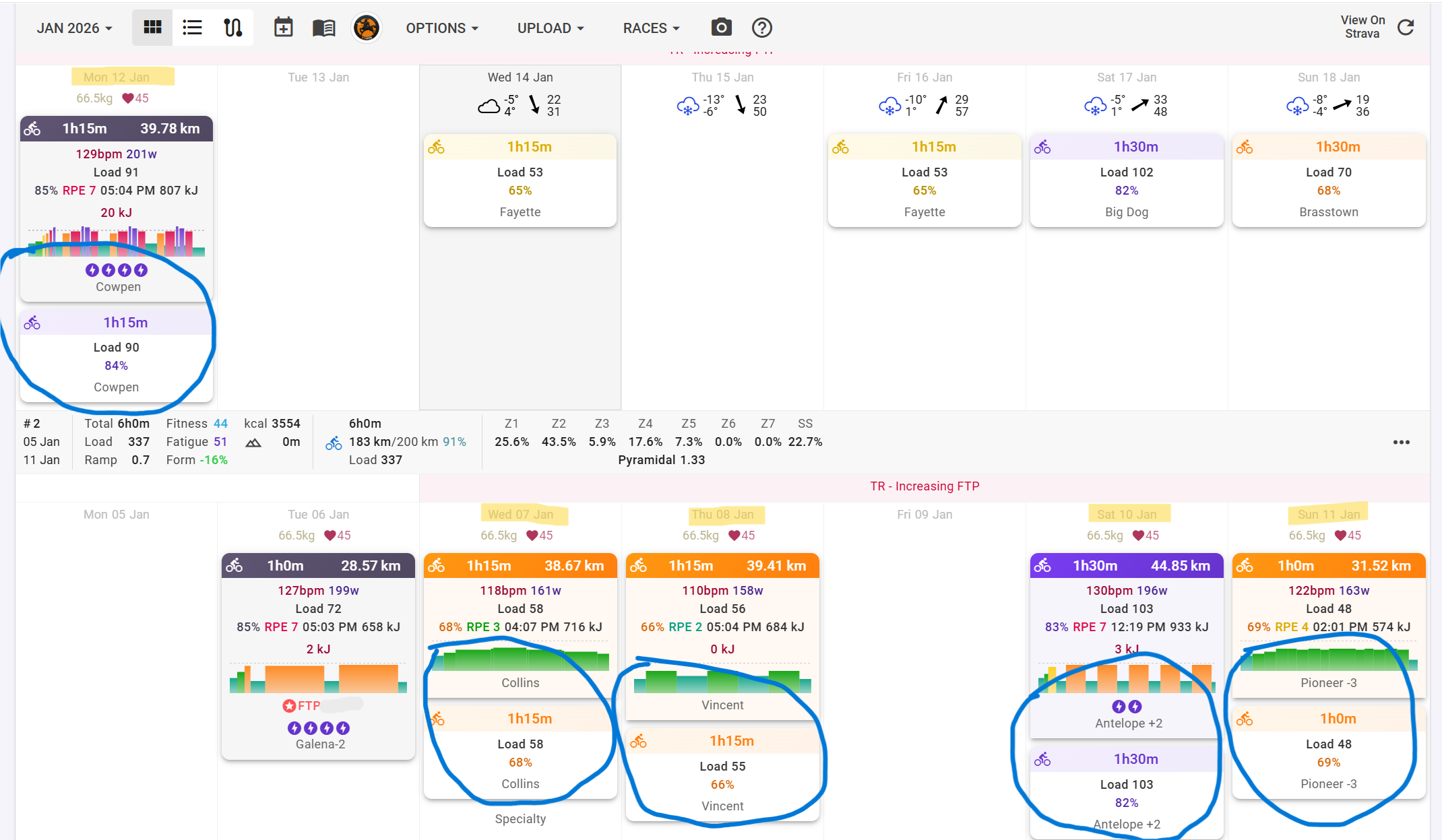
I wonder if somebody could please check whether a bug has crept into the Add Calendar feature. It is loading past events. I have confirmed that the “Only download future events” checkbox is selected. I have added to Intervals a TrainerRoad calendar that began on 2026-01-07. Intervals is showing the plan’s past workouts (between 2026-01-07 and yesterday), which also appear as incomplete duplicates of the planned workouts that I have completed.
Steps:
I made a TrainerRoad plan that began on 2026-01-07 and added it to Intervals that day. Nothing seemed amiss because there were no past events. Let’s call this TR-P1. When I saw that TR had set workouts on some days that didn’t suit me, I deleted TR-P1 from TR. Then I created a new plan (TR-P2). Then I deleted TR-P1 from Intervals. I did not immediately add TR-P2 it to Intervals. A couple of days later I added TR-P2 to Intervals. This is when I started to see the past events. I have since removed the TR-P2 calendar from Intervals and re-added it a number of times over the last few days in case I fat-fingered something. The problem is repeatable.
The attached screenshot shows 1) the Intervals calendar entries for the past TR events and 2) how they are unmatched duplicates of the workouts in the plan that I have completed.
Thanks.