For every running activity synced from Garmin, the “Avg HR” shown on intervals.icu
is far lower than the average heart rate shown for the same activity in Garmin
Connect — not a one-off outlier, this happens consistently on all my past runs
(they all show ~59-60 bpm average, which is close to resting HR, not running HR).
- Activity: link to the specific activity on intervals.icu
- Garmin Connect shows: Avg HR 159 bpm
- intervals.icu shows: Avg HR ~60 bpm
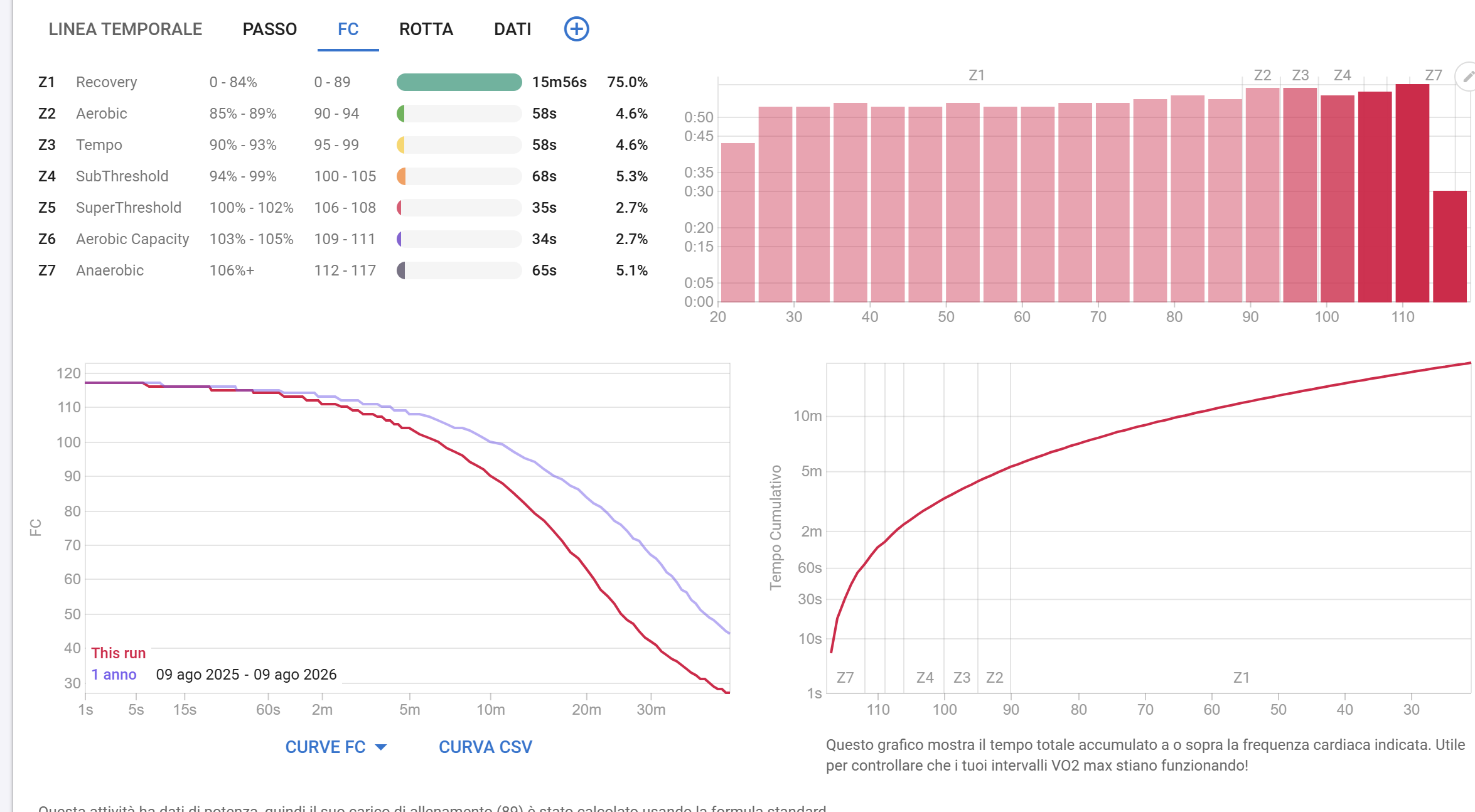
Looking at the HR chart on the activity page (Analysis > FC tab):
- The “This run” curve starts around 118 bpm at 1s and then declines
progressively down to ~30-40 bpm by the 20-30 minute mark. - The zone breakdown shows 75% of the time in Z1 (0-89 bpm), and the highest
zone reached in the whole activity tops out at ~117 bpm (Z7: 112-117 bpm).
This doesn’t add up with Garmin’s own reported average of 159 bpm for the same
activity — if the true average was 159, a meaningful part of the activity
should show HR well above 117 bpm, not below it. It looks like the HR stream
intervals.icu is using for the average/zones on this activity isn’t the real
running HR data (maybe wrong data source, partial import, or a field mapping
issue during the Garmin sync).
What I’ve checked:
- The same low-HR pattern (~59-60 bpm average) appears on every run I’ve
looked at, not just this one. - [add: whether you’ve already tried disconnecting/reconnecting the Garmin
integration under Settings > Integrations, and whether that changed anything]
Setup:
- Garmin device: Forerunner 255
- HR source: wrist-based optical sensor
- Sync: Garmin Connect → intervals.icu (automatic sync)
Question: is this a known issue with HR data import/mapping from Garmin for
this device, and is there a way to re-sync/re-import the correct HR stream
for already-imported activities?