Hello!
He tries to run the workouts, but the page keeps getting blocked and is always trying to generate. It won’t go any further.
Okay, that’s it. I deleted several files, asked four times, he unlocked it and generated the workouts. Let’s see what he prescribed. 
1 Like
Hdkiller.
Could you take a look at the website? It stopped generating the workouts. I made the first plan for the race and then deleted it to make another one, but it stopped working.
Hi, your project sounds promising. I wish you success.
However - not everyone uses Whoop fitness trackers for sleep / HRV and or recovery/daily readiness estimates. Will this AI coach expand to other fitness trackers in the future?
Top 16 Companies Leading the Fitness Tracker Market
1.Apple
2.Google (Fitbit)
3.Samsung Group
4.Xiaomi Corp.
5.Huawei Technologies
6.Garmin
7.Amazfit (Zepp Health)
8.Fossil Group
9.Withings
10.Polar Electro
11.Suunto Oy
12.Whoop Inc.
13.Oura Health Oy
14.Noise
15.Realme
16.Oppo
17.Others
Above from a random Google search - landing on the following site, (could be valid or could be bs.):
Yes, I plan to add support for as many fitness trackers as possible. Unfortunately, this isn’t straightforward, as most of them have very restrictive APIs. Throughout January, I’ll be reaching out to providers one by one to get the platform onboarded. In the meantime, .FIT files are already supported, and wherever a public API exists, I’ll integrate it.
I’m also working on a major update to the AI training planning feature, which I’m hoping to release later today, along with several other fixes.
2 Likes
Hi!
The AI is already able to generate the workouts for the event I requested. But no workouts are showing up on the intervals map.
1 Like
First of all, thank you to everyone in the intervals.icu community for the incredible feedback, ideas, bug reports, and encouragement so far. This project genuinely wouldn’t be where it is today without your input.
I want to strongly encourage you to keep reaching out — whether it’s issues, feature requests, ideas, or general feedback. My goal is for Coach Watts to be community-driven, shaped by real-world needs and actual training workflows.
All requests and discussions posted in this thread will be treated as top priority, and I’ll be actively tracking and addressing them here.
If you’d rather not post publicly, feel free to DM me directly with specific issues or ideas. Everything helps, and everything gets read.
Thanks again for being part of this — and now, onto what’s new 
Smarter Plans, Multi-Sport, and Workout Sharing!
I’ve been hard at work making Coach Watts the most powerful and flexible training partner, and this release is packed with features focused on dynamic, event-driven planning.
Here’s what’s new in v0.5.0:
 Precision Planning: Race Events & Periodization
Your training is no longer a static calendar. We’ve introduced advanced event management so your plan works backward from your most important goals:
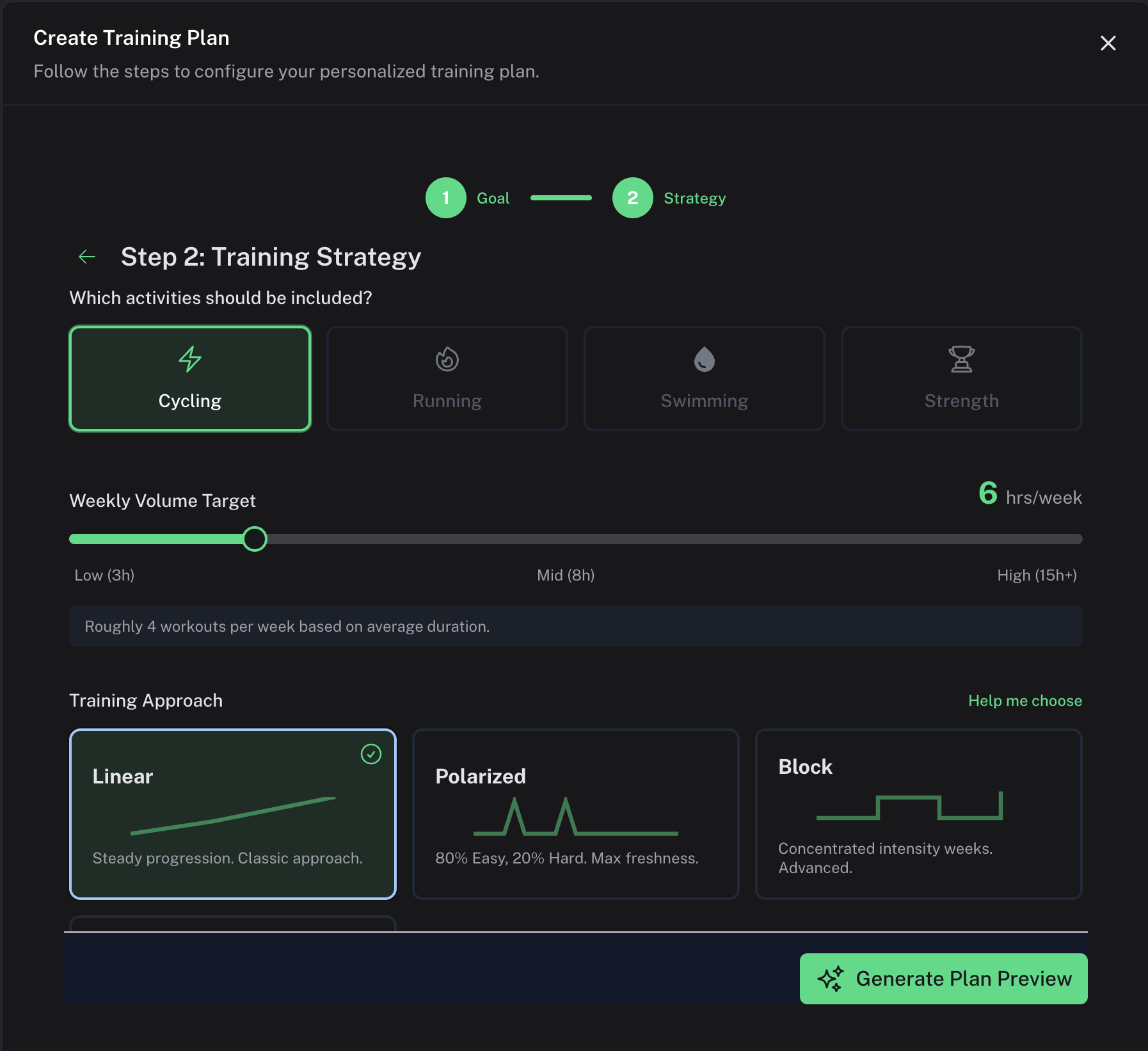
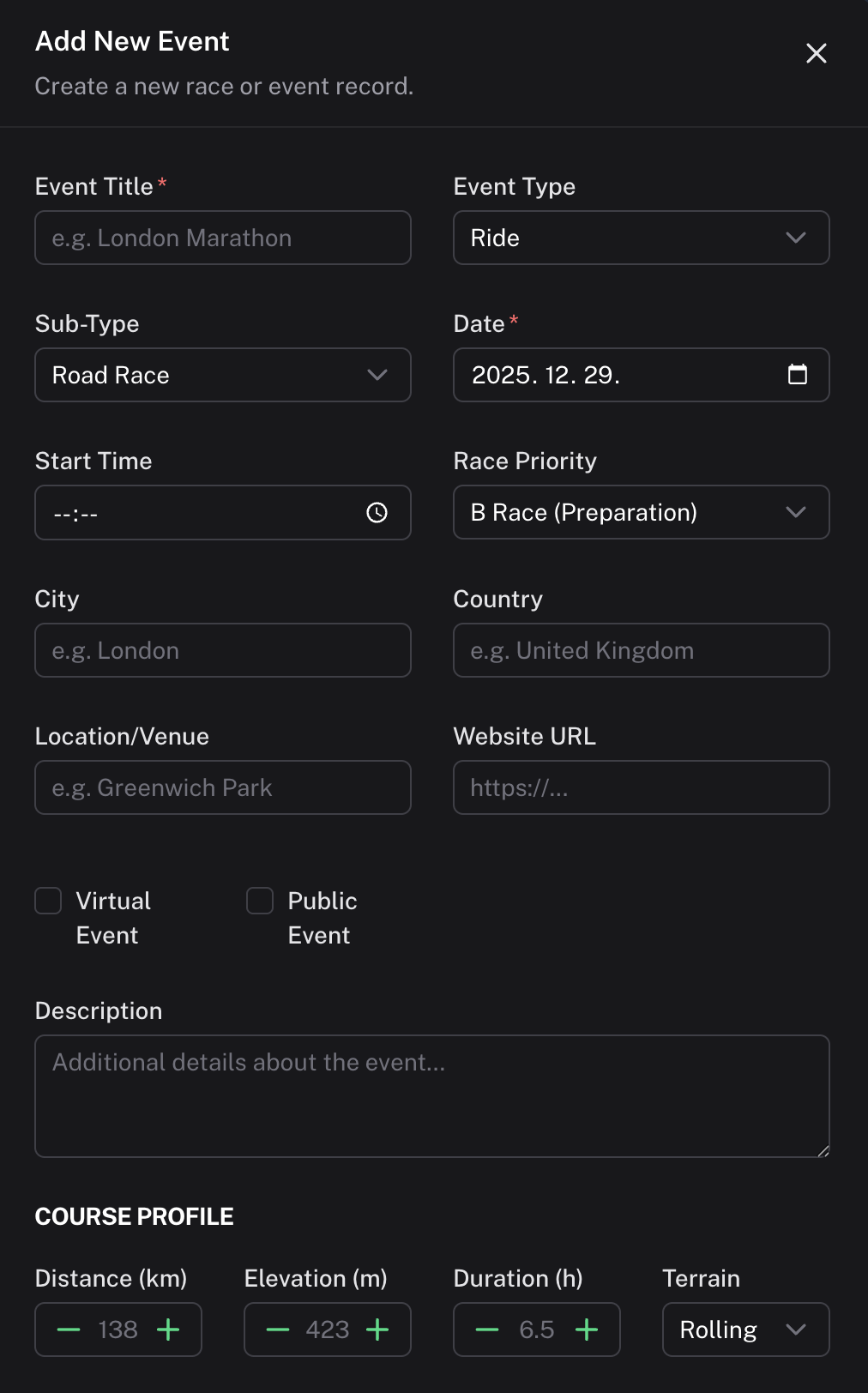
- Event-Driven Periodization: You can now add key races, events, or trips to your schedule. Coach Watts will automatically structure your training blocks (base, build, peak) to ensure you hit peak fitness exactly when you need it.

- Goal Wizard: Easily set up and manage all your upcoming competitive and target events with dedicated new pages and tools.
 Smarter AI Coaching & Customization
The AI planner is now highly flexible, giving you more control over your week-to-week schedule and specific workouts:
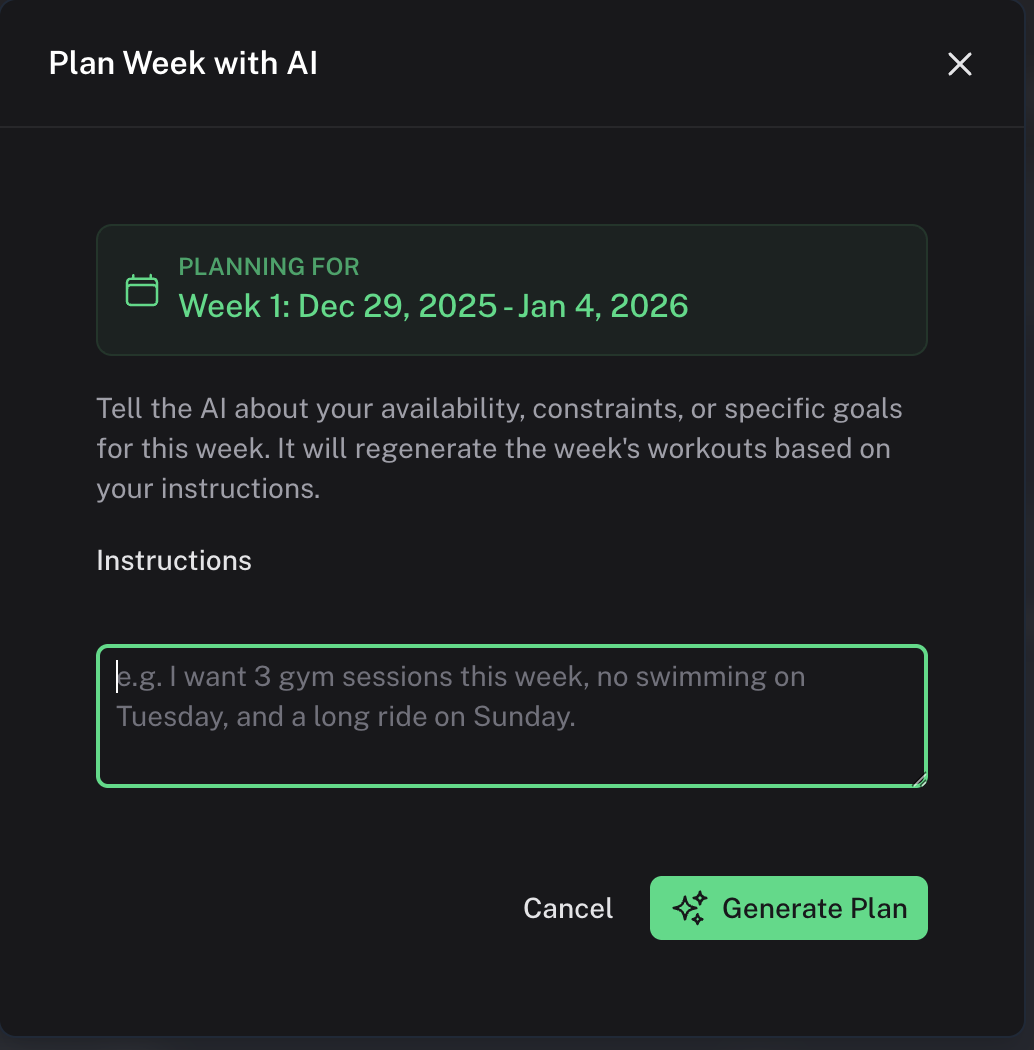
- AI Week Planning with Instructions: Have an unusual schedule or feeling fatigued? You can now chat directly with the planner, providing custom instructions (e.g., “Keep volume low due to a busy work week,” or “Focus on sprint power this Sunday”).

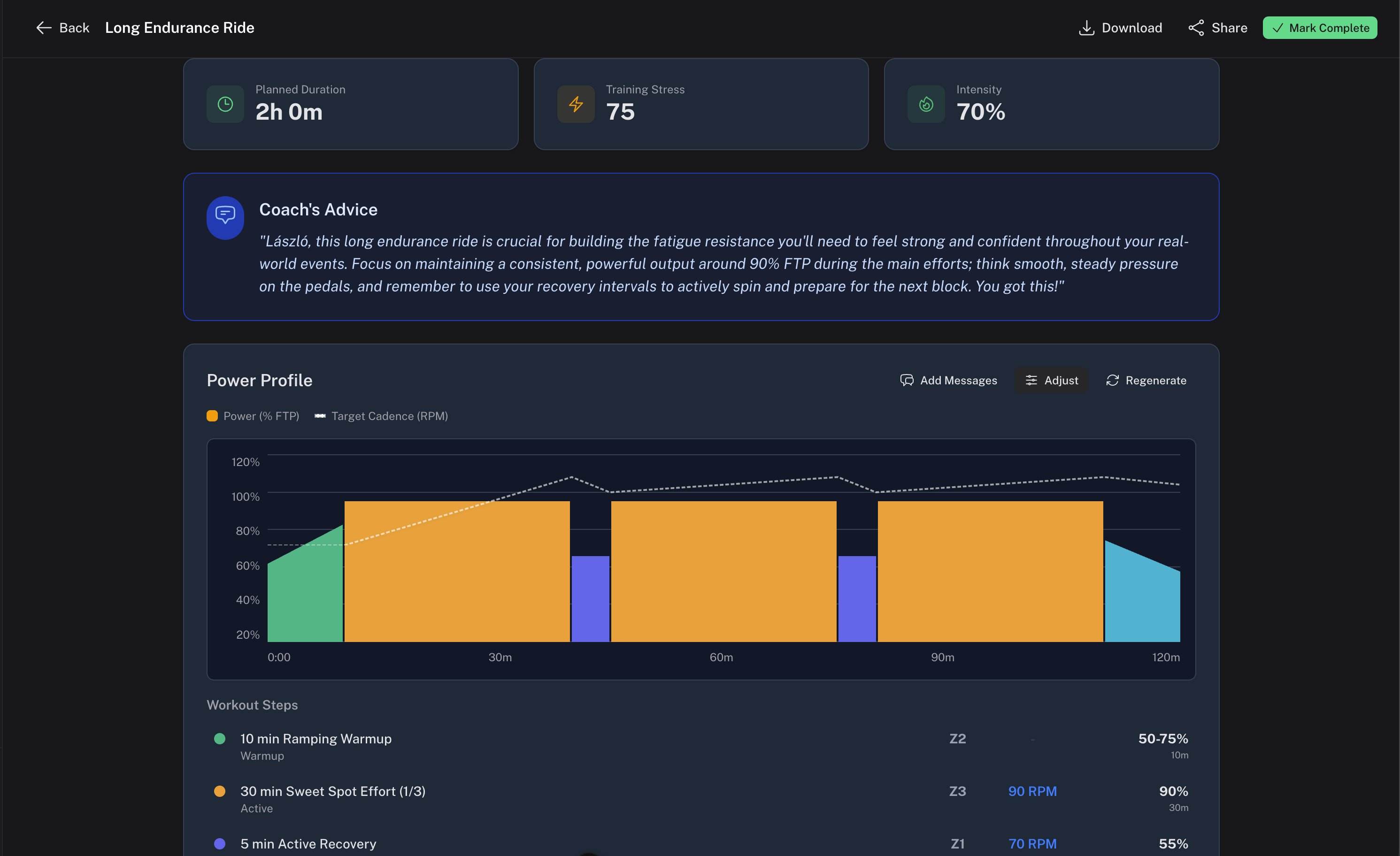
- On-the-Fly Workout Adjustments: Easily modify any planned workout’s duration or intensity right in the app. If you need 15 minutes less, or a slightly easier session, the plan adapts instantly.
- Personalized Coaching Messages: Get helpful, personalized coaching tips, instructions, and motivational messages generated for your specific workouts before you start riding.
 Multi-Sport Support Has Arrived!
For all our triathletes, runners, and swimmers—or anyone who cross-trains—Coach Watts now fully supports managing multiple disciplines:
- Activity Type Management: Specify the sport (cycling, running, swimming, strength, etc.) for each workout and manage your volume across all activities.
- Sport-Specific Views: Workouts now render dynamic, sport-specific views, including heart rate zone tracking and stats for all activities, and pace/speed calculations for running and swimming.
- Strength Training Focus: Planned workouts can now include a target area field to help you focus your strength training efforts.
 Sharing & Downloads for Any Platform
Get your structured workouts out of Coach Watts and onto your favorite device or platform:
- Workout Download: Instantly download any structured workout in industry-standard ZWO (Zwift, TrainerRoad compatible) and FIT formats.

- Easy Sharing: Share individual planned workouts or entire training plans via a simple public link. Perfect for showing off a great session or getting feedback from a third-party coach.
- Visualization Tools: New charts show your workout structure, including power zone distribution and power range ramps, so you know exactly what you’re getting into.
 Improvements & Polish
- Account Deletion: Added a straightforward option to delete your user account and data if needed.
- UI Consistency: We’ve enforced a consistent dark mode theme for a smoother visual experience.

Screenshots:

2 Likes
I’ve been playing around and create my first training plan. I generated the specific workout for next week and the workouts show the green mark, though they do not show up on intervals.
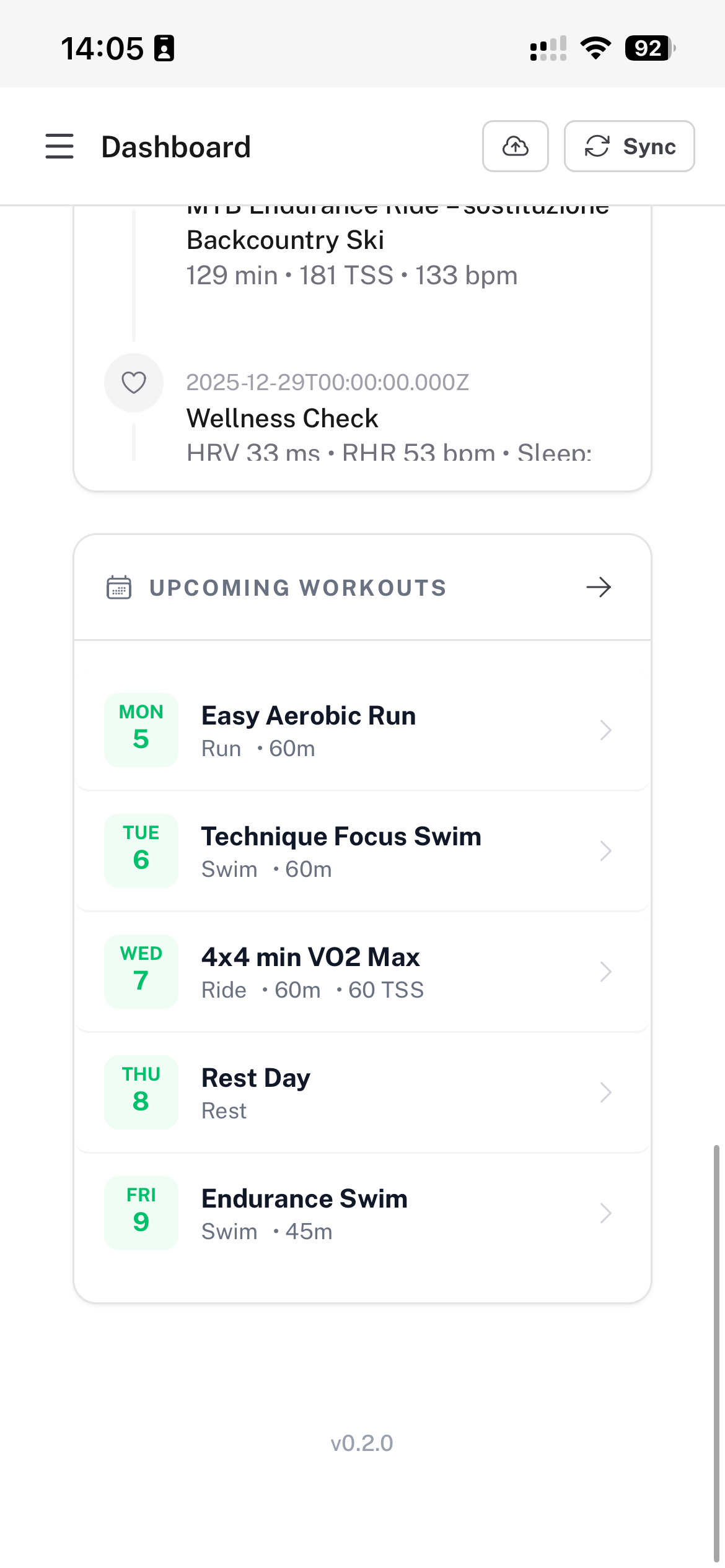
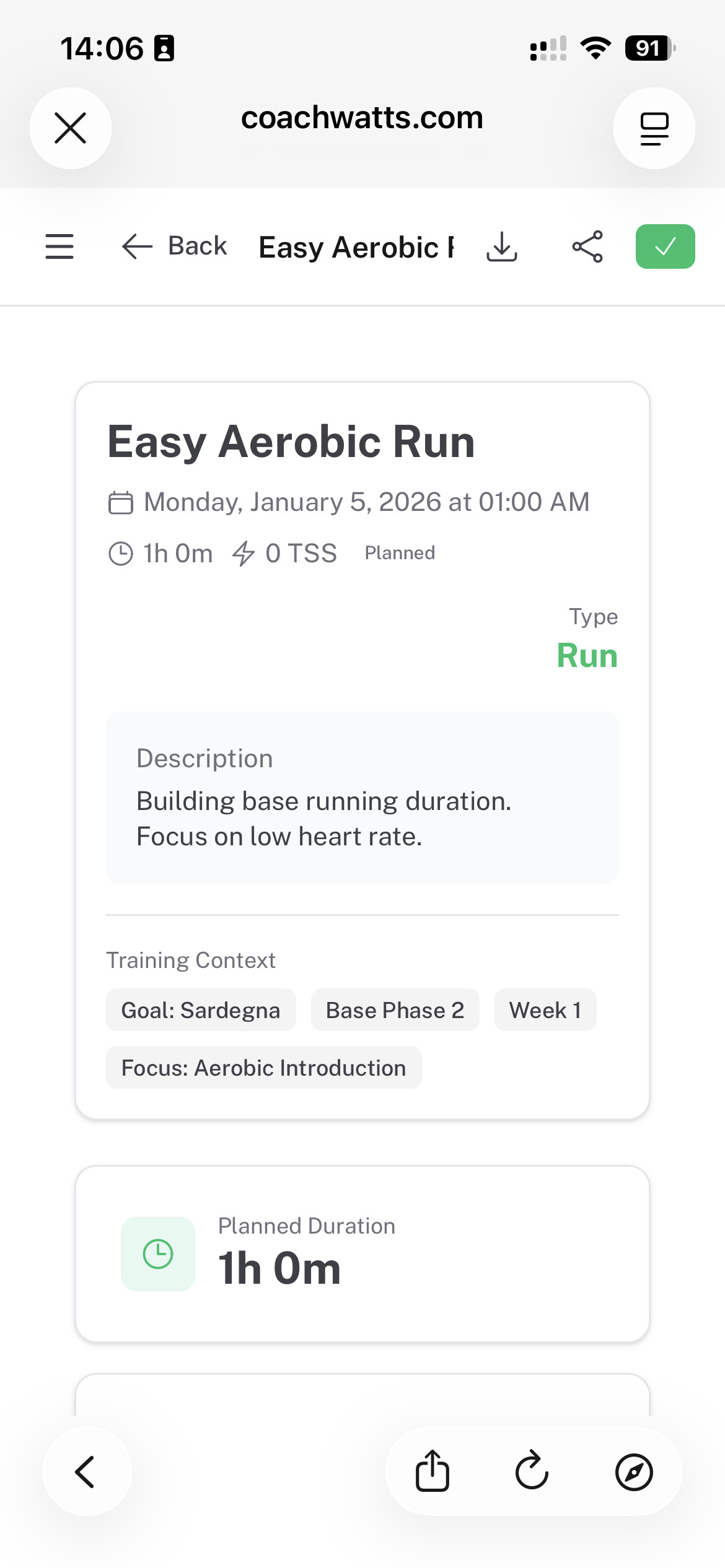
1 Like
Hi
I register yesterday and to be honest I’m impressed 
I connect to intervals.icu and import my activities.
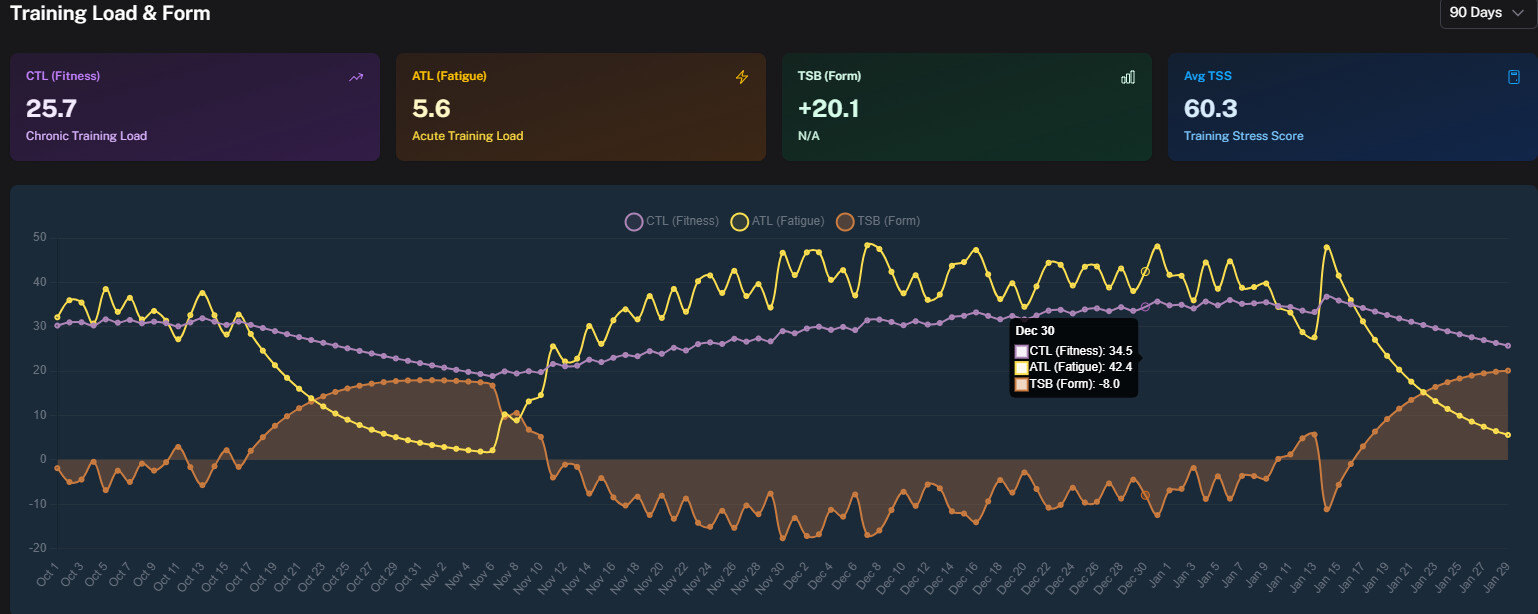
For start I see my TSB is very high (+20.1) when my today’s TSB should be much lower (-8).
Looking at training trend I have like future activities completed ?!
What’s up?
1 Like
A few issues for me, from my quick preview of the application. I certainly wouldn’t want to use this if the basic data is not correct:
- For TSS on each ride activity, excluding running, hiking and walking on holiday, it shows as follows (half the activities were with a power meter, and the other half without):
- 55 (should be 36) - power
- 255 (should be 159) - power
- 125 (should be 91) - power
- 77 (should be 49) - power
- 171 (should be 113) - power
- 411 (should be 235) - power
- 182 (should be 113) - HRtss
- 252 (should be 152) - HRtss
- 340 (should be 194) - HRtss
- 234 (should be 137) - HRtss
- 276 (should be 159) - HRtss
-
I have to repeatedly change both HR and Power zones as it resets to a default value. Surely it should be pulling from Intervals?
-
There are only 5 levels for Power; why stop at VO2max? Anaerobic Capacity (level 6) is as important as the first 5, and then there is also Neuromuscular Power (L7).
-
The recommendation for today says that I’m detrained (which I know I am, having been on vacation for three weeks). The Fitness, Fatigue and Form on the calendar match Intervals, but not on the recommendation:
The athlete presents with superior recovery metrics (HRV 95ms, low RHR, and 7.9 hours of sleep), indicating high readiness to train. However, the athlete is highly detrained (CTL 27.0, ATL 1.5). Since the planned workout lacks defined duration and TSS, a modification is necessary to impose structure. The recommendation is to define the ‘Easy Ride’ as a controlled, Zone 2 effort for 60 minutes to maintain consistency and gradually rebuild the aerobic base without risking overload.
- On the Executive Summary, for Fitness, it shows the following, also incorrect. My fitness has dropped from 59 to 46 and not the 27 it shows on the recommendation:
Fitness is currently low due to a lack of consistent training load application over the last month, resulting in detraining (CTL 27.0). The potential for fitness gains is high given the rested state.
- Under the block titled, “Boost Training Frequency”, it shows the following, without knowing time available, and my plan going forward. I haven’t loaded any plans or events, so the recommendations are based on what?:
Increase frequency of low-intensity rides to 3-4 times per week to boost weekly TSS and reverse CTL decline.
-
Athlete profile - maxHR, RestingHR and LTHR shows blank, as does the FTP, Weight and W/Kg.
-
Performance page
- the 30 days total looks correct.
- CTL, ATL and TSB are incorrect (as mentioned above) as well as average TSS (due to the higher than actual values from each activity).
- The PDC is blank (no data)
- The PMC looks correct.
- FTP Evolution shows one value, and only Oct-Dec. That’s also incorrect.
- Intensity Distribution is blank
It’s not important for me, that this works, but rather for other users to ensure that the setup is correct. Garbage in = garbage out. That said, the display is okay… it’s clean and easy to read.
2 Likes
I am seeing similar behviour. PMC chart values seem to disagree with intervals.icu although the overall trend is the same. Future, “planned” workouts seem to be considered as comoleted when generating athlete profile or custom reports. Even after clearning all future planned activities some of the metrics in the custom report seem to have been made up and don’t reflect reality.
I like the idea of this platform and the reporting available, but the foundation of this needs to be correct data with no chance of the AI hallucitating values or trends that are not concrete data points from the source data.
1 Like
Thank you for the detailed reports. I am currently investigating the discrepancies.
1 Like
Thanks to recent feedback, I’ve addressed several data integrity issues. The focus was ensuring training metrics are calculated only from correct, completed data.
What’s Fixed
- Duplicate workouts removed: Duplicate planned activities no longer inflate TSS, CTL, ATL, or TSB. Existing duplicates are filtered and metrics recalculated.
- Planned & future workouts excluded from metrics: Planned activities are now fully separated from completed workouts across calendars, reports, PMC, and recommendations.
- Consistent metrics everywhere: Fitness (CTL), Fatigue (ATL), and Form (TSB) now come from a single canonical source and match across calendar, reports, and recommendations.
- PMC & chart range errors fixed: Charts and data queries are capped to valid date ranges, preventing far-future values from skewing results.
- Profile thresholds now persist: FTP and LTHR are now properly stored and used. Autodetected profile changes require confirmation to prevent silent resets.
- Stronger metric filtering: Invalid or duplicate activities are ignored during calculations to ensure reliable totals and trends.
Known Minor Discrepancies
- Some remaining differences may appear for strength / weight training workouts.In cases where Intervals.icu has no explicit load value, Coach Watts currently calculates one, which can lead to small mismatches. This is under review and will be investigated further over the coming days.
- Calendar synchronization is being addressed next, allowing planned workouts created in Coach Watts to appear correctly in Intervals.
- If recommendations seem inconsistent due to historical data, there is now a profile wipe option in Settings to fully reset the athlete profile and training load if the AI has been influenced by prior data.
Bottom Line
Profile auto-detection has been refactored; please resync your athlete profile using Settings → Profile → Basic Settings → Auto-detect from Apps to ensure your thresholds and zones are fully up to date.
If you still see discrepancies after, please report so I can investigate quickly.
2 Likes
Looks like my PMC chart is now correct, but the “big” values on the performance page (CTL, ATL, TSB etc) are still wrong. That seems to mean the athlete profile is also wrong.
Custom report seems to be working a bit better though.
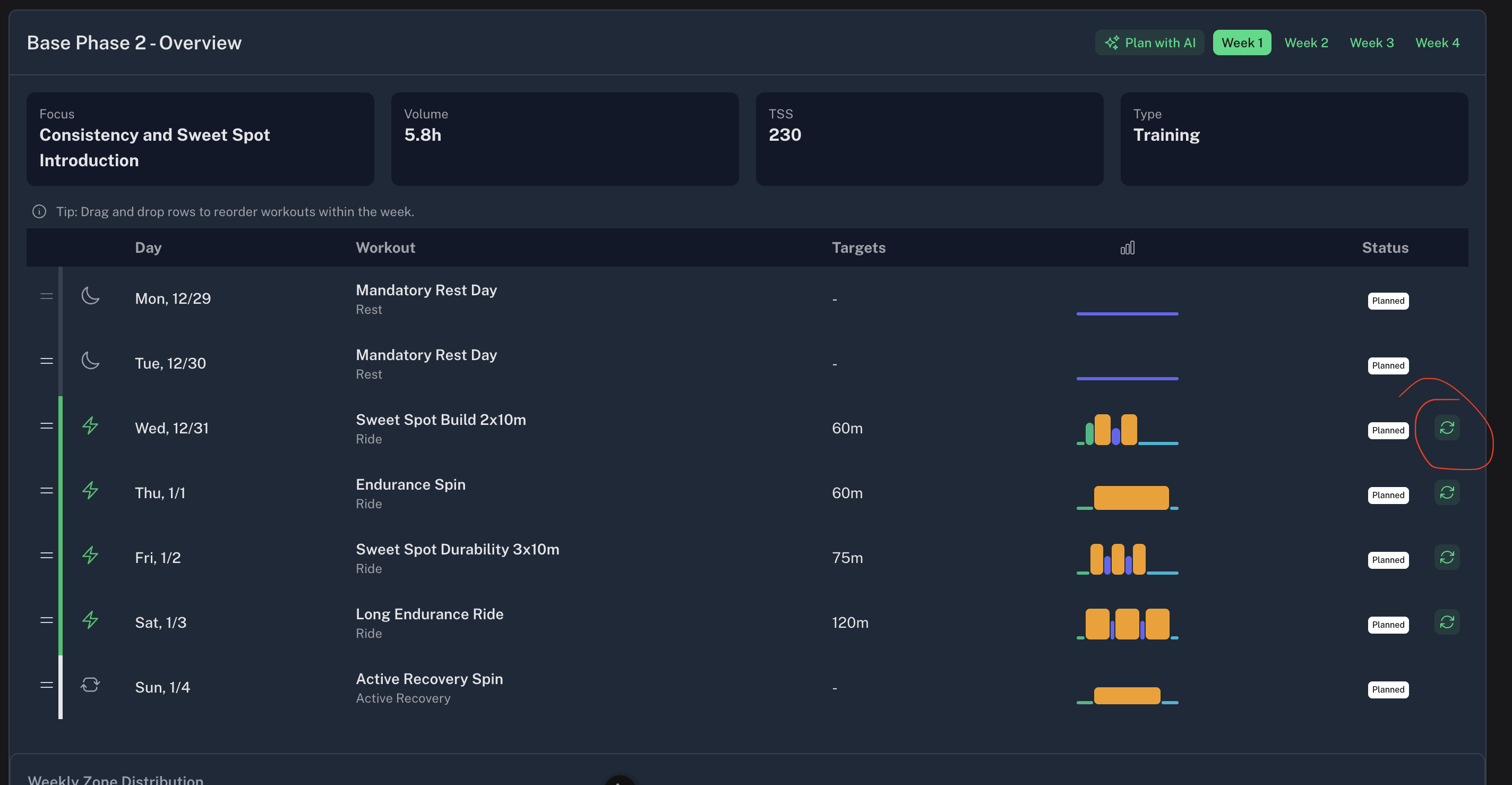
The planned workouts are not pushed anyhow to intervals. The field option to save them as .fit or .zwt return a 500 error page.
Some settings have pulled through, but they are incorrect.
- The value for MaxHR is the value for LTHR

- LTHR shows N/A
- FTP shows -
- Training load and form is still incorrect
- TSS from each activity still shows the higher values
- Average TSS is still higher
- CTL, ATL and TSB shows correct on the calendar page, for each day

- TSS for today’s very easy activity shows 96, when it was actually 56
- Planned workouts (this week) now shows on the calendar
- I don’t have duplicate activities, so not sure why the inflated TSS would show for each activity
So for me, the data hasn’t changed from yesterday.
Hello,
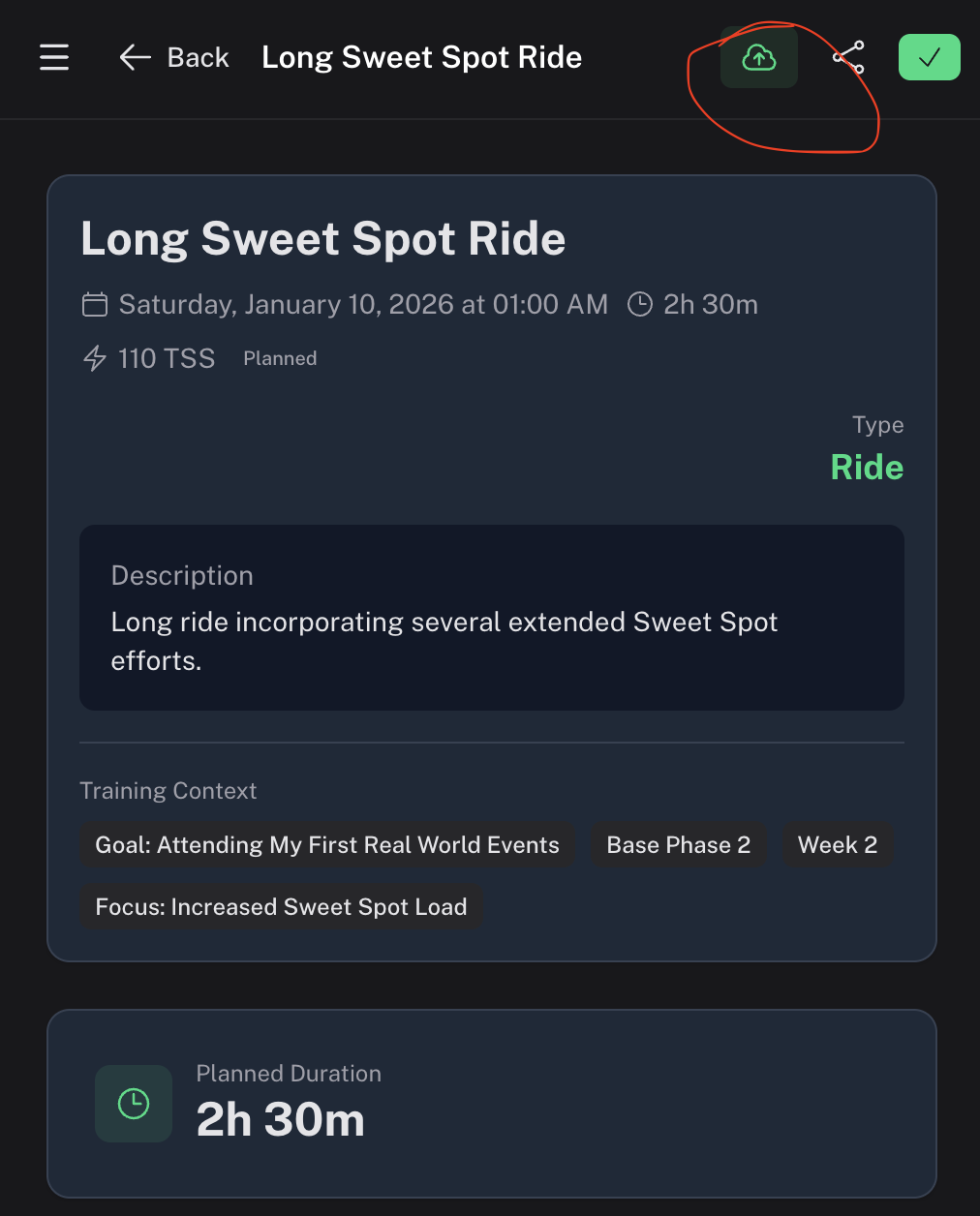
The .fit file download has been fixed, and planned workouts can now be published to Intervals.icu. I’m continuing to investigate the remaining discrepancies in TSS, CTL, ATL, and TSB calculations.
Thanks for taking the time to provide such detailed feedback, it’s really appreciated.
Bonjour HDkiller
Tout d’abord merci pour ce super logiciel et le travail fourni. Pour ma part je suis surpris de l’échange avec l’IA, en effet, mon RPE était à 3/10 et voici ce qu’il m’indique :
“Puisque l’effort perçu était très élevé (3/10)” ce qui est assez incoherent avec la base d’interval.icu qui indique “facile” à l’échelle 3/10
1 Like
Thanks for this, the only thing I noticed at first glance that the import of the RPE is not correct:
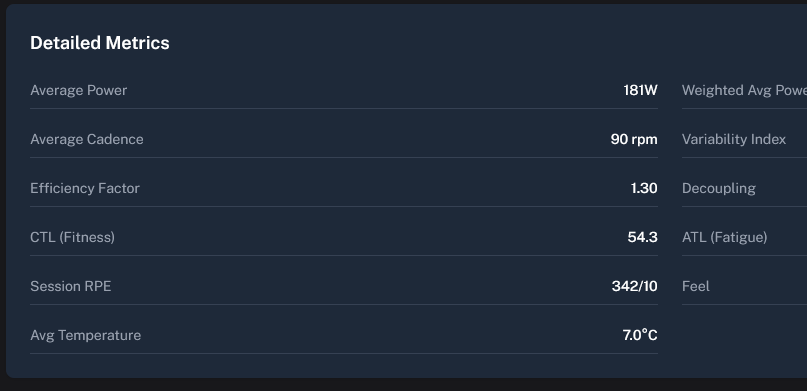
For this specific workout it should be a 5.
1 Like
Hi hdkiller,
The platform looks very promising. The depth of analysis and the quality of the suggestions are impressive. However, as others have mentioned, there seem to be some issues with how real TSS, CTL, ATL, and TSB are calculated and displayed.
For example, I completed a ride with a load of 64 shown in Intervals.icu. The same activity shows 110 TSS in Coach Watts. In the dashboard (and in the athlete profile and performance), CTL, ATL, and TSB are displayed as 13, 0, and +13 respectively, which doesn’t seem to reflect the actual training load.
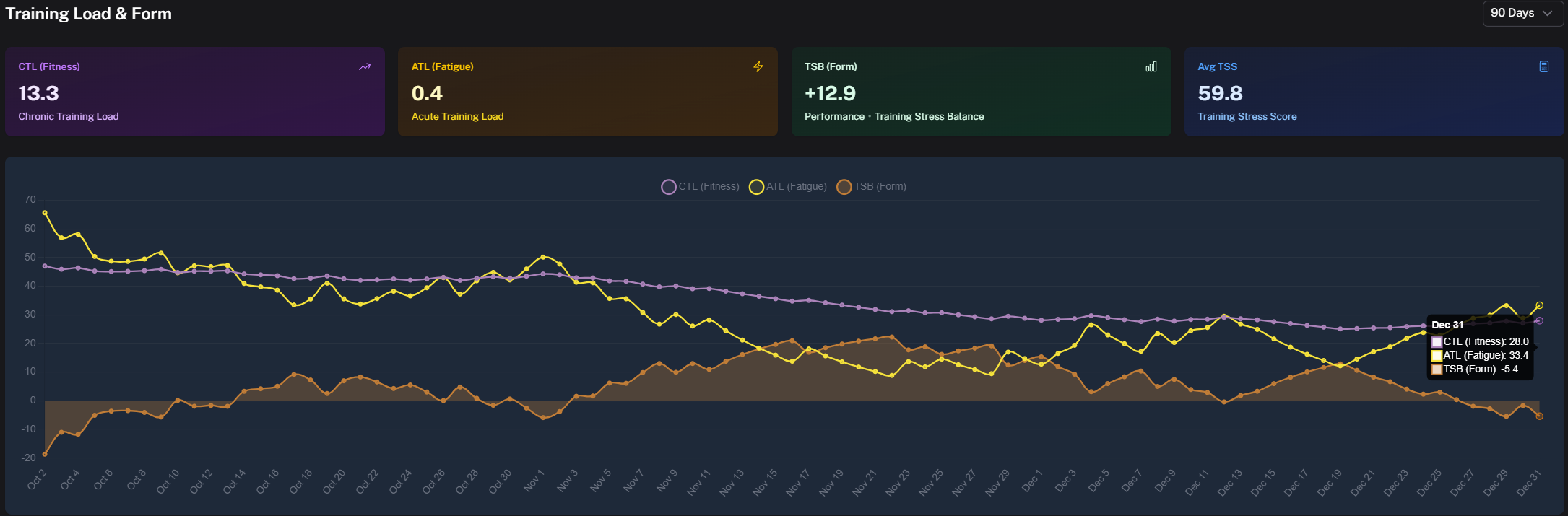
Thanks for the great work so far. Once the data aligns with reality, the concept behind the platform will be very compelling !
1 Like