Hi!
One thing I’ve noticed, and I’m sharing it here so people can find it, is that LeCoach doesn’t read your race descriptions! Let me explain: If you set a race for March 15th as a training goal until then, but you also have one on February 25th that appears, it can’t read it. You need to add a 3-hour VO2MAX workout for it to modify the training! Or you can modify it in the future Rutget!! 
I have to say I love s  eeing all the planned workouts and being able to modify the ones I want. It’s simple but effective and clear! I’ll give you more feedback on what you can improve. But from what I’ve seen, it won’t be much.
1 Like
@Rutger I have been playing with this a bit this evening and so far I am impressed. You have already fixed a couple of things I noticed in a brief look before after others have reported those!
I have asked for a training plan for the next 25 weeks aiming for a summer event next year and the system has done a pretty good job of scheduling sensible looking sessions with a good progression whilst staying within the limitations I expressed. The re-worked system for entering daily hours vs weekly totals really helped there I think.
Bugs:
After generating a plan sometimes I get a pop-up trying to display some areas where the plan wasn’t able to fully match the targets. This disappears far too quickly so I can’t read it all.
Feature Requests:
Dark Mode please 
Please pull in more historical data, or at least pull it in on request. I would like to be able to challenge the AI to analyse historical trends in order to inform future training blocks but at the moment it seems to pull in only 4 weeks of historical data from intervals.
Questions:
Do we have two way sync? If I start editing or moving things in intervals does LeCoach keep track of that and know what I have done?
How are secondary events/goals best handled? I have a priority event next summer, but I likely want to schedule in some extra lower priority events earlier in the year. How do I best do this whilst ensuring a small taper without sacrificing too much fitness gain. Do I go for one long plan like I have building right out to the main event, and then ask AI to schedule in the extra events? Or should I generate shorter plans in blocks? The earlier events won’t necessarily require the same training focuses as my priority event (which is an ultra-endurance type thing) so I would prefer my plan to really focus on building for that from the start.
1 Like
Waar kan ik de App vinden voor gsm
@Rutger Some further observations:
Can we have the ability get to recover old training plan forms? After reviewing a plan generated for my partner in more detail after syncing to intervals I think it would benefit from some small tweaks, but tweaks that need to be applied to try and alter the overall progression, rather than changing specific entries. This doesn’t seem to be possible at the moment?
Do you already have plans to give the AI the ability to make edits to the planned sessions directly? One of the great things I have found with AIEndurance is the ability to say something like this:
“My schedule this week is sightly different and I don’t have time for a long ride on my regularly Wednesday session. Can you move this to Tuesday instead? I need to move the current interval session programmed on Tuesday to some other day, can you suggest the best time to fit this in avoiding Wednesday?”
The AI will proceed to pull all my sessions for the week and propose a reshuffling that makes sense, and then can make those edits directly. I’d love to see something similar here as it is supremely useful for someone like me with a schedule that pretty regularly gets mixed up!
Hi Djeno, je kunt gewoon naar de website LeCoach.app gaan. Die werkt ook op mobiel. Wellicht dat ik in de toekomst een app voor de appstores maak.
Hi Ben, thanks for the elaborate feedback and kind words! I was out riding myself so took a while to get back!
Here’s the answers:
- bug of the quick message disappearing. I will move this message to before submit so you can actually act on it.
- feature request dark mode: I’ll put this on the list. Never use dark mode myself but know there’s lots of demand for it!
- more historical data: will expand it and will check how we can be smart about it to avoid pulling lots of data for people who don’t need it.
- yes, full two-way sync. If you move, edit, delete a workout in Intervals those changes reflect in LeCoach and vice versa. The only exception: if you delete your training plan in LeCoach that will wipe ONLY workouts that were originally created in LeCoach to avoid unexpected deletion of workouts you made in Intervals.
- regarding subgoals. currently how it works is have an overall goal running long-term. And then for example 2-4 weeks before a secondary event select all those workouts, press edit and tell lecoach you have an event and what kind of workouts/build-up and taper you want for that event. I’m planning to make this smarter (cause I also really like secondary goals within a larger plan) but this will most likely be a bit further in the future.
- regarding training plan tweaks. This is going the be the next big improvement I started working on. Don’t know how to crack the code yet but i indeed want users to easily edit, refine, review training plans ongoing, so also after they submitted to their agenda. In you have ideas, lmk!
- regarding having ai do the shuffling via chat etc: actually started the project chat-based only but found good-old buttons and an interface more convenient/faster. But I don’t think it would be too hard to get some of that back. You know that currently you can also select multiple workouts and then prompt ai to make changes? the only thing it can’t do in that flow is delete workouts or move them to another day. I’ll try to make that feature more powerful for now to facilitate that.
Thanks again for all the feedback!
Gave your app a try today and first impression is very positive.
One negative point I found concerns the “tests” workouts.
I created a plan, and in two day i have a VO2max test with a prescribed 5min effort at 115% FTP. Since this is the test block of the effort, I think no power target should be there, only a “go to the max” kinda period. In Zwift term it would be a Freeride block.
KUTGW !
@Rutger, I used an iCloud address and have not received the confirmation email. Thanks.
Hi, thanks for trying this out! Yes, the tests definitely need some work, i think the best solution would be indeed no power target and a descriptive text. Will put this on the list.
Did you like the concept that for a 5m power test we make it part of a vo2max workout (first rep) so that it more naturally becomes a part of your training cycle instead of an isolated thing where you just do the 5m effort?
1 Like
ahh thanks for making me aware of this, thought we had this fixed but now indeed see that some icloud addresses still bounce. Will see if we can do further improvements.
I will dm you as well.
Intervals.icu should be deleting the Strava one if there is a matching activity from another source. I can confirm that Intervals.icu is not allowed to give out Strava data via the API.
You could do “Import All Strava Data” to get all your Strava files into Intervals.icu free of API restrictions:
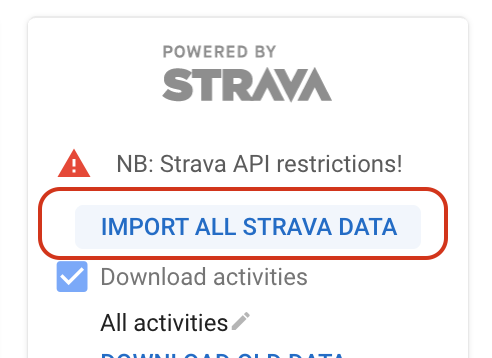
Thanks for all the feedback so far everyone. We just shipped a minor update:
- You can now instruct LeCoach to make workouts with cadence targets for individual workout planning. For example strength/low cadence.
- Added a ‘Delete training plan’ button in your training plan overview. This will delete all workouts created by LeCoach and allow you to generate a new training plan.
- Several improvements to coaching instructions and training plan algorithm.
hi @Rutger great app - I will experiment more. I noticed it could not detect my HRV from healthfit via apple watch/health as it is SDNN HRV, I know Intervals pro had this issue initially.
Thanks for reporting, yes I think we indeed read the other hrv. Will work on a fix tomorrow!
1 Like
Really appreciate you taking this all on board. I’ve been interacting with LeCoach more since my last comments to try and firm up some thoughts on these.
-
(Training Plan Tweaks) This isn’t the best long term solution but in the short term I would love to either be able to get back to the training plan “form” for the current plan in order to edit and re-generate it without having to type everything from scratch, or to be able to see a list of all historical forms so I can copy and paste the bits I want to keep. Longer term I think the better solution to this blends in with number 7…
-
(Edit via chat) I think bringing back full edit capabilities to the main chat should be a fundamental part of the system. At the moment to edit more than one workout at a time I have to manually filter (select) all the right boxes, whereas the AI would be able to filter much more quickly based on complex descriptive filters like “select my long rides on every second weekend and make sure they all on Saturday rather than which ever day they are currently scheduled for” or “I am out of the country between 5th and 20th March, please change all my rides to be suitable suitable for an indoor trainer, specifically no longer than 1.5 hours. Increase the interval intensity or duration if needed to keep a sensible training load.”
Beyond simply better filtering I think conversational updates of the schedule make more sense in the main chat. Today I had a real world example where I asked Le Coach if it would be sensible for me to add a short indoor ride as I had some delayed muscle soreness from strength training and thought my legs would benefit from some light activity. Previously today was scheduled as a rest. LeCoach agreed a short, easy, active recovery ride would be ideally and suggested a 45 minute zone 1 effort. I asked LeCoach to add it to my plan for today. LeCoach respond about how to click the “plus” button on the calendar to do this instead. I had to go and find the right day, hit the plus button and then I could say “please add recovery ride as we just discussed.” LeCoach (through the add prompt) knew exactly what I meant and added the exact workout described which is great; but it felt weird to have to do it in a different place. I should be able to have that full conversation in the main chat window. I think the edit capabilities already in place through the GUI should stay too of course for simple adjustments.
I think this change to allowing full edit capabilities in the main AI chat could be the foundation for number 6, allowing controlled refinements to the overall plan. As a real example of this I have a plan generated for my partner. It is generally very sensible and I am very impressed! However, I know she favors a very long ride at the weekend and the AI has been conservative with the hours scheduled. I would like to re-adjust the plan to increase all long weekend rides and be able to suggest starting at around X hours now, progressively increasing towards Y hours near the target event. I would like the AI to also adjust the other scheduled sessions each week to maintain the same overall volume/load. This is a relatively small refinement to an already well structured plan and so fits into this category (point 6) but it also feels much like a natural extension of the capabilities I am proposing for point 7. While I’m thinking about this may also be an easy way to introduce initial capability for point 5. Long term maybe a graphical secondary goal event entry type thing might be nice, but initially just telling LeCoach about a goal and asking it to adjust the plan accordingly would be great.
Going back to point 7 and how this could be implemented. AIEndurance currently allows exactly what I propose. When the AI is going to make some edits it checks each one individually with the user requiring a yes/no type confirmation. As a starter I think this would be fine. Something along the lines of:
LeCoach - “I suggest moving your long Saturday ride to Friday and adding your requested Sprint Intervals Session on Sunday. How does that sound?”
Me - “Great, please make those changes.”
LeCoach - “Moving Long Endurance Ride from Saturday 2nd Feb to Friday 1st Feb. Confirm Yes/No”
Me - “Yes”
LeCoach - “Adding Sprint Intervals session on Sunday 3rd Feb. Confirm Yes/No”.
Me - “Yes”
Longer term I think this would be better with a dedicated pop-up GUI element which shows all of the proposed changes (a little like the plan preview window) and asks the user to confirm the changes. This was more complex changes involving wider time ranges or more sessions could be made more manageable.
Good suggestions. The current process for revising plans is cumbersome and difficult to do.
Not sure if I did something wrong while messing around but lets see what you think.
I initially created a plan and deleted just to improve fitness. I deleted that and made one for a specific race, made a mistake with the date so deleted that, then deleted the final one I made and have just deleted that and made one for a 2 day tour to see how it would handle it and respond. Seems that all the new plans I made the AI has given the plan the wrong end dates.
The latest plan was supposed to be 28th March for the A race, but has the end date as 12th April.
1 Like
Just generated plan. Lets see if it is better than MyWhoosh training plans.
I disconnected and reconnected my Zwift connection and now it’s working as expected. 
1 Like